 anotemy
Sign in
Try it free
anotemy
Sign in
Try it free
What is anotemy: the anatomy note-taking app
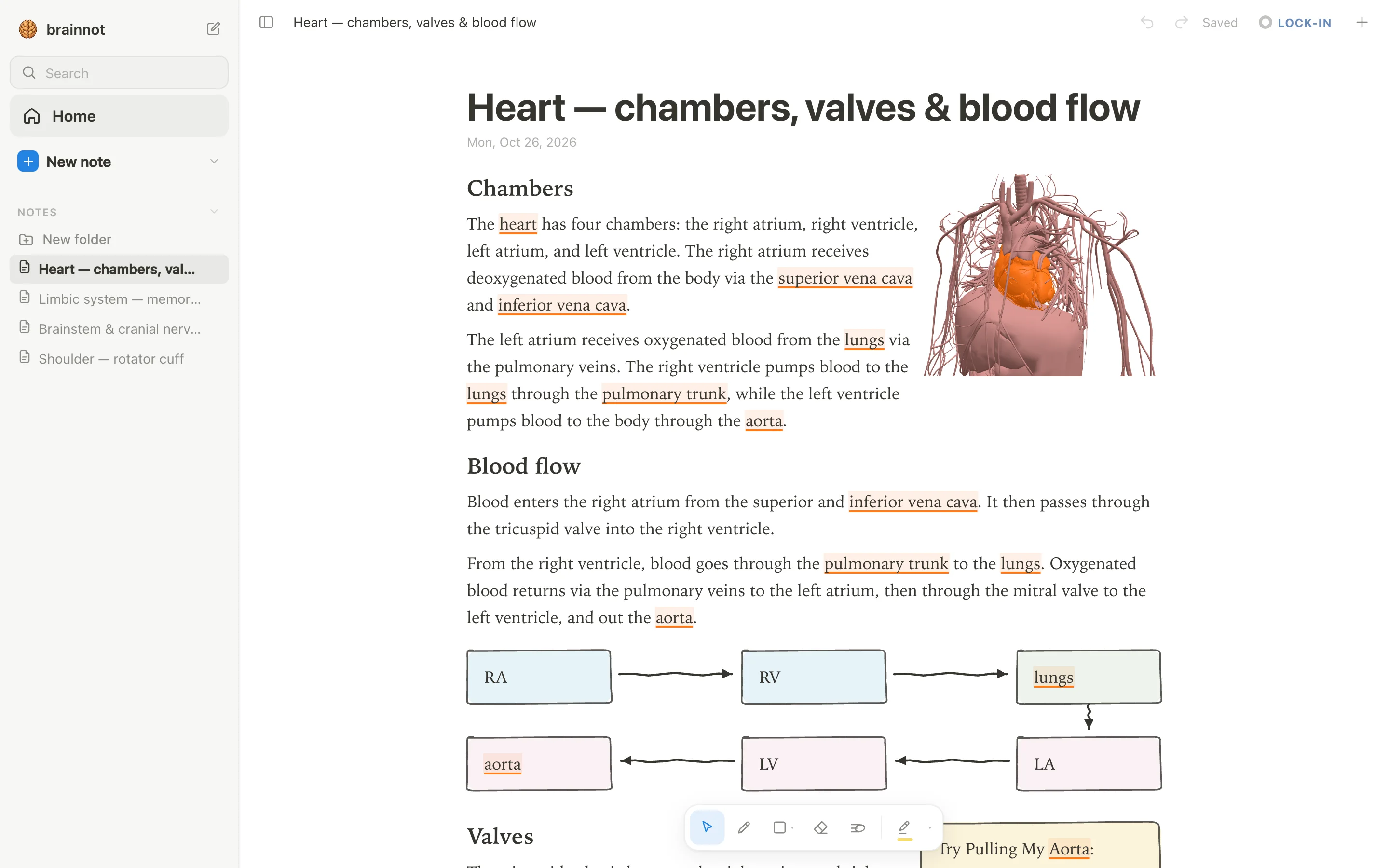
anotemy is a web app for anatomy note-taking. You type a structure's name, and the word lights up; tap it to open that structure in 3D, then draw and keep notes in one place.
What anotemy is
anotemy is an anatomy note-taking app for medical, nursing, PA, PT, dental and neuroscience students.
You type a structure's name and the word lights up in your text; tap that word and the structure opens in 3D. You can draw, highlight, and drop in lecture slides, all in one note. anotemy is free while in beta.
Who it is for
anotemy is made for medical, nursing, PA, PT, dental, and neuroscience students who need to remember anatomy. It does the job of connecting the words you type to the 3D body and brain so that a note is not just text.
Because anotemy runs in a browser, it works on a laptop or desktop and on iPad, where Apple Pencil draws and a finger scrolls. There is no native iPhone or Android app.
What it does
Here are the features that ship today in anotemy:
- Type a structure's name and the word itself lights up in the text: brain structures underlined in violet, body structures in orange. Tap the word to open that structure in 3D.
- 76 brain regions in 3D, each lit inside a see-through brain; tap a highlighted brain word and the structure turns in 3D right above the word.
- 6,800 body parts in 3D (muscles, bones, organs, vessels, nerves), opened from the word you typed.
- Put a 3D view into the note as a picture cut to the model's edges; the text flows around it.
- Draw with a pen, mouse or Apple Pencil; loop a takeaway and it becomes a box; the text makes room for whatever you draw.
- Hand-drawn boxes, circles, arrows, tables, headings, lists and four highlighter colors (yellow, green, blue, pink).
- Drop lecture slides in as a PDF (PowerPoint: save it as PDF for now): they wait in a rail beside the page and go anywhere in the note, and the text reflows around them.
- Quiz: one tap on a structure gives quick questions about it.
- Print view (⌘P) lays the note out on A4.
What anotemy is not
anotemy is often confused with other things, and it does not try to be everything.
- Not a replacement for a full 3D atlas: anotemy opens the structures you type, but it is not a complete interactive atlas of every anatomical structure.
- No native iPhone or Android app: it is a web app that runs in a browser or on iPad.
- No handwriting-to-text recognition, no spaced-repetition scheduler like Anki's, no real-time collaboration, and no audio recording of lectures.
Price and platforms
anotemy is free while in beta. There is no charge to use any of its features during the beta period, and no paid plans or subscriptions exist today. The beta label simply means the product is still being refined, but you can use everything for free now.
anotemy runs in a modern browser on a laptop or desktop computer, where you draw with a mouse or pen. On iPad, it runs in the browser too, and Apple Pencil draws while a finger scrolls; there is nothing to install. There is no native iPhone or Android app.
You can start writing without an account, so you can try anotemy immediately. Signing in with Google or Apple keeps your notes and syncs them to every device, including your laptop, desktop, and iPad. Once signed in, your notes follow you across devices.
How to start
Open anotemy.com/app in your browser. Type a lecture heading, such as 'hippocampus' or 'heart', and anotemy lights up the word in the text, underlining brain structures in violet and body structures in orange, so you can tap it to open the 3D model. Then draw a box around a key takeaway using a pen, mouse, or Apple Pencil, and the text will make room for it.