 anotemy
Sign in
Try it free
anotemy
Sign in
Try it free
anotemy vs Complete Anatomy: Which fits your anatomy notes?
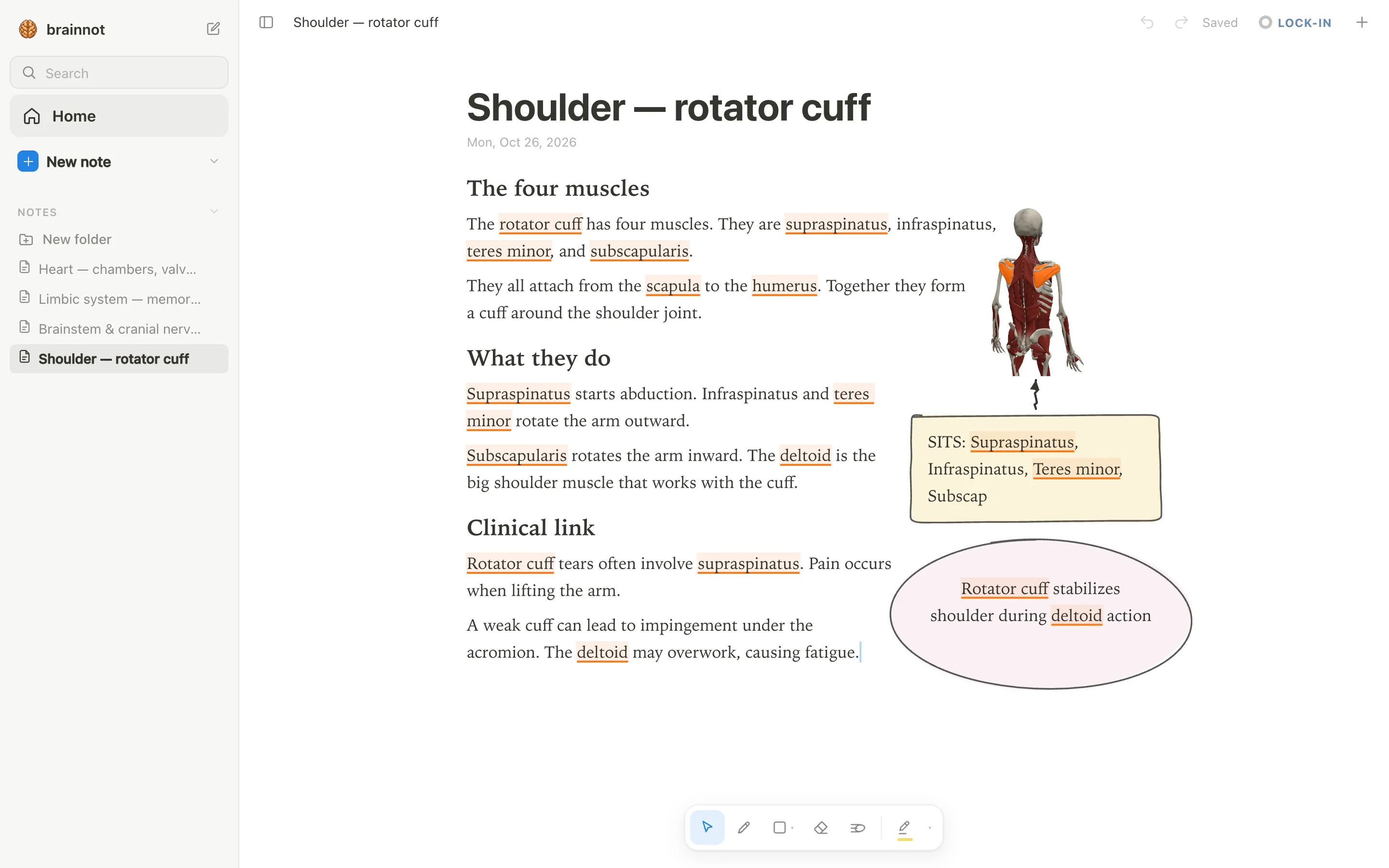
anotemy is a browser-based anatomy note-taking web app where typed structure names light up and open in 3D, with handwriting and PDF slide placement. Complete Anatomy is a native app with more detailed 3D gross anatomy, radiology, and guided courses, but no standalone notebook or PDF import.
We make anotemy; the other apps' facts come from their own pages, read on 2026-10-26, and prices change.
Side by side
Here's how anotemy and Complete Anatomy compare on the features anatomy students search for most.
| What you're comparing | anotemy | Complete Anatomy |
|---|---|---|
| Platforms | Runs in a modern browser on a laptop or desktop, and on iPad, where Apple Pencil draws and a finger scrolls. No native iPhone or Android app. | Native apps: iPad, iPhone, Mac, Windows, Android. Complete Anatomy for Web is for institutional subscribers only; individual web access in development. Dissect/annotate tools only on tablet + desktop, not phone. iPad app requires iPadOS 18+. |
| Price (free tier and paid) | Free while in beta. | No free tier stated: free download + 3-day free trial, no payment details required. Student plan $39.99 first year then $74.99; Professional $99.99; in-app iOS Student $74.99, Individual $59.99, Pro $99.99. |
| Handwriting | Draw with a pen, mouse or Apple Pencil; loop a takeaway and it becomes a box; the text makes room for whatever you draw. | Limited: sketch/pen annotations directly on the 3D model, tablet + desktop only. No handwritten notebook. |
| Typed notes | Type a structure's name and the word itself lights up in the text; tap the word to open that structure in 3D. Put a 3D view into the note as a picture cut to the model's edges; the text flows around it. | Text, textboxes, labels and stickies on the model, saved as Screens (interactive bookmarks). No standalone notes/notebook feature. |
| PDF and slides | Drop lecture slides in as a PDF (PowerPoint: save it as PDF for now): they wait in a rail beside the page and go anywhere in the note, and the text reflows around them. | No PDF or slide import/annotation on vendor pages. Can import own images (MRI scans, x-rays) to correlate with the model. |
| 3D anatomy | 76 brain regions in 3D, each lit inside a see-through brain; 6,800 body parts in 3D (muscles, bones, organs, vessels, nerves), opened from the word you typed. | Full male + female gross anatomy, 20+ microanatomy models, 700+ Gray's-inspired atlas screens, cross-sections, muscle motion, AR, 550+ radiology images. New 3D brain model in beta. |
| Flashcards or quizzes | Quiz: one tap on a structure gives quick questions about it. | Create Questions and Quizzes (unlimited on both plans), quizzes inside courses. No flashcards or spaced repetition found on vendor pages. |
| Sync and offline | Sign in with Google or Apple to keep notes and sync them to every device. | Apps largely work offline; courses, videos and detailed models must be downloaded first; work created offline syncs on reconnect. Web version needs internet. |
Where Complete Anatomy is better
Complete Anatomy wins for depth of 3D gross anatomy and native app coverage.
- More detailed 3D anatomy: full male and female gross anatomy, 20+ microanatomy models, cross-sections, and muscle motion.
- Radiology integration: 550+ radiology images, full-body since Jun 2026, with a new 3D brain model in beta.
- Guided courses and dissection tools on tablet and desktop, plus quizzes inside courses.
- Native apps on iPad, iPhone, Mac, Windows, and Android, so you can use it on your phone.
- Draw directly on the 3D model and save annotated Screens as interactive bookmarks.
Where anotemy is better
anotemy is designed around writing anatomy notes, not just viewing a model.
- Type a structure's name and the word lights up in your text; tap it to open the 3D model right above the word.
- Place a 3D view into the note as a picture with text flowing around it, so your notes stay readable.
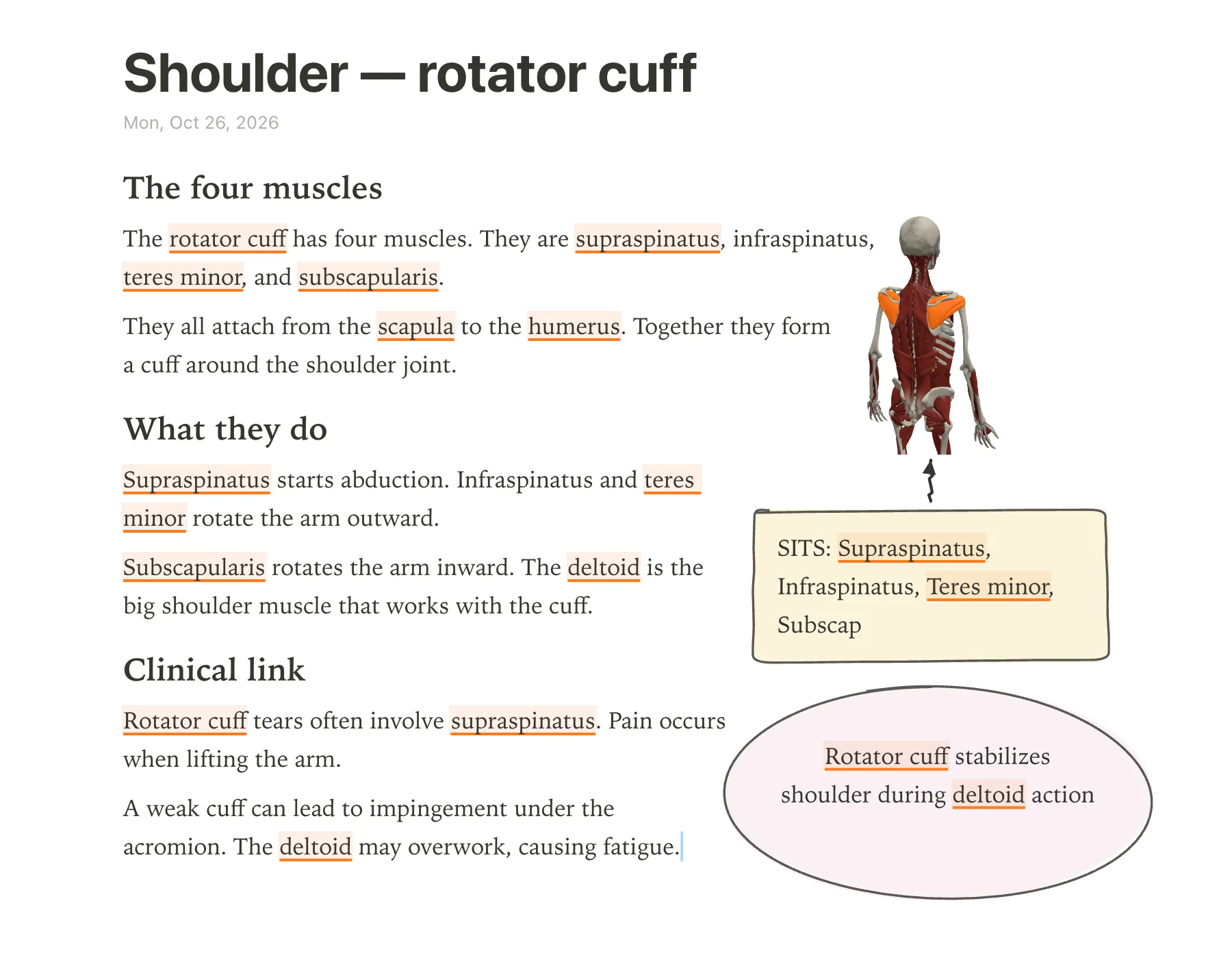
- Handwritten boxes, circles, arrows, tables, headings, lists, and four highlighter colors; loop a takeaway to make it a box.
- Drop lecture slides as PDFs into a rail beside the page and move them anywhere; the text reflows around them.
- One tap on a structure gives quick quiz questions, and the whole app is free while in beta.
Using both together
Complete Anatomy and anotemy serve different parts of a study session. Use Complete Anatomy for its detailed 3D models, radiology images, and guided dissections when you need to explore anatomy in depth. Then write your notes in anotemy: type the same structure names, see them light up, open the 3D view inside your note, and add handwritten boxes or slide PDFs. anotemy's 3D model is smaller but integrated with your text, so you can quickly recall a structure while reviewing.
If you already pay for Complete Anatomy, you can keep it for the full model and radiology, and use anotemy free while in beta for your lecture notes and quick quizzes. They don't overlap much: Complete Anatomy doesn't import PDFs or offer a notebook, while anotemy doesn't have the full gross anatomy detail or native phone app.
Which should you choose?
For medical students who keep their own written or typed notes and want those notes to link directly to a 3D atlas, anotemy may fit better. anotemy is free while in beta and runs in a modern browser on a laptop, desktop, or iPad. When you type a structure like hippocampus or rotator cuff, the word itself lights up and you can tap it to open that structure in 3D, with 76 brain regions and 6,800 body parts available. You can insert a 3D view into the note, draw freely, import lecture slides as PDF, and run quick quizzes on structures. However, anotemy has no native iPhone or Android app, so you need a browser on those devices.
For medical students who need the most detailed interactive gross-anatomy model with guided courses, dissections, radiology, and native apps on iPhone, iPad, Mac, Windows, and Android, Complete Anatomy is the stronger choice. Complete Anatomy offers full male and female anatomy, over 20 microanatomy models, motion, AR, and radiology images, and its apps work largely offline after downloading content. It has a 3-day free trial with no payment details required, but no free tier is stated after that trial. The Student plan costs $39.99 for the first year then $74.99 per year, and the Professional plan is $99.99 per year. Complete Anatomy does not have a standalone notebook, and its text annotations stay on the 3D model as Screens rather than in a note page.
For medical students on a tight budget or who want to try a note-taking approach without paying now, anotemy is free while in beta, and you can sign in with Google or Apple to keep notes and sync them. Complete Anatomy's free download only includes a 3-day trial; what remains usable after the trial is not stated by the vendor. If you need to work primarily on a phone or want the deepest 3D dissection tools, Complete Anatomy's native apps are more capable. If you want your anatomy notes, drawings, and PDF slides together in one page with the words themselves opening 3D views, anotemy is the better starting point.
Prices and features checked on 26 October 2026 on each one's own site: Complete Anatomy.