 anotemy
Sign in
Try it free
anotemy
Sign in
Try it free
How to Take Notes in Medical School: A Method That Builds Recall
For medical school, take notes that help you understand then recall: skim slides before class to make headings, write what the lecturer says that isn't on slides, and turn notes into questions and diagrams that same day. anotemy lets you type a structure like 'hippocampus' and see it in 3D, while Anki handles spaced repetition.
What good medical school notes do
In medical school, notes serve two purposes: first, they help you understand structures and pathways while the lecture is fresh in your mind, and second, they become the raw material for active recall and spaced repetition. Good notes are not a transcript of the slides; they are a spatial, linked record of what the lecturer said that the slides left out.
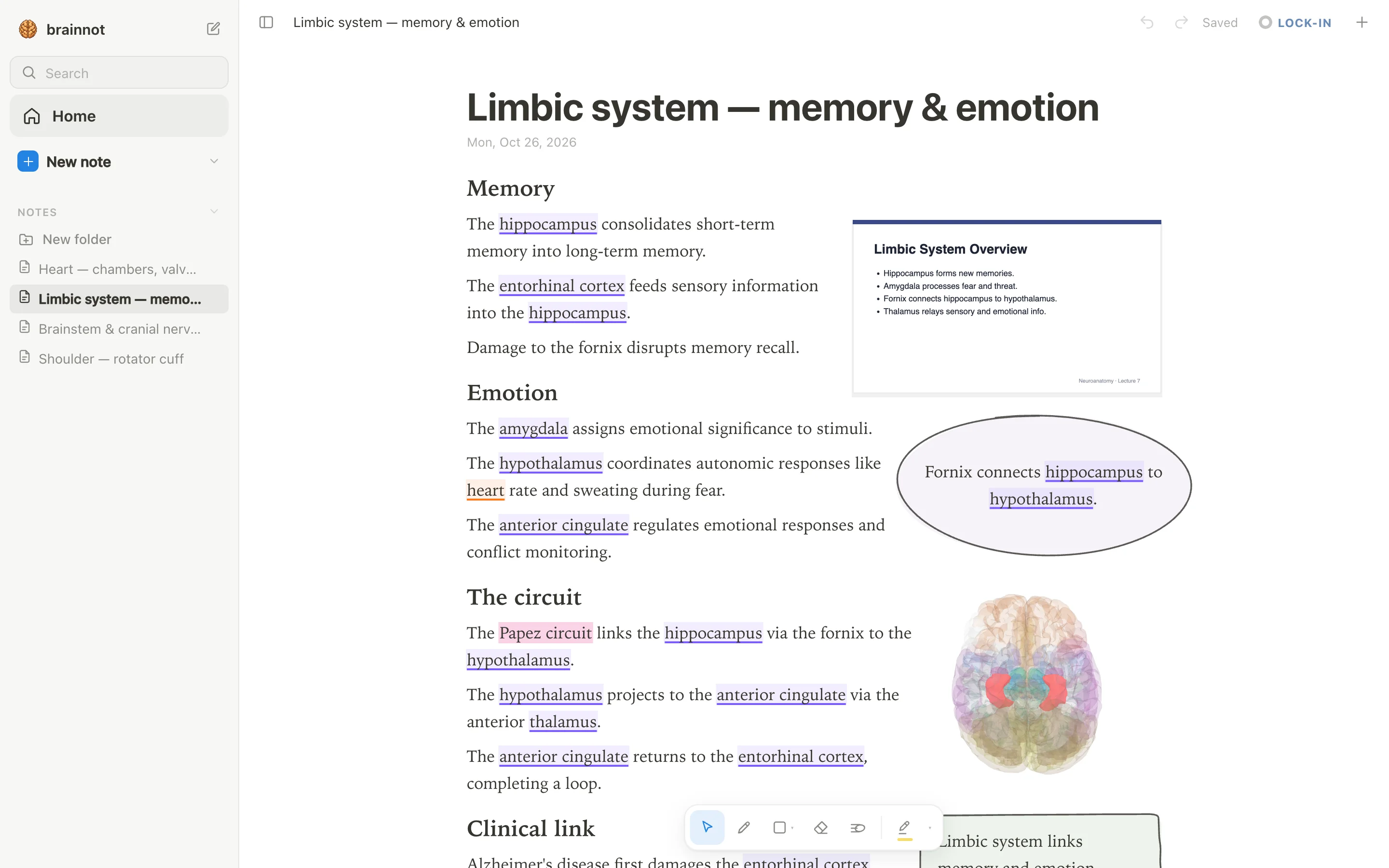
A anotemy note is built for this. When you type a structure's name, the word itself lights up in the text—brain structures underlined in violet, body structures in orange—and tapping that word opens the structure in a see-through 3D brain. The lecture slide sits in a rail beside your notes, so you never have to copy it, and a takeaway bubble or box holds the one thing you must remember.
The parts of a good medical school note work together: the slide gives context, the typed terms link to 3D anatomy, your own words capture why the structure matters, and the diagram or table turns a list into a map.
- The lecture slide stayed in the rail beside the note, not copied into it.
- Every anatomy term is typed so it becomes a live link to a 3D structure.
- The lecturer's explanation sits in your own words, not in slide bullets.
- A takeaway bubble or box marks the single most important point.
- The same-day pass turned those notes into questions for Anki.
Before the lecture
Before a medical school lecture, skim the slides for headings, bolded terms, and learning objectives. Open anotemy and create a page with those headings; when you later type a term like 'brainstem' or 'hippocampus' it will underline in violet and open in 3D, turning the slide list into a spatial map you can navigate.
Decide which five structures or pathways matter most by looking at the objectives, not by guessing. Knowing those five lets you watch for how the lecturer links them, and you can pre-type their names in anotemy so they light up as you write during class.
- Skim slides for main regions and pathways, not fine details.
- Make headings in anotemy from the slide titles.
- Type the five key structure names so they light up as you type.
- Note what the lecturer will likely ask you to label or explain.
During the lecture
During the lecture, do not copy the slide; it is already in the rail beside your anotemy page. Write the sentence the lecturer says that explains why the hippocampus sits where it does, the clinical pearl that never appears on a slide, or the mnemonic they repeat twice. Because the slide stays visible, you can glance at it while writing only what is new.
If the lecturer emphasizes a pathway, type the structure names as you hear them. Each word becomes a live link to the 3D model, so your notes stay anchored in anatomy rather than drifting into freehand bullet points that lose the spatial relationships.
anotemy also lets you drop the lecture slides into the note itself as a PDF, and the text reflows around them. Keep one slide on the page if it holds a diagram you will annotate, but otherwise leave the rail where it is and write beside it.
The same day
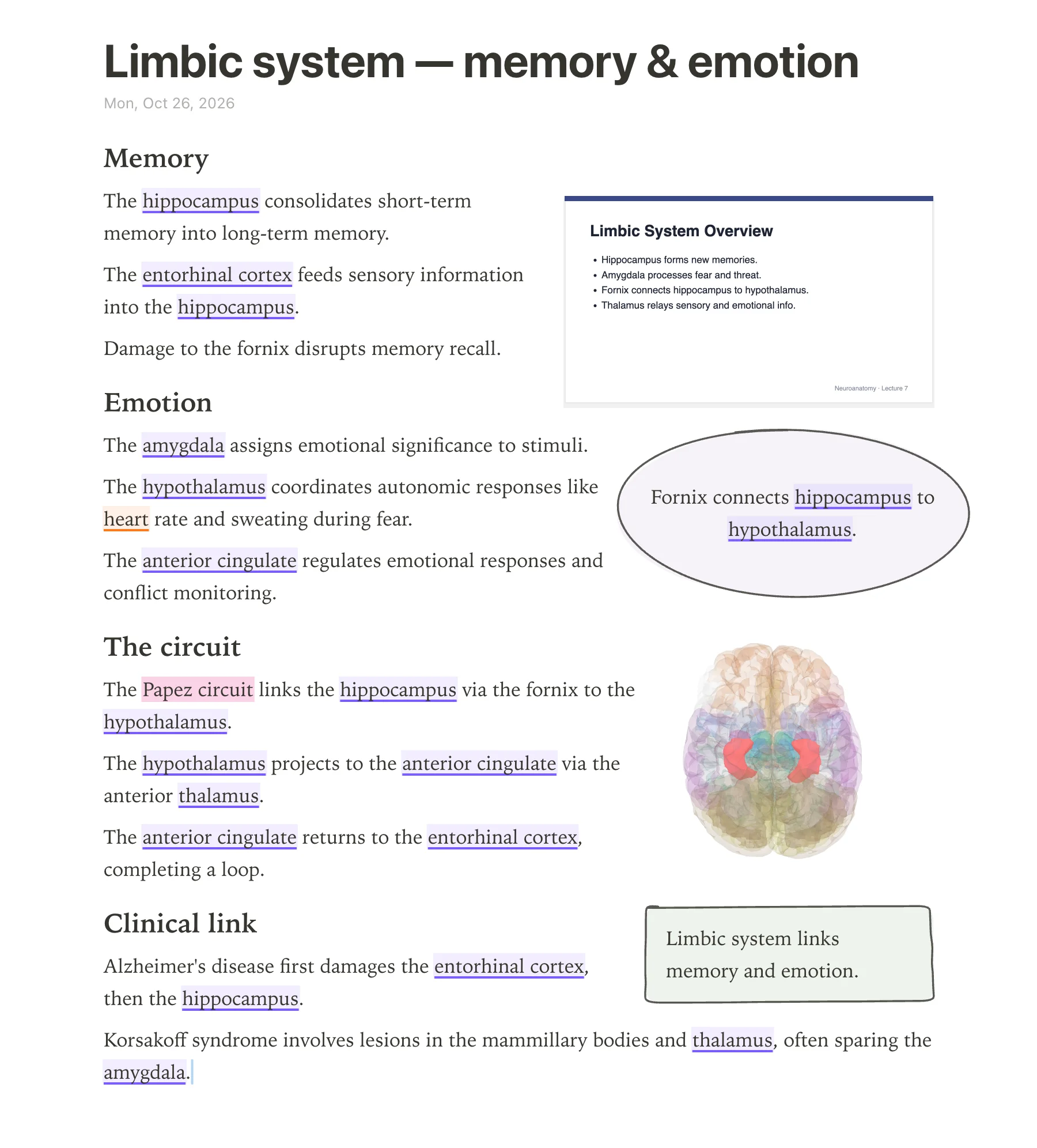
The same day, go back to the anotemy page and turn each explanation into a question you can answer from memory, because active recall is what makes a note turn into exam knowledge. For example, if you wrote that the Papez circuit links the hippocampus to the thalamus, turn it into 'What does the Papez circuit connect?' and answer it without looking.
Draw a diagram or a small table next to the relevant structures using the pen, mouse, or Apple Pencil. Loop the single most important sentence and anotemy turns it into a takeaway box, with the text making room for whatever you draw. Four highlighter colors—yellow, green, blue, pink—let you mark different types of facts: yellow for definitions, green for clinical correlations, and so on.
For long-term retention, copy those questions into Anki, which does spaced repetition that anotemy does not schedule yet. anotemy's quiz feature gives you quick questions on a structure with one tap, but Anki remains the tool for scheduling reviews over weeks and months.
Every week
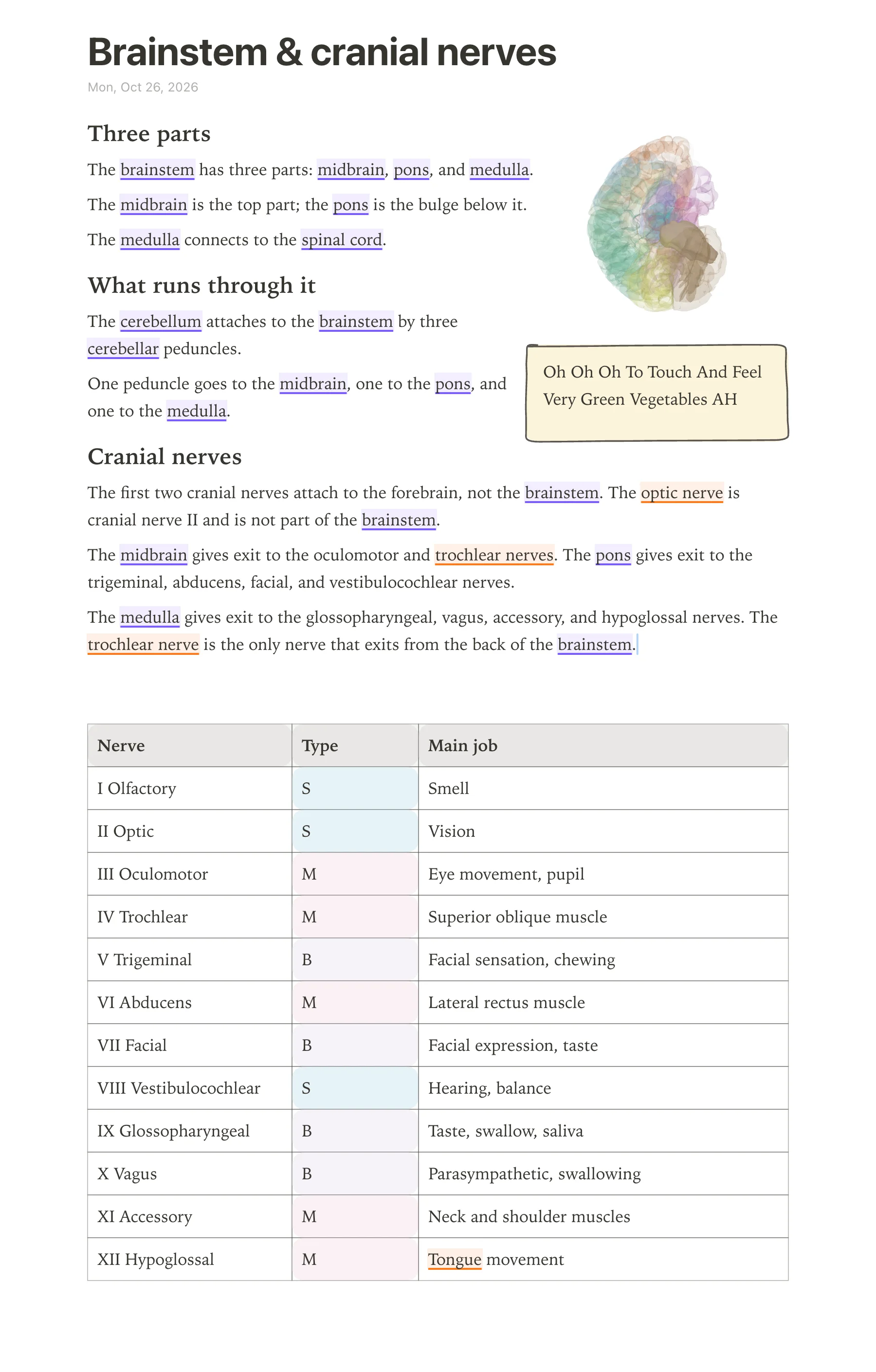
Once a week, go back through the notes you took in the past seven days and turn them into retrieval practice. Pick five to ten structures, hide the notes, and quiz yourself: say the name of the structure out loud, describe its location, blood supply, innervation, or clinical correlation, then check. anotemy helps here because it stores the structure's name in the note, so you can ask yourself what the hippocampus does before tapping the word to open it in 3D and see whether your mental picture matched.
Move anything you missed into spaced repetition. anotemy has no built-in scheduler like Anki's, so use Anki (or any flashcard app) for the facts you keep forgetting. Make the cards from your own notes, not from a shared deck, because the act of writing the card is part of the learning.
Keep the weekly review short: it is a check for weak spots, not a second lecture. If a note is messy, fix it now while the lecture is still fresh, because in three weeks you will not remember what the arrow was supposed to mean.
Which app for which job
No single app covers every part of medical school note-taking, and picking one for everything usually means compromising on the job it does worst. The table below matches the common tasks in anatomy-heavy courses to tools that actually do that job well, including free and paid options.
anotemy is a web app for anatomy note-taking. It lets you type a structure's name such as "hippocampus" or "femur" and tap the word to open that structure in 3D, and you can put the 3D view into your note. It is free while in beta, runs in a modern browser on a laptop or desktop, and on iPad where Apple Pencil draws and a finger scrolls.
For long-term memorization, Anki's spaced-repetition engine is the standard, and it works well alongside anotemy. Goodnotes and Notability are handwriting-first iPad apps that also support typed text and PDF annotation, but neither has anatomy 3D. OneNote is typed-first and free with a Microsoft account, with handwriting as a secondary input.
| Job | What works | Example apps |
|---|---|---|
| Handwriting on iPad | Ink engine built for Apple Pencil, shapes, search, and PDF markup; often has a free tier with file or note limits. | Goodnotes, Notability |
| Typed notes on a laptop | Free-form text pages with rich formatting, cross-device sync, and a reliable desktop app; OneNote is free, anotemy is free while in beta. | Microsoft OneNote, anotemy |
| Anatomy with 3D | Type a structure's name and open it in 3D from the note, with 76 brain regions and 6,800 body parts; no handwriting-to-text recognition. | anotemy |
| Lecture slides | Drop a PDF of the slides beside the page and write notes around them; anotemy accepts PDF (save PowerPoint as PDF for now), Goodnotes and Notability annotate PDFs directly. | anotemy, Goodnotes, Notability |
| Flashcards with spaced repetition | Mature scheduler, cloze and image occlusion, large shared decks; Anki desktop and AnkiDroid are free, AnkiMobile for iPhone/iPad is a one-time $24.99. | Anki |
Mistakes to avoid
Medical students often develop note-taking habits that feel productive in the moment but slow down revision later. The fixes below keep your notes useful for months, not just for the day after the lecture.
None of these fixes require buying another app. Most come down to writing in your own words, keeping the note tied to the structure you are learning, and reviewing on a schedule instead of rereading passively.
- Copying slides word for word. Fix: stop the slides, summarize the point in one sentence, and type the structure's name so anotemy links it to the 3D model.
- Hoarding hundreds of screenshots. Fix: paste only images you will actually quiz yourself on, and label each one with the structure and a question it answers.
- Making one enormous document for an entire block. Fix: one note per region or system, with a heading and a short summary at the top, so you can find the diaphragm or the rotator cuff in seconds.
- Highlighting everything. Fix: use anotemy's four highlighter colors with a rule: pink for clinical correlates, yellow for definitions, and nothing else until the weekly review.
- Never testing yourself until exam week. Fix: every week, close the note and recall the structures from memory, then open the 3D view only for the ones you missed.
- Using an app only because everyone else does. Fix: match the app to the job; handwriting on iPad is good in Goodnotes, spaced repetition is good in Anki, and anatomy 3D from typed notes is what anotemy does.
Prices and features checked on 26 October 2026 on each one's own site: Goodnotes · Notability · Microsoft OneNote · Anki (desktop) + AnkiWeb + AnkiMobile + AnkiDroid · RemNote.