 anotemy
Sign in
Try it free
anotemy
Sign in
Try it free
Best iPad Note-Taking Apps for Medical School
Goodnotes (from $11.99/year) and Notability (from $11.99/year) lead for Apple Pencil handwriting and PDF slides on iPad. anotemy (free beta) adds 3D anatomy when you type terms like hippocampus; OneNote is free and typed-first.
We make anotemy; facts about Goodnotes, Notability, OneNote, and RemNote come from their own pages, read on 2026-10-26, and prices change.
How we picked
We compared five apps that medical students commonly use on iPad: Goodnotes, Notability, anotemy, OneNote, and RemNote. We read each app's own pages on 2026-10-26 and checked what works on iPad with an Apple Pencil.
We looked for four things: handwriting quality, PDF slide import and annotation, typed notes, and study tools such as flashcards or quizzes. We also weighed price, including what the free plan limits. anotemy is the app we make, and it runs in the iPad's browser instead of the App Store.
- Handwriting: Goodnotes and Notability are Apple Pencil-first; OneNote and RemNote support ink but are less paper-like.
- PDF slides: importing and marking lecture slides matters for preclinical courses.
- Typed notes: OneNote is typed-first; anotemy links typed anatomy terms to 3D models.
- Study tools: Goodnotes and RemNote have spaced-repetition flashcards; Notability adds AI quizzes; anotemy has a quick question mode.
- Price: free tiers exist, but limits vary from 3 files to 5 notes or 3 annotated PDFs.
1. Goodnotes — best for polished Apple Pencil notes and PDF slides
Goodnotes is best for students who want handwriting that feels natural on iPad and need to mark up PDF lecture slides. Pick it if you take most notes with an Apple Pencil and want built-in spaced-repetition flashcards on Apple devices. The free plan allows only 3 files total across notebooks, whiteboards, and text documents, with watermarked exports; paid plans start at $11.99/year for Essential. Goodnotes runs on iPad, iPhone, Mac, Android, Windows, and web, but the iPad app has the most complete feature set.
- Good: Apple Pencil pressure and tilt, handwriting search, and conversion to text.
- Good: PDF and image import, plus Word/PowerPoint on iOS/iPadOS; PDF tables of contents imported.
- Good: Study Sets flashcards with Practice Mode and Smart Learn spaced repetition; import from Anki/Quizlet.
- Good: Works fully offline; syncs via iCloud or Goodnotes Cloud (Pro).
- Watch out: Free plan is very limited: 3 files, 3 folders, 5MB import, watermarked exports.
- Watch out: No 3D anatomy; Goodnotes AI credits are limited unless you add the $9.99/month AI Pass.
2. Notability — best for synced audio and AI study tools
Notability is best for students who record lectures and want audio synced to handwritten notes, plus AI-generated quizzes and flashcards. Pick it if you like writing on iPad and need lecture capture across almost every platform. The free Starter plan gives 5 free notes and 7-day version history but no AI; paid plans start at $11.99/year for Lite during the current 20% off promo ($3.99/month). Notability runs on Mac, Windows, iPad, iPhone, Android, and web.
- Good: Audio recording synced to notes, live transcription and real-time summaries on Pro.
- Good: Learn generates quizzes, flashcards, and summaries; Pro gives unlimited AI use.
- Good: Handwriting recognition and Math Conversion; mixes typing and handwriting on the same page.
- Good: PDF, DOC, and presentation import; presentation mode with laser pointer.
- Watch out: Free plan only 5 notes; AI features require Plus or Pro.
- Watch out: No 3D anatomy; Windows desktop app maturity is unclear.
3. anotemy — best for 3D anatomy linked to typed notes
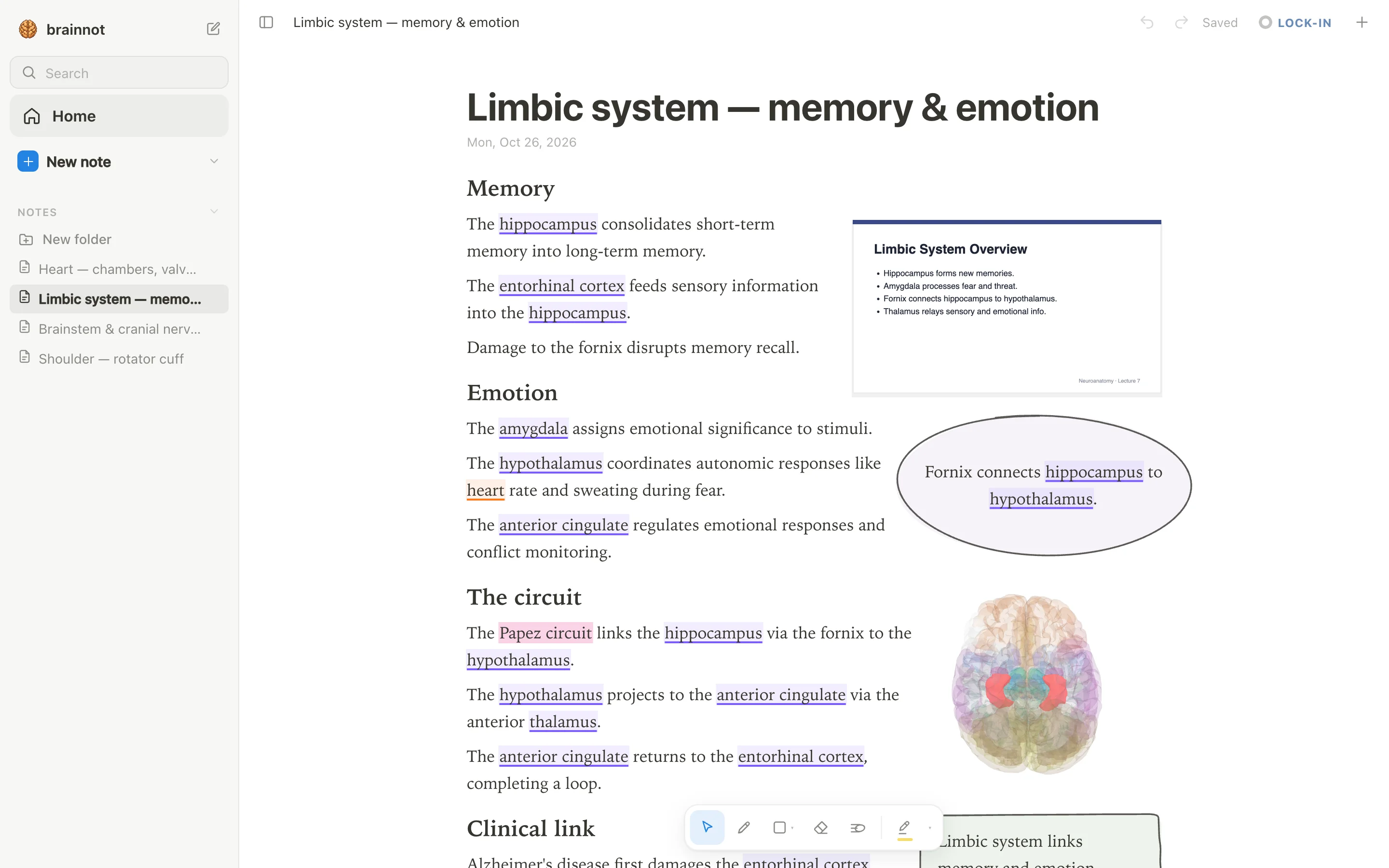
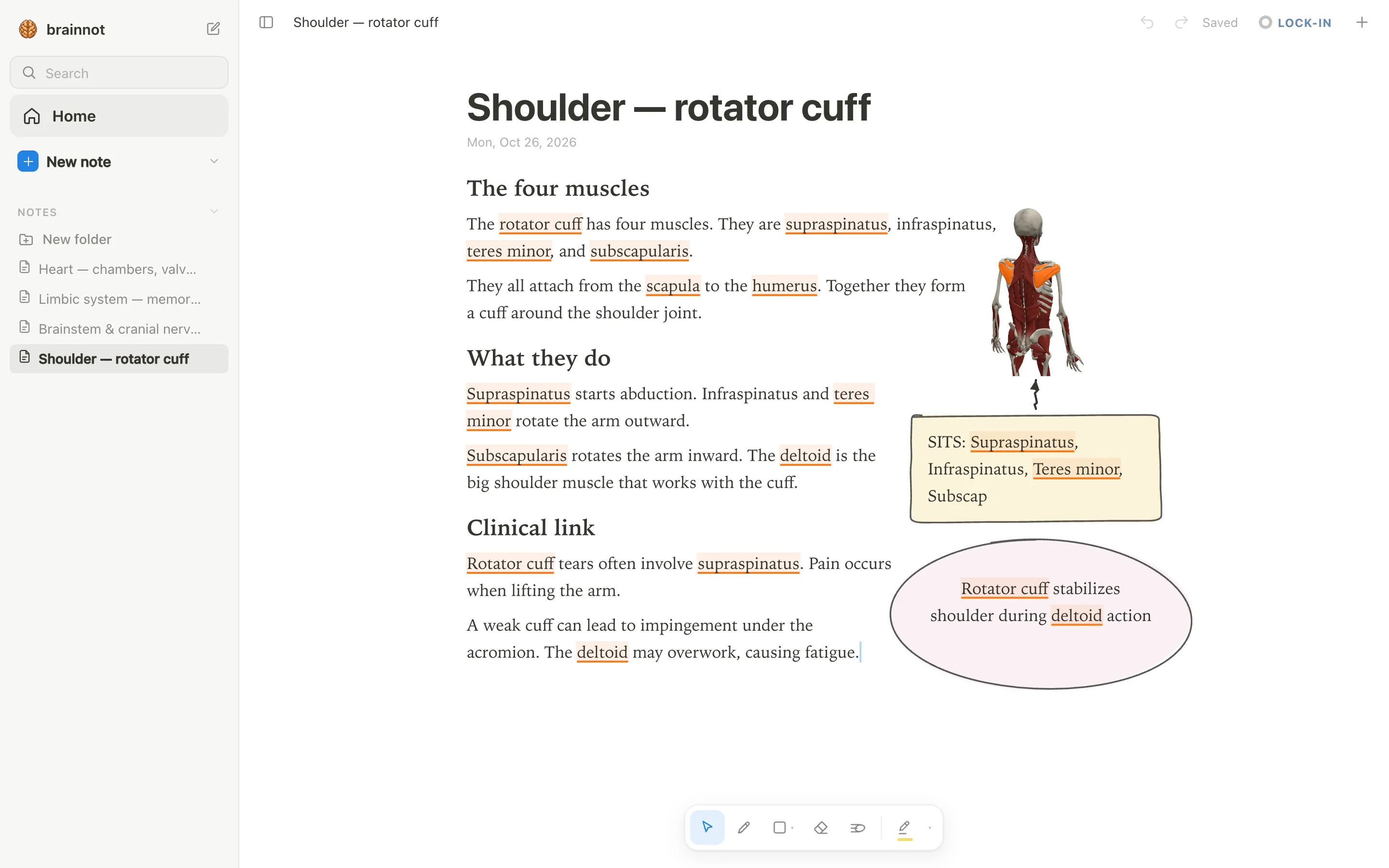
anotemy is best for medical school courses where you need to link typed notes to 3D anatomy. Pick it if you type terms like hippocampus, rotator cuff, or supraspinatus and want the structure to light up in a 3D model while you write. anotemy is free while in beta and runs in a modern browser on iPad, where Apple Pencil draws and a finger scrolls; there is no native App Store app.
- Good: Type a structure's name and the word lights up; tap to open it in 3D, with 76 brain regions and 6,800 body parts.
- Good: Dock lecture slides as PDF beside your notes; text reflows around them.
- Good: Draw with Apple Pencil; loop a takeaway and it becomes a box; hand-drawn tables, arrows, and four highlighter colors.
- Good: Quick quiz questions on each structure; print view to A4.
- Watch out: No native iPhone or Android app; no handwriting-to-text recognition.
- Watch out: No audio recording or real-time collaboration; no spaced-repetition scheduler like Anki.
4. OneNote — best for free typed notes and Microsoft 365 sync
OneNote is the free, typed-first notebook from Microsoft that syncs everywhere through OneDrive. It runs on Windows, Mac, iPad, iPhone, Android, and the web, so it's the obvious pick if you already live in Microsoft 365 or Teams. Because the app itself costs nothing, the main limit is storage: you get whatever free OneDrive space comes with a Microsoft account, and AI features like Copilot require a paid Microsoft 365 plan.
Medical students who type most of their notes and want quick access from any device should try OneNote before paying for anything. Handwriting with Apple Pencil works, but it feels less paper-like than Goodnotes or Notability, and typed notes are OneNote's real strength. Microsoft says college students can save 50% on Microsoft 365 with Copilot included with a verified college email, though the exact price was not available.
- Good: Completely free on all platforms, with no note count or file count limit in OneNote itself.
- Good: Strong typed notes with free-form text containers, tables, tags, and Office-style formatting.
- Watch out: PDF slides are inserted as printouts you can ink over, but the text isn't editable like a real PDF annotator.
- Watch out: Built-in flashcards are limited; the AI Study Guide needs a paid Microsoft 365 plan with Copilot, and there's no classic spaced-repetition scheduler.
- Watch out: Feature parity varies by platform, such as no ink-to-text on Mac and limited PDF export on the web.
5. RemNote — best for outline notes plus built-in flashcards
RemNote combines a bullet-based outliner, PDF annotation, and flashcards with spaced repetition in one app. The free plan gives unlimited notes, flashcards, and synced devices, but caps things like annotated PDFs at 3, handwriting at 1 document, and AI at 250 credits a month. Pro removes most caps and costs $8 a month billed yearly ($10 month-to-month), and students get 25% off Pro.
Medical students who want to turn lecture notes directly into Anki-style cards without leaving their note app should pick RemNote. Typed notes are the main mode, organized as bullets rather than a free page, and handwriting is supported but limited on the free plan.
- Good: Built-in spaced repetition using Anki SM-2 (with optional FSRS v6), and you can import Anki .apkg decks.
- Good: Free plan has unlimited notes and flashcards, so you can start for nothing.
- Watch out: The free plan lets you annotate only 3 PDFs and create only 1 handwritten document, which is tight for med school.
- Watch out: The outliner layout is rigid compared with the free-form pages in Goodnotes or Notability.
- Watch out: No 3D anatomy; you'd need to use something like anotemy alongside it.
- Watch out: Handwriting-to-text may require Pro or AI credits, and the AI features are credit-metered.
Side-by-side comparison
The table below compares the five apps on the features that matter most for medical school: handwriting, PDF slide markup, typed notes, 3D anatomy, and price. Prices listed are the main paid plan or free tier limit, not every option.
| App | Handwriting | PDF slides | Typed notes | 3D anatomy | Price |
|---|---|---|---|---|---|
| Goodnotes | Yes, polished Apple Pencil ink | Yes, annotate PDFs and images | Yes, typed text boxes and Text Documents | No | Free up to 3 files; Essential $11.99/yr, Pro $35.99/yr |
| Notability | Yes, handwriting-first with audio sync | Yes, import and annotate PDFs | Yes, mix typed text with ink | No | Free 5 notes; Lite $11.99/yr, Plus $15.99/yr, Pro $79.99/yr, Classic $39.99 one-time |
| anotemy | Yes, draw with pen or Apple Pencil | Yes, drop lecture slides as PDF beside page | Yes, typed notes light up anatomy words | Yes, 76 brain regions and 6,800 body parts | Free while in beta |
| OneNote | Yes, inking but less paper-like | Limited, printouts you ink over | Yes, strong free-form typed notes | No | Free app; Microsoft 365 from $9.99/mo for Copilot |
| RemNote | Yes, but free plan limits to 1 handwritten doc | Yes, annotate PDFs, free plan limits to 3 | Yes, bullet-based outliner | No | Free with caps; Pro $8/mo billed yearly, students 25% off |
Which one should you pick?
If you write everything by hand on your iPad and want the best Apple Pencil feel, Goodnotes is the default.
If you record every lecture, Notability is better because audio syncs to your ink and its AI can make quizzes from your notes.
During an anatomy-heavy year, anotemy is the only app here that links typed anatomy words to a 3D model, and it is free while in beta.
If you want flashcards inside your notes, RemNote has spaced repetition built in, though you'll hit the free plan's PDF and handwriting caps quickly. OneNote is the best free, typed-first option if you don't need 3D anatomy or advanced PDF markup.
Prices and features checked on 26 October 2026 on each one's own site: Goodnotes · Notability · Microsoft OneNote · RemNote.