 anotemy
Sign in
Try it free
anotemy
Sign in
Try it free
Goodnotes alternatives for anatomy
anotemy is the strongest Goodnotes alternative for anatomy because it links typed structure names to 3D models, while Notability handles recorded lectures and OneNote offers a free typed canvas.
We make anotemy; facts about Goodnotes, Notability, OneNote and RemNote come from their own pages, read on 2026-10-26; prices change.
Why look past Goodnotes for anatomy
Goodnotes is a strong handwriting-first note app for iPad, with polished ink, PDF markup, and built-in Study Sets that add spaced repetition to flashcards. Many anatomy students already use it to annotate diagrams and lecture slides, and it works offline with notes stored on the device.
For anatomy, however, Goodnotes hits real limits. It has no 3D anatomy models to open from a structure name, typed text is secondary to handwriting, and the cross-platform sync that matters when you move from iPad to a laptop requires Pro and is still rolling out on iOS. Android and Windows versions do not offer the full iPad feature set, so your anatomy notebook may behave differently across devices.
Alternatives such as anotemy, Notability, OneNote and RemNote cover different gaps. anotemy links typed anatomy terms to 3D structure views, Notability syncs audio with handwritten notes and AI quizzes, OneNote gives a free typed canvas inside Microsoft 365, and RemNote ties notes to spaced-repetition flashcards. The right choice depends on whether you need 3D, audio, or free cross-platform typing.
1. anotemy — best for 3D anatomy notes and linked structures
anotemy is best for medical, nursing, PA, PT, dental and neuroscience students who want to connect typed anatomy notes to 3D models. It runs in a modern browser on a laptop or desktop and on iPad, where Apple Pencil draws and a finger scrolls; there is no native iPhone or Android app. anotemy is free while in beta, and you can start writing without an account or sign in with Google or Apple to sync notes to every device.
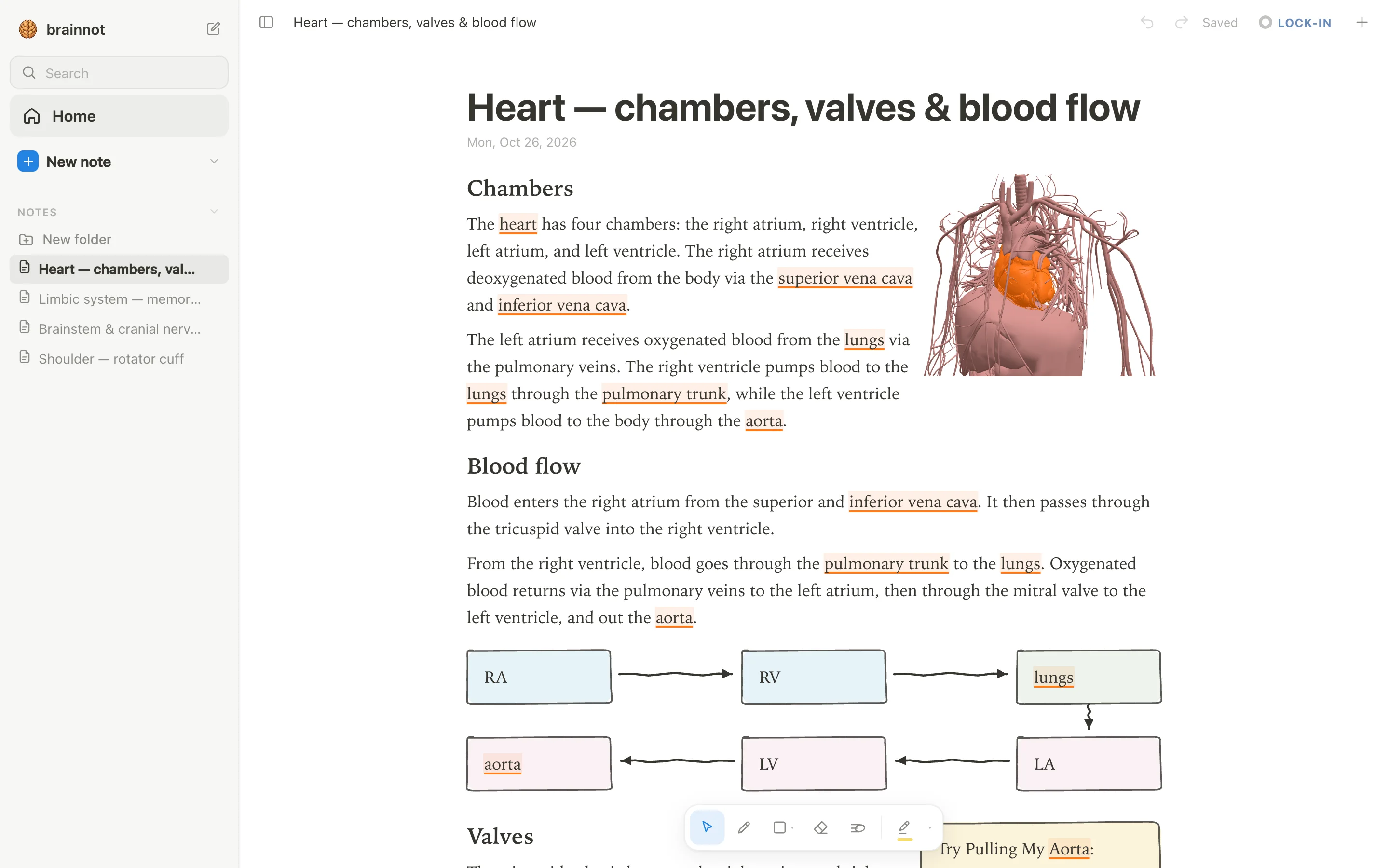
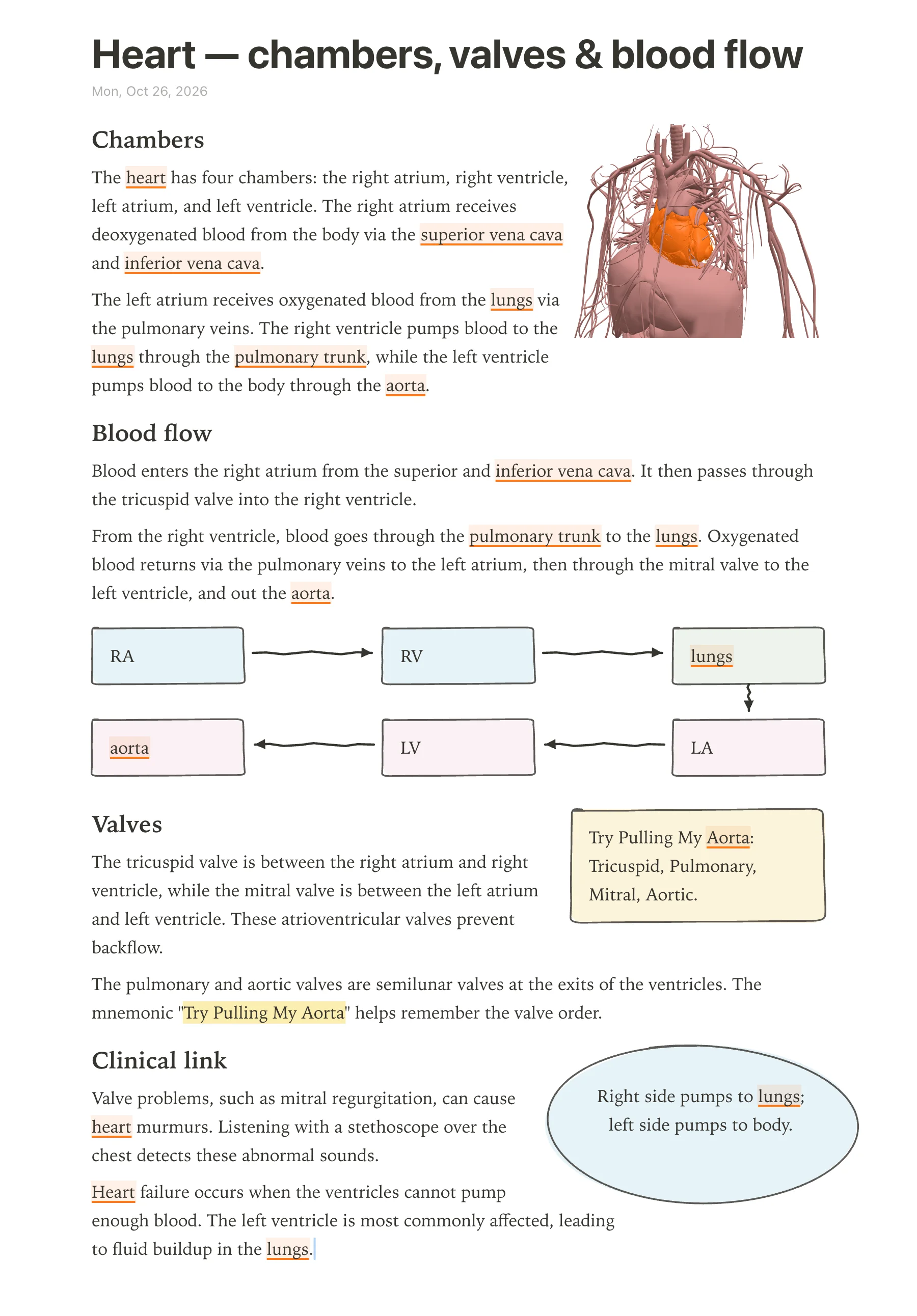
- Good: Type a structure's name and the word lights up in the text—brain structures underlined in violet, body structures in orange. Tap the word to open that structure in 3D.
- Good: Includes 76 brain regions and 6,800 body parts in 3D, so you can rotate muscles, bones, organs, vessels and nerves right above the word you typed.
- Good: Put a 3D view into the note as a picture cut to the model's edges, and the text flows around it; hand-drawn boxes, arrows and highlighters stay part of the note.
- Good: One tap on a structure gives quick questions for a quiz, and lecture slides dropped in as PDF wait in a rail and can go anywhere on the page.
- Watch out: No native iPhone or Android app, so you always work in a browser window rather than a dedicated mobile app.
- Watch out: No spaced-repetition scheduler like Anki's; use Anki alongside it for long-term retention.
2. Notability — best for recorded lecture notes and AI quizzes
Notability is best for students who record lectures and want audio synced to handwritten notes, plus AI-generated quizzes and flashcards. The free Starter tier limits you to 5 notes, so most anatomy students will need a paid plan: Plus costs $15.99 per year (or $5.99 per month) under the current site-wide 20% discount, and Pro costs $79.99 per year (or $15.99 per month). Notability runs on Mac, Windows, iPad, iPhone, Android and web, with handwriting-first ink for Apple Pencil and Android stylus, but the new Windows desktop app is less proven than the iPad version.
- Good: Audio recording is tied to your handwriting, so you can tap a word to hear what the lecturer said at that moment; Pro adds live transcription and real-time summaries.
- Good: Learn generates AI flashcards, quizzes, fill-in-the-blank and summaries from your notes, PDFs and recordings; a separate Flashcard Import adds spaced repetition with Again/Hard/Good/Easy ratings.
- Good: Classic one-time purchase at $39.99 gives unlimited note-taking without a subscription, useful if you want to avoid recurring fees.
- Watch out: The free Starter plan caps you at 5 notes, which is not enough for a full anatomy course with lab diagrams and slide annotations.
- Watch out: No 3D anatomy models, so structure names stay as flat labels on diagrams.
- Watch out: The new Windows desktop app is not yet listed in Notability Cloud's FAQ, and stylus support there is unverified from the vendor.
3. OneNote — best for free typed notes and Microsoft 365
OneNote is best for students who want a free, typed-first notebook that syncs everywhere and lives inside Microsoft 365 or Teams. It is free on Windows, Mac, iPad, iPhone, Android and the web, with notebooks stored on OneDrive; there is no paid tier for OneNote itself, but Microsoft 365 Personal adds Copilot in OneNote for $9.99 per month or $99.99 per year. OneNote's canvas uses movable text containers with rich formatting, tables and tags, while handwriting is a secondary input—Windows supports ink-to-text, but Mac does not.
- Good: Free on all platforms with a Microsoft account, so you can type anatomy notes on any device without paying for the app.
- Good: Typed notes are the main mode, and the free-form page canvas lets you place text, tables and tags anywhere, then convert handwriting to text on Windows.
- Watch out: No built-in 3D anatomy; PDF annotation is limited to inserting a PDF as a printout you can ink over, and the printout text is not editable on mobile.
- Watch out: No real spaced-repetition flashcard scheduler. Copilot's Study Guide can generate flashcards for Education and Enterprise customers, but consumer availability is unverified.
- Watch out: Feature parity varies: Mac has no ink-to-text, and the web app cannot export a whole section or notebook to PDF.
4. RemNote — best for outline notes and built-in spaced repetition
RemNote is best for students who want outline notes, PDF annotation, and spaced-repetition flashcards in one app, with optional paid AI study tools. You should pick it if you like bullet-based notes where every bullet can become a flashcard, and you study on Windows, macOS, Linux, iPad, iPhone, Android, or the web. The free plan gives unlimited notes and flashcards but caps annotated PDFs at 3, image-occlusion images at 5, and handwritten documents at 1; Pro costs $96/year ($8/month equivalent) or $10 monthly, with a 25% student discount.
- Good: Built-in spaced repetition with Anki SM-2 default and optional FSRS v6 beta; cards made inline from notes.
- Good: PDF/web reader with highlights, freehand drawing, and notes linked to highlights; click a sentence to make a card.
- Good: Unlimited notes and flashcards on the free plan, sync across devices.
- Watch out: No 3D anatomy; you'll need a separate anatomy atlas or images.
- Watch out: Free plan limits PDF annotation to 3 documents and handwriting to 1 document, so anatomy students with many PDFs will need Pro.
- Watch out: Buying Pro through the iOS App Store costs $14.99/month or $149.99/year, far more than on remnote.com.
Side-by-side comparison
Here's how the five apps compare for an anatomy student on iPad or beyond. anotemy is the only one with 3D anatomy; Goodnotes, Notability, and RemNote all have flashcards but in different ways, and OneNote's flashcards depend on Copilot.
| app | handwriting | typed notes | 3D anatomy | flashcards | price |
|---|---|---|---|---|---|
| Goodnotes | Yes (strong on iPad) | Yes (text boxes + Text Documents) | No | Yes (Study Sets with spaced repetition) | Free (3 files); Essential $11.99/yr; Pro $35.99/yr |
| anotemy | Yes (pen, mouse, Apple Pencil draws; finger scrolls) | Yes (typed structure words link to 3D) | Yes (76 brain regions, 6,800 body parts) | No (quick quiz on structures, no SRS) | Free while in beta |
| Notability | Yes (Apple Pencil, Android stylus) | Yes (mixes with handwriting) | No | Yes (AI flashcards + import SRS) | Free (5 notes); Lite $11.99/yr; Plus $15.99/yr; Pro $79.99/yr |
| OneNote | Yes (ink on Windows/iPad/Android; no ink-to-text on Mac) | Yes (strong typed notes) | No | Limited (Copilot Study Guide flashcards, no built-in deck) | Free; Microsoft 365 from $9.99/mo or $99.99/yr |
| RemNote | Yes (handwritten documents, 1 free) | Yes (outliner, bullet-based) | No | Yes (spaced repetition built in) | Free (limits); Pro $96/yr or $10/mo; Pro+AI $216/yr |
Should you switch?
Stay on Goodnotes if you're already deep into its handwriting and PDF markup, and you don't need 3D anatomy in your notes. Its built-in Study Sets flashcards and polished Apple Pencil ink are hard to beat, especially if you work mostly on iPad and can live with the free tier's 3-file limit or pay $11.99 per year for Essential.
Switch to anotemy if your anatomy study would benefit from typing a structure like 'hippocampus' and seeing it light up in 3D right in your note, or if you want a body atlas of 6,800 parts without leaving your notes. anotemy runs in a browser on iPad and desktop and is free while in beta, but it has no native iPhone or Android app and no spaced-repetition scheduler.
Pick Notability if you record lectures and want audio synced to handwriting plus AI quizzes; pick OneNote if you want a free typed notebook that syncs everywhere and you're in Microsoft 365; pick RemNote if you want outline notes where every bullet can become a spaced-repetition flashcard, even if it means giving up 3D anatomy.
Prices and features checked on 26 October 2026 on each one's own site: Goodnotes · Notability · Microsoft OneNote · RemNote.