 anotemy
Sign in
Try it free
anotemy
Sign in
Try it free
anotemy vs Goodnotes: Which is right for anatomy notes?
anotemy is the better pick for anatomy students who type notes and want every structure name to open a 3D model, and it is free while in beta. Goodnotes is stronger if you prefer handwriting on an iPad and need polished PDF markup plus spaced-repetition flashcards.
We make anotemy; Goodnotes facts come from Goodnotes' own pages, read on 2026-10-26, and prices change.
Side by side
These are the main differences for medical students choosing a note app. anotemy is a free anatomy note-taking web app that links typed structure names to 3D models. Goodnotes is a handwriting-first notebook with a free tier and paid plans.
Use the table to check the tools you rely on most. anotemy puts 3D anatomy inside your notes; Goodnotes offers more native apps and handwriting extras.
| What you're comparing | anotemy | Goodnotes |
|---|---|---|
| Platforms | Runs in a modern browser on laptop, desktop, and iPad; no native iPhone or Android app. | Native apps for iPad, iPhone, Android, Windows, Mac, and Web; Apple apps are the flagship. |
| Price (free tier and paid) | Free while in beta. | Free tier: 3 files, watermarked exports. Essential $11.99/yr; Pro $35.99/yr (adds cloud sync). |
| Handwriting | Draw with pen, mouse, or Apple Pencil; loop takeaways become boxes. No handwriting-to-text recognition. | Core feature with pressure and tilt on iPad; handwriting search and conversion on most platforms, but not Windows. |
| Typed notes | Type a structure name and the word lights up; tap it to open that structure in 3D. Text flows around 3D and drawings. | Typed text boxes plus separate Text Documents; handwriting-first, with typing support historically weaker on Windows. |
| PDF and slides | Drop lecture slides in as PDF (save PowerPoint as PDF for now); they sit in a rail and text reflows around them. | Imports PDF and images everywhere; Word and PowerPoint only on iOS/iPadOS, converted to PDF, layout may shift. |
| 3D anatomy | 76 brain regions and 6,800 body parts in 3D, opened from the word you typed. | No 3D anatomy models. |
| Flashcards or quizzes | One tap on a structure gives quick questions about it. | Study Sets with flashcards, Practice Mode, and Smart Learn spaced repetition; likely Apple-only. |
| Sync across devices | Sign in with Google or Apple to keep notes and sync them to every device. | iCloud for Apple only; Goodnotes Cloud cross-platform sync needs Pro and is still rolling out. |
Where Goodnotes is better
Goodnotes is the stronger choice for handwriting-first medical students who want a polished ink experience and built-in spaced repetition. If you take most notes with an Apple Pencil and annotate PDFs heavily, these advantages matter.
- Native iPhone, Android, Windows, and Mac apps, plus Web, while anotemy runs only in a browser and on iPad.
- Handwriting-to-text recognition on iPad, iPhone, Mac, Android, and Web, which anotemy does not offer.
- Study Sets with spaced repetition (Smart Learn) and import from Anki or Quizlet, where anotemy only has quick one-tap quizzes.
- Goodnotes AI tools such as Ask Mode, audio transcription, summaries, and image generation (Pro), though many use limited monthly credits.
Where anotemy is better
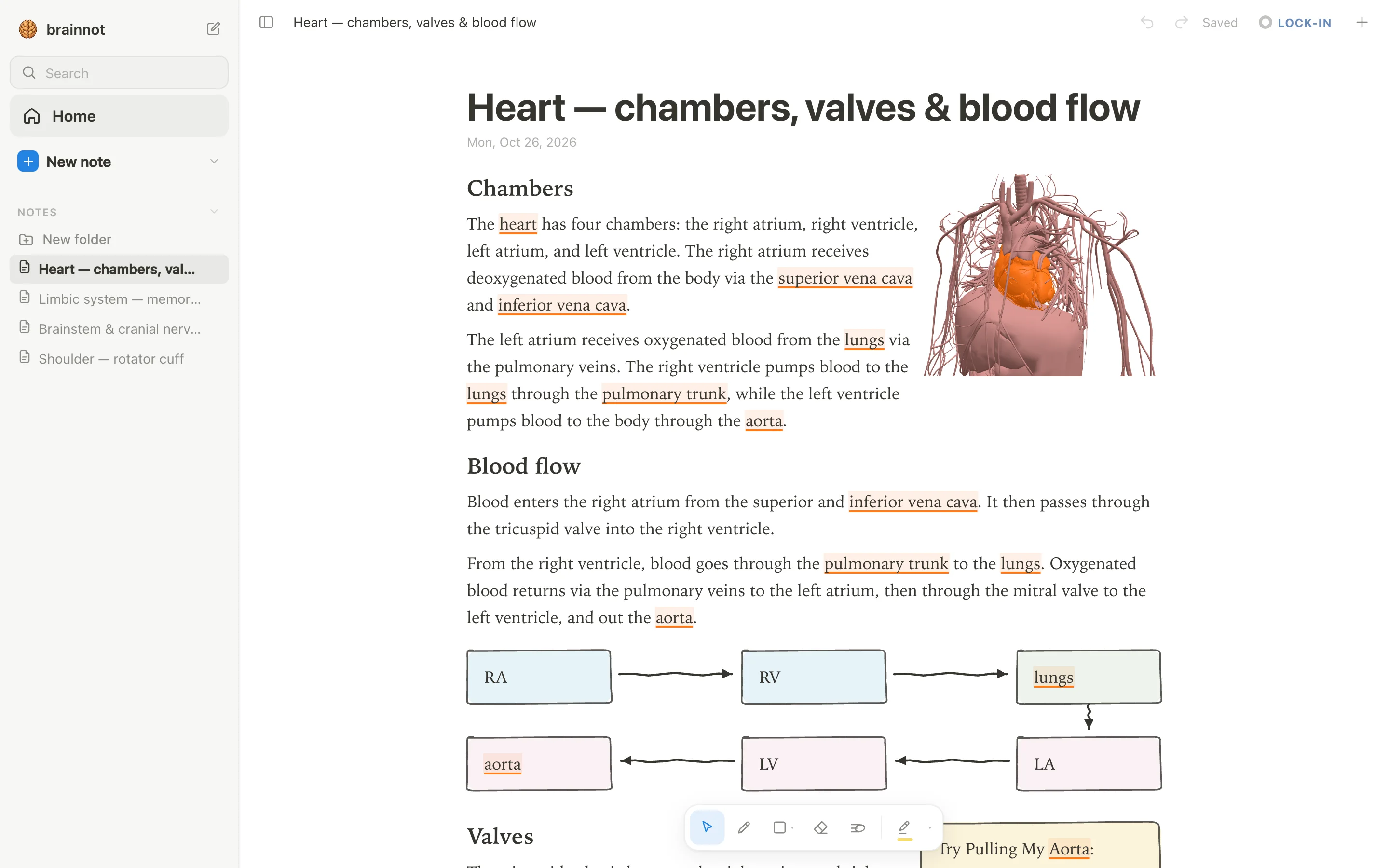
anotemy is built specifically for anatomy and health-science note-taking, so it connects your written words directly to a 3D body and brain. Instead of typing a structure name into a flat page and later looking it up elsewhere, anotemy lights up the word in your text and lets you open that structure in 3D with one tap. This is the core difference: anotemy turns your notes into an interactive anatomical reference.
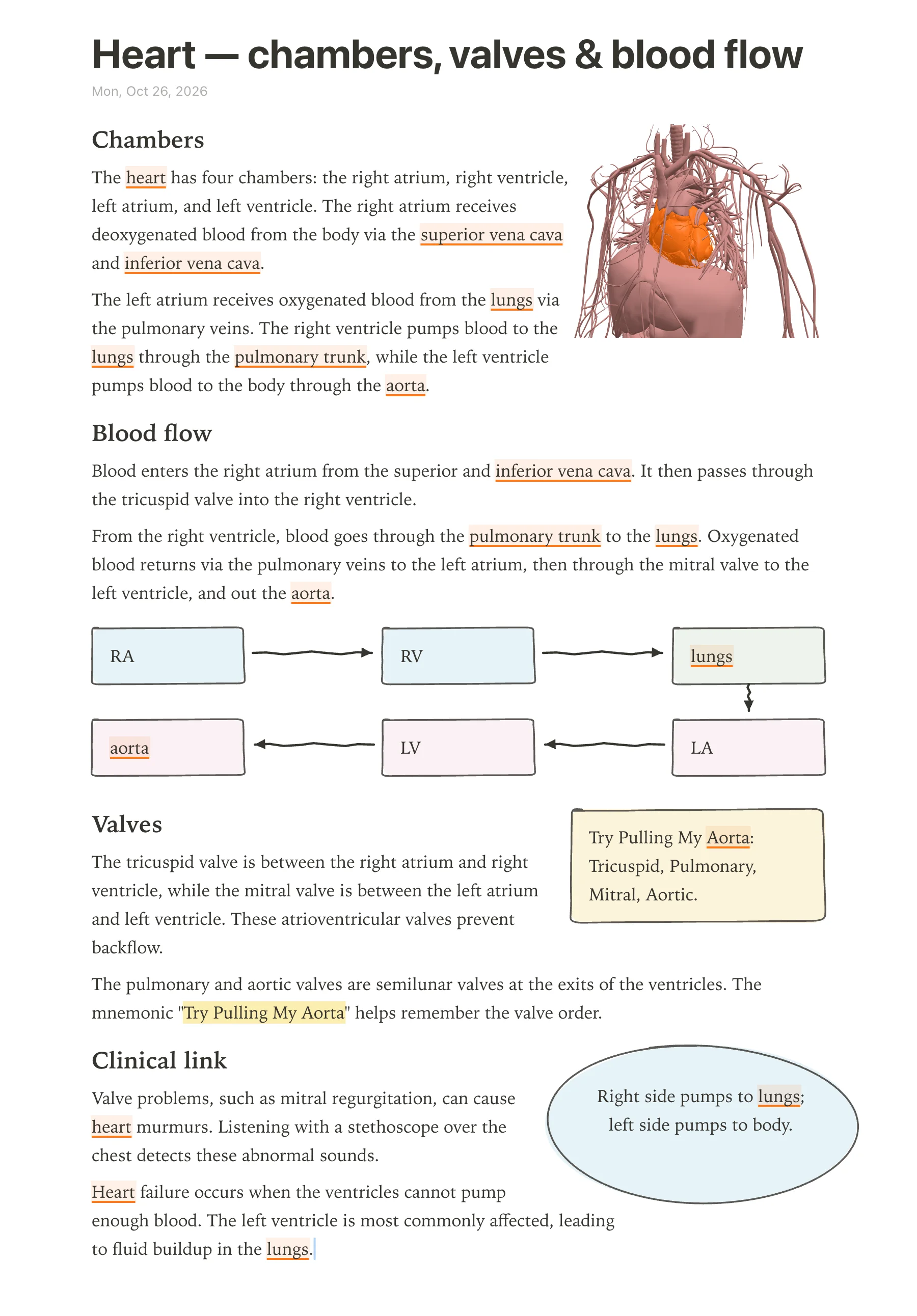
- Type a structure's name and the word itself lights up in the text: brain structures underlined in violet, body structures in orange. Tap the word to open that structure in 3D. anotemy includes 76 brain regions and 6,800 body parts in 3D, all available from the words you type. Goodnotes has no 3D anatomy models.
- Put a 3D view into the note as a picture cut to the model's edges; the text flows around it. This lets you embed a rotatable heart or a highlighted brain region right inside your note, not as a separate file.
- Draw with a pen, mouse, or Apple Pencil; loop a takeaway and it becomes a box; the text makes room for whatever you draw. Hand-drawn boxes, circles, arrows, tables, headings, lists, and four highlighter colors (yellow, green, blue, pink) are supported. You can sketch a blood flow diagram or circle a muscle origin and the note reflows around your drawing.
- Drop lecture slides in as a PDF (PowerPoint: save it as PDF for now): they wait in a rail beside the page and go anywhere in the note, and the text reflows around them. This keeps slide images and your annotations on the same page without disrupting your writing.
- Quiz: one tap on a structure gives quick questions about it. This built-in self-testing is anatomy-specific and works directly from the structure you highlighted in your note.
Using both together
A student can use Goodnotes and anotemy side by side if they want a polished handwriting notebook and an anatomy-linked text environment. Goodnotes is handwriting-first and offers Study Sets with spaced repetition, which anotemy does not have. anotemy is typing-first and links words to 3D anatomy, which Goodnotes does not do.
For example, you could type anatomy lecture notes in anotemy, tap structure names to study the 3D model, draw diagrams and mnemonic boxes, and then use Goodnotes to keep a separate handwritten notebook for clinical reasoning or to make flashcards from your notes. anotemy is free while in beta, so using both costs nothing beyond Goodnotes' own plan if you choose one.
Which should you choose?
For a medical or anatomy student who wants to type notes and have every structure name connect to a 3D model, anotemy is the clearer choice. You can write a heart note, tap the word 'aorta' to see the vessel in 3D, draw a blood flow diagram, and quiz yourself from the same page. No other note app offers this direct word-to-3D link for anatomy.
For a student who primarily handwrites on an iPad and wants refined ink, PDF markup, handwriting-to-text conversion, and built-in spaced-repetition flashcards, Goodnotes fits better. Its Apple Pencil support and Study Sets are more mature than anotemy's drawing tools, and anotemy has no handwriting-to-text recognition or spaced-repetition scheduler.
If you want both worlds, you can use them together: type and explore anatomy in anotemy, then copy key facts into Goodnotes flashcards or keep a handwritten summary there. anotemy is free while in beta, so you can test whether the 3D linking helps without committing to a subscription.
Prices and features checked on 26 October 2026 on each one's own site: Goodnotes.