 anotemy
Sign in
Try it free
anotemy
Sign in
Try it free
anotemy vs OneNote for anatomy notes
anotemy turns anatomy terms you type into interactive 3D models instantly, while OneNote is a free typed-first notebook with strong handwriting and Microsoft 365 integration. Choose anotemy for 3D anatomy learning, OneNote for general note organization.
We make anotemy; facts about OneNote come from Microsoft's pages as of 2026-10-26, and prices change.
Side by side
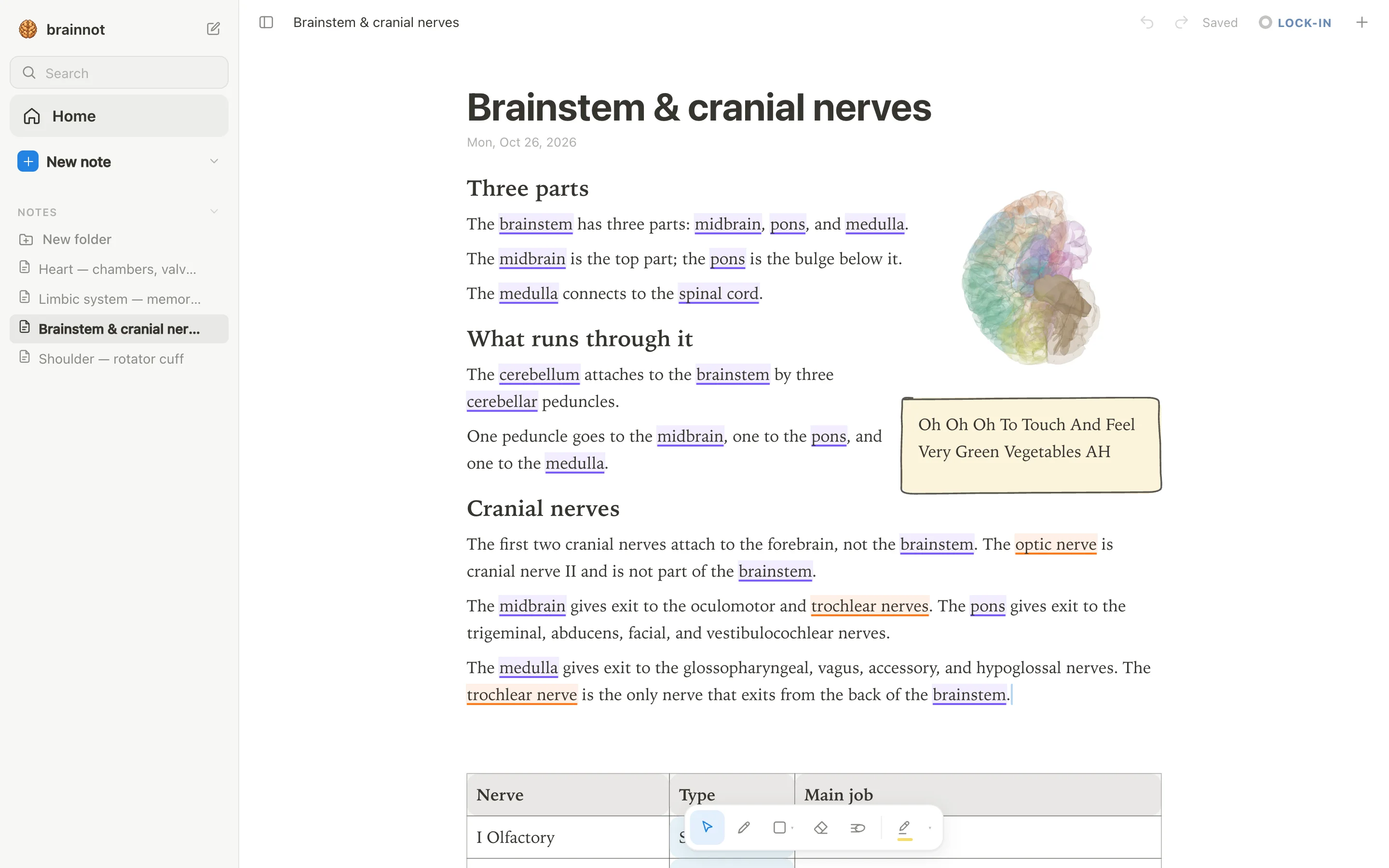
anotemy and OneNote take different approaches to notes: anotemy links typed anatomy words to 3D models, while OneNote is a general typed-first notebook.
| What you're comparing | anotemy | OneNote |
|---|---|---|
| Platforms | Modern browser on laptop/desktop and iPad (Apple Pencil draws, finger scrolls). No native iPhone or Android app. | Windows, Mac, iPad, iPhone, Android, and web. Free on all platforms with a Microsoft account. |
| Price (free tier and paid) | Free while in beta. | Free tier: OneNote free with Microsoft account; OneDrive storage limits apply. Paid: Microsoft 365 Personal $9.99/month, Family $12.99/month, Premium $19.99/month. |
| Handwriting | Draw with pen, mouse, or Apple Pencil; no handwriting-to-text recognition. | Inking on Windows, iPad, Android; Ink to Text on Windows. Mac draws with mouse/trackpad but no conversion. |
| Typed notes | Type anatomy terms; words light up (brain structures violet, body orange) and open 3D; text reflows around drawings. | Strong typed notes: free-form page canvas, movable text containers, rich text, tables, tags, Office formatting. |
| PDF and slides | Drop lecture slides as PDF; they sit in a rail beside the page and go anywhere; text reflows. | Insert PDFs as File Printout images to ink over; printout text isn't editable; not a native PDF annotator. |
| 3D anatomy | 76 brain regions and 6,800 body parts in 3D; tap highlighted word to see structure turn in 3D above word. | No built-in 3D anatomy. |
| Flashcards or quizzes | One tap on a structure gives quick questions about it. | No classic built-in flashcards or SRS; Copilot can generate flashcards with Microsoft 365 (limited, education/enterprise). |
| Sync across devices | Sign in with Google or Apple to sync notes to every device. | Syncs via OneDrive; offline editing with merge when reconnected. |
Where OneNote is better
OneNote wins on platform coverage, handwriting recognition, and Microsoft ecosystem integration.
- OneNote is free on all major platforms with a Microsoft account, while anotemy is a web app only on laptop/desktop and iPad.
- OneNote has native apps for iPhone and Android; anotemy doesn't.
- OneNote supports handwriting-to-text on Windows; anotemy has no handwriting recognition.
- OneNote integrates with Microsoft 365 and has Copilot AI for summarizing notes; anotemy has no AI features.
- OneNote allows offline editing with merge when reconnected (from Microsoft's documentation).
Where anotemy is better
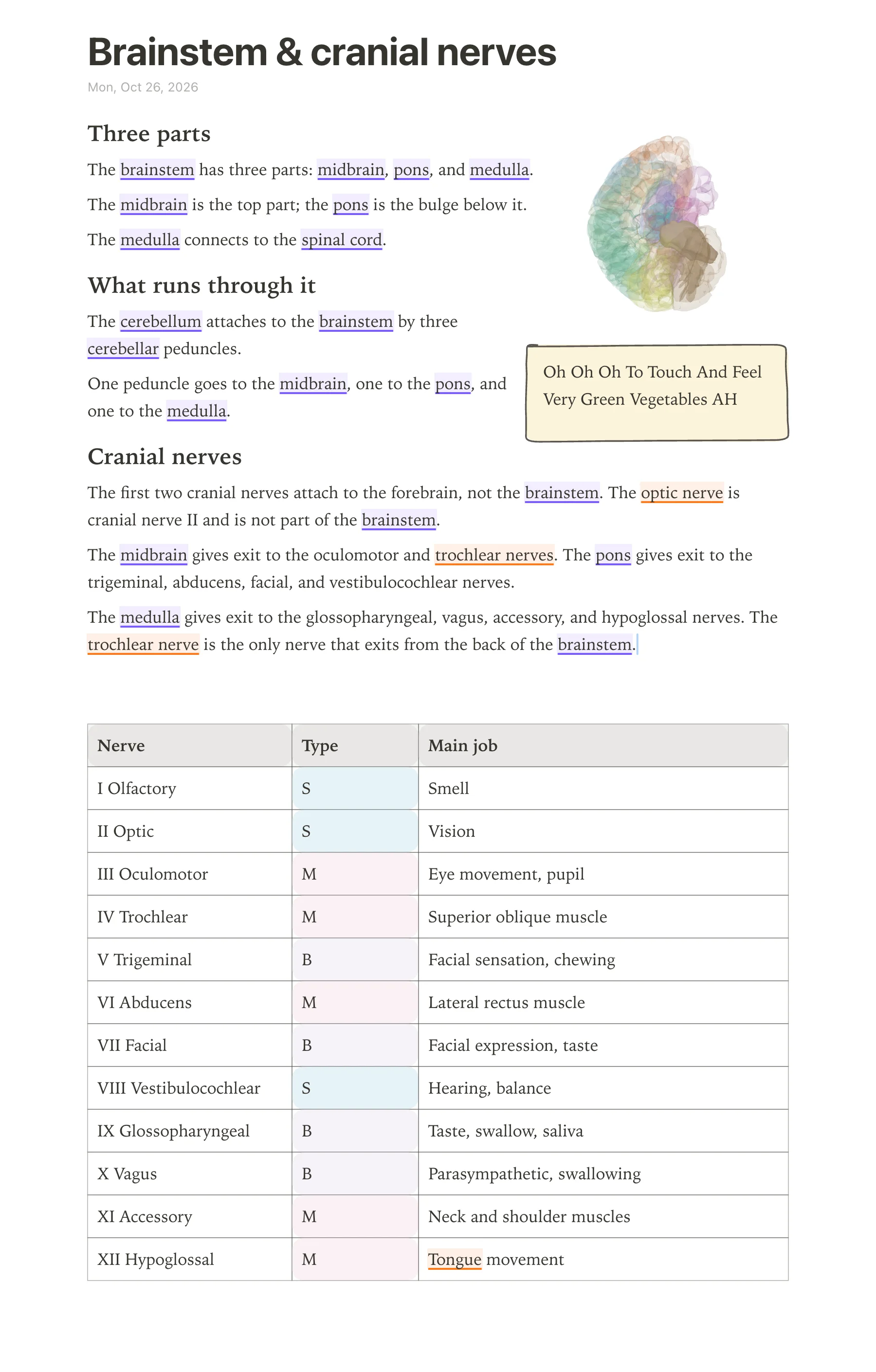
OneNote is a general-purpose notebook that works well for typed notes across many subjects, but anotemy is built specifically for learning anatomy. In anotemy, the words you type become links to 3D models, so a name like "brainstem" is not just text. anotemy runs in a modern browser on a laptop or desktop, and on iPad where Apple Pencil draws and a finger scrolls.
- Type a structure name like "brainstem" or "biceps brachii" and the word itself lights up: brain structures underlined in violet, body structures in orange. Tap that word to open the structure in 3D right above your note.
- anotemy has 76 brain regions and 6,800 body parts in 3D, each opened from the word you typed. No need to switch apps or hunt through an atlas.
- Put any 3D view into your note as a picture cut to the model's edges, and the text flows around it. This gives you a labeled study sheet that OneNote's flat images can't match.
- Draw boxes, circles, arrows, tables, headings, lists, and use four highlighter colors (yellow, green, blue, pink). Loop a takeaway and it becomes a box automatically.
- One tap on a structure gives quick quiz questions about it, so you can test yourself in the middle of note-taking.
Using both together
Using anotemy and OneNote side by side makes sense for many students. anotemy has no spaced-repetition scheduler, no handwriting-to-text recognition, no real-time collaboration, and no audio recording of lectures, while OneNote covers some of those gaps with its cross-platform typed notes and ink tools. OneNote is free on all major platforms and syncs notebooks through OneDrive; anotemy runs in a browser on a laptop or desktop, and on iPad with Apple Pencil.
A practical workflow: keep your lecture PDFs, typed outlines, to-do lists, and non-anatomy notes in OneNote. For anatomy-heavy topics, open anotemy to type the names of structures, open them in 3D, and build a visual page with hand-drawn tables and arrows. anotemy has a print view, so you can print your anatomy page to PDF and attach it to a OneNote notebook for storage or sharing. With a free Microsoft account, OneNote itself costs nothing; anotemy is free while in beta.
Which should you choose?
For the visual anatomy learner who wants words to open 3D models: choose anotemy. Type "brainstem", tap the underlined word, and the brainstem turns in 3D right above your note. You can draw directly on the page, loop takeaways into boxes, and quiz yourself on any structure. anotemy is free while in beta and you can start writing without an account, though you need to sign in with Google or Apple to keep notes and sync them to every device. It has no native iPhone or Android app, so it works best on a laptop, desktop, or iPad.
For the student who needs a full-featured note system across every device, with strong typed notes, ink on Windows and iPad, PDF printout annotation, and Microsoft 365 integration: choose OneNote. OneNote is free on Windows, Mac, iPad, iPhone, Android, and the web, with notebooks stored on OneDrive (free OneDrive storage applies). You get rich text, tables, tags, and the option to add Copilot AI features with a Microsoft 365 subscription. OneNote's anatomy support stops at flat images and your own drawings; it has no linked 3D anatomy models.
For the student already using OneNote but frustrated by static anatomy images: add anotemy for your anatomy course. Use OneNote for lecture capture and organization, then build interactive anatomy pages in anotemy and print them to PDF to store in OneNote. This keeps your study materials in one place while giving you the 3D interaction OneNote lacks.
Prices and features checked on 26 October 2026 on each one's own site: Microsoft OneNote.