 anotemy
Sign in
Try it free
anotemy
Sign in
Try it free
anotemy vs Kenhub for anatomy notes
For medical students who want to tie their own typed notes to a 3D atlas, anotemy opens 6,800 body parts and 76 brain regions from the words you type, free in beta. Kenhub is stronger as a ready-made study library: 2D illustrated atlas, 485+ spaced-repetition quizzes, and video lessons, but it has no personal notes or 3D view.
We make anotemy; the Kenhub facts here come from Kenhub's own pages, read on 2026-10-26, and prices change.
Side by side
anotemy is a free web app that turns your own typed anatomy notes into a 3D atlas; Kenhub is a subscription study platform with a 2D illustrated atlas, video lessons, and adaptive quizzes.
| What you're comparing | anotemy | Kenhub |
|---|---|---|
| Platforms | Modern browser on laptop, desktop, and iPad with Apple Pencil; no native iPhone or Android app | Browser only for main platform, responsive; add-to-home-screen; no native course app in US store; separate Daily Anatomy Flashcards app native on iOS and Android |
| Price (free tier and paid) | Free while in beta | Free forever tier: atlas, articles, Latin/English terms, sample videos and quizzes; paid from $39/mo, $87/3mo, $290 lifetime (prices geo-dependent; 7-day money-back) |
| Handwriting | Draw with pen, mouse, or Apple Pencil; loop a takeaway becomes a box; no handwriting-to-text recognition | No drawing or stylus features found |
| Typed notes | Type a structure name and it lights up; tap to open in 3D; no real-time collaboration | No personal notes feature found on vendor pages |
| PDF and slides | Drop lecture slides in as PDF; text reflows; PowerPoint save as PDF for now | No PDF/slide import or annotation found |
| 3D anatomy | 76 brain regions and 6,800 body parts in 3D; insert 3D view as picture | No 3D; 2D illustrated atlas with 5,000+ HD illustrations, cross sections, histology, CT/MRI; blog argues against 3D |
| Flashcards or quizzes | One tap on a structure gives quick questions; no spaced-repetition scheduler like Anki's | 485+ adaptive quizzes powered by spaced repetition; custom exam-prep quizzes; separate Daily Anatomy Flashcards app with 500 structures |
| Sync across devices | Sign in with Google or Apple to keep notes and sync to every device; start without account but no sync | Not stated for web; Russian iOS app listing says videos can be downloaded offline |
Where Kenhub is better
Kenhub is the stronger choice if you want ready-made video lessons, a 2D illustrated atlas with histology and radiology images, and built-in spaced-repetition quizzes.
- Full video library: Kenhub offers 141+ hours of video lessons and articles, while anotemy has none.
- Spaced-repetition built in: Kenhub's 485+ adaptive quizzes use spaced repetition; anotemy gives quick questions but no scheduler, so you would need Anki alongside.
- 2D atlas depth: Kenhub includes 5,000+ HD illustrations, cross sections, histology, and CT/MRI images; anotemy focuses on 3D models and does not include those.
- Native flashcards app: Kenhub's separate Daily Anatomy Flashcards app runs natively on iOS and Android; anotemy has no native mobile app.
- Premium support: Kenhub's paid plans include 24/7 'anatomy geeks' help; anotemy has no equivalent support.
Where anotemy is better
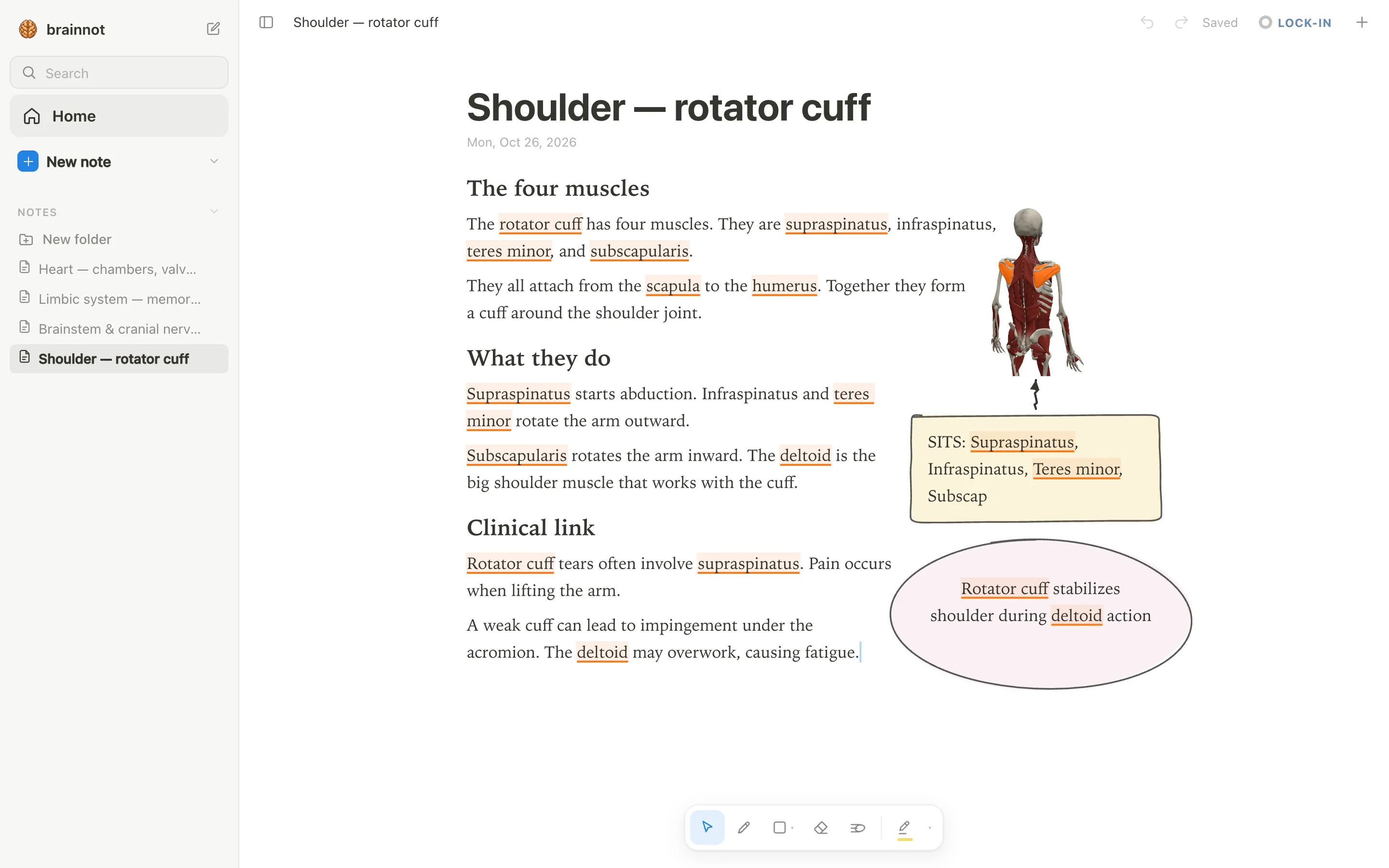
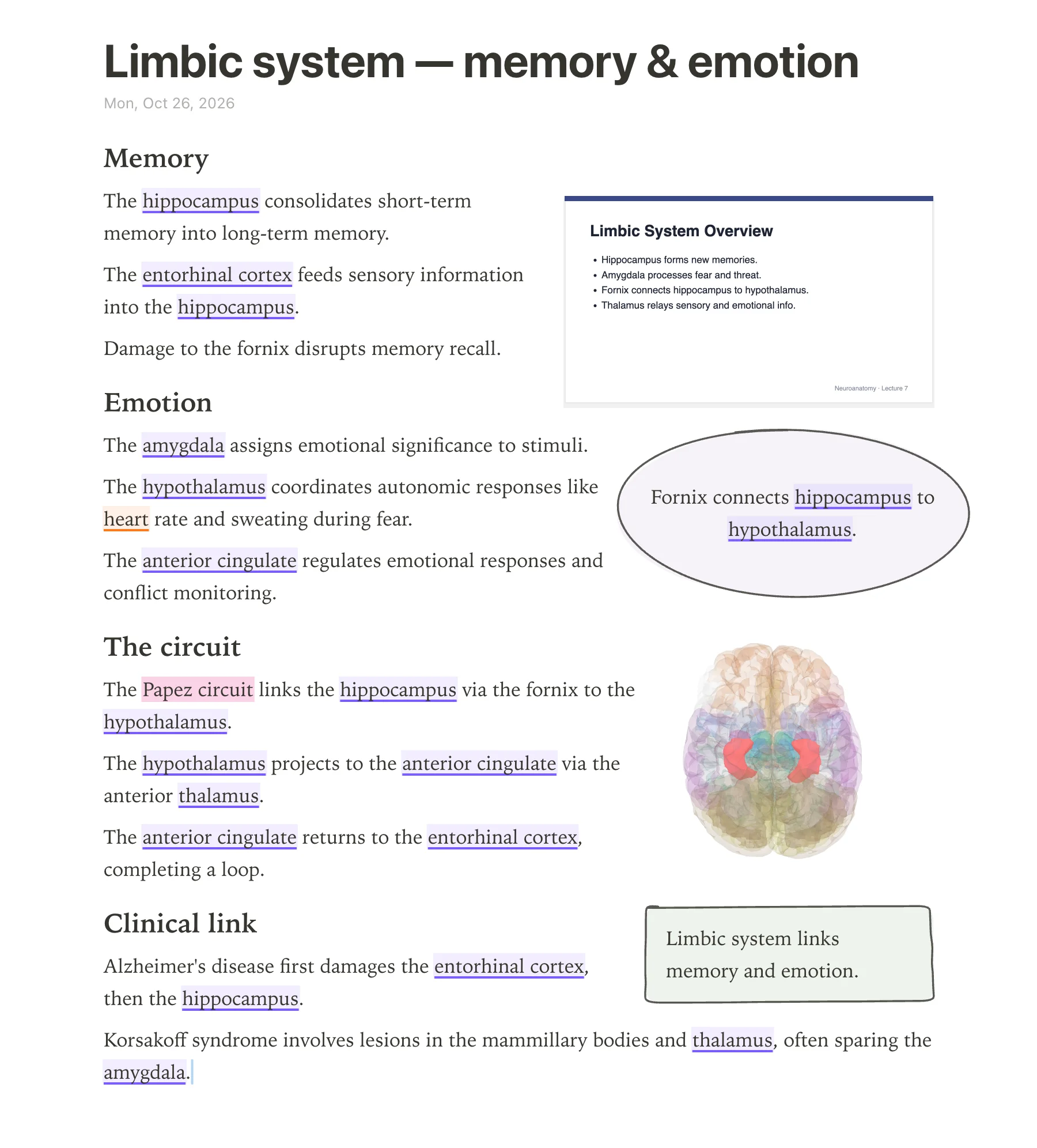
anotemy is built specifically for anatomy note-taking, connecting the words you type directly to interactive 3D models. When you type a structure's name, such as hippocampus or rotator cuff, the word itself lights up in the text—brain structures underlined in violet, body structures in orange. Tapping that word opens the structure in 3D right above the note, letting you see relationships without leaving your page. Kenhub offers a 2D illustrated atlas with 5,000+ HD images, but it does not provide 3D models or any way to link your own notes to anatomical views.
anotemy also treats drawing as a first-class part of note-taking. You can draw with a pen, mouse, or Apple Pencil; loop a takeaway and it becomes a box; the text makes room for whatever you draw. It includes hand-drawn boxes, circles, arrows, tables, headings, lists, and four highlighter colors (yellow, green, blue, pink). Kenhub has no drawing or stylus features found on its platform.
- Type any structure name and the word lights up in the text; tap it to open an interactive 3D model of that brain region or body part.
- Insert a 3D view into the note as a picture cut to the model's edges, with text flowing around it.
- Drop lecture slides in as a PDF (PowerPoint must be saved as PDF for now); slides wait in a rail beside the page and go anywhere in the note, and the text reflows around them.
- Print view (⌘P) lays out the note on A4, useful for paper study or sharing.
- anotemy is free while in beta, with no account needed to start writing; you can sign in with Google or Apple to sync notes across devices.
Using both together
It makes sense to use Kenhub and anotemy side by side, because they serve different parts of anatomy study. Kenhub is a content library: a 2D atlas, articles, video lessons, and adaptive quizzes. anotemy is a note-taking tool: it turns your own typed or drawn notes into an interactive 3D reference. There is no direct integration between them, but you can keep both open in browser tabs.
A typical workflow: watch a Kenhub video or read an article (free sample content, or premium if you subscribe), then summarize key points in anotemy. As you type structure names in anotemy, they light up and open 3D views, helping you visualize what Kenhub showed in 2D. You can also drop lecture slides or screenshots from Kenhub into anotemy as PDFs, and annotate them with drawings.
For review, anotemy has a quick quiz feature: one tap on a structure gives quick questions about it. However, anotemy has no spaced-repetition scheduler like Anki's. If you want adaptive spaced-repetition quizzes, Kenhub's premium plan provides 485+ quizzes, or you can use a separate app like Anki alongside anotemy.
Which should you choose?
For a student who wants interactive 3D models linked directly to their own notes, anotemy is the clear choice. Its ability to light up typed structure names, embed 3D views, and support hand-drawn annotations makes it unique among anatomy study tools. Kenhub does not offer 3D or note-taking features at all.
For a student who prioritizes comprehensive video courses and adaptive quizzes, Kenhub's premium plan is better. Kenhub provides 141+ hours of video, 485+ quizzes, and a large 2D atlas. anotemy has no video content and only quick per-structure quiz questions, not a spaced-repetition system.
For a student on a budget, anotemy is free while in beta, which means you can use all current features without payment. Kenhub has a free tier with limited atlas, articles, and sample videos/quizzes, but full access requires a paid plan (monthly, 3-month, or lifetime). You can start with anotemy for notes and Kenhub's free tier for supplemental reading, then decide later if Kenhub premium is worth the cost for you.
Prices and features checked on 26 October 2026 on each one's own site: Kenhub.