 anotemy
Sign in
Try it free
anotemy
Sign in
Try it free
Best note-taking apps for medical students
For 2026 medical students, anotemy is best for 3D anatomy notes, while Goodnotes is best for handwriting on iPad. Notability, OneNote, RemNote, Obsidian and Anki each have strengths for slides, typing, outlining, and flashcards.
We make anotemy; the other apps' facts come from their own pages, read on 2026-10-26; prices change.
How we picked
We compared seven note-taking apps used by medical students in 2026: anotemy, Goodnotes, Notability, OneNote, RemNote, Obsidian, and Anki. Each app's facts come from its own pages, read on 2026-10-26; prices change.
We looked for what matters in medical school notes: strong anatomy support, PDF and slide annotation, spaced repetition, handwriting, and cross-platform use. We make anotemy, so we describe it first and fairly; the other apps' strengths and limits are from their own pages.
- Anatomy-specific features: whether the app links terms to 3D models or images.
- PDF and slide annotation: how it handles lecture slides and textbooks.
- Flashcards and spaced repetition: built-in or add-on support for exam prep.
- Handwriting support: Apple Pencil or stylus input for drawing and notes.
- Cross-platform and pricing: free tier limits and paid plans for students.
1. anotemy — best for 3D anatomy notes
anotemy is an anatomy note-taking web app for medical, nursing, PA, PT, dental and neuroscience students. It runs in a modern browser on laptop or desktop, and on iPad, where Apple Pencil draws and a finger scrolls. There is no native iPhone or Android app.
You can start writing without an account, then sign in with Google or Apple to keep notes and sync them to every device. It is free while in beta.
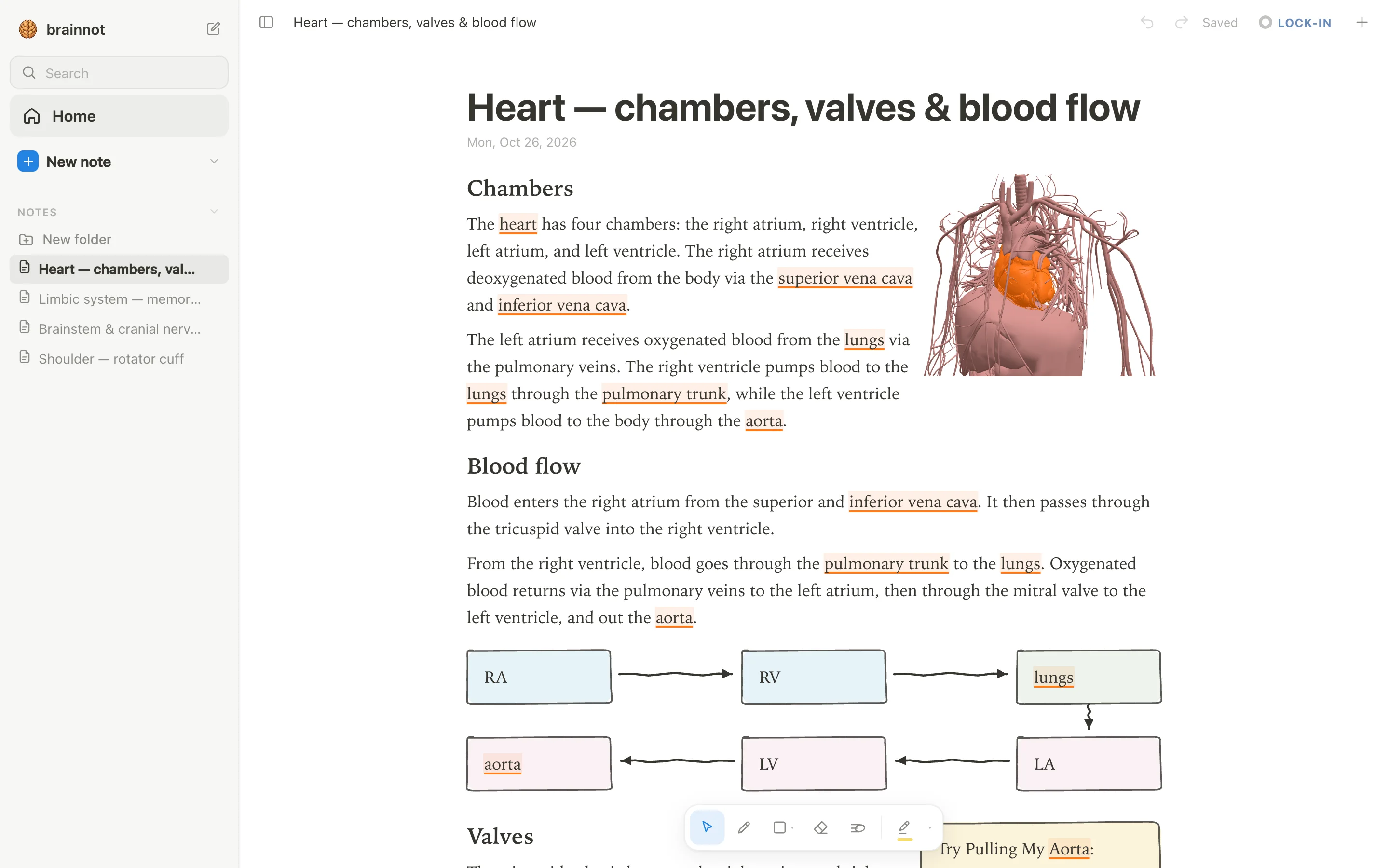
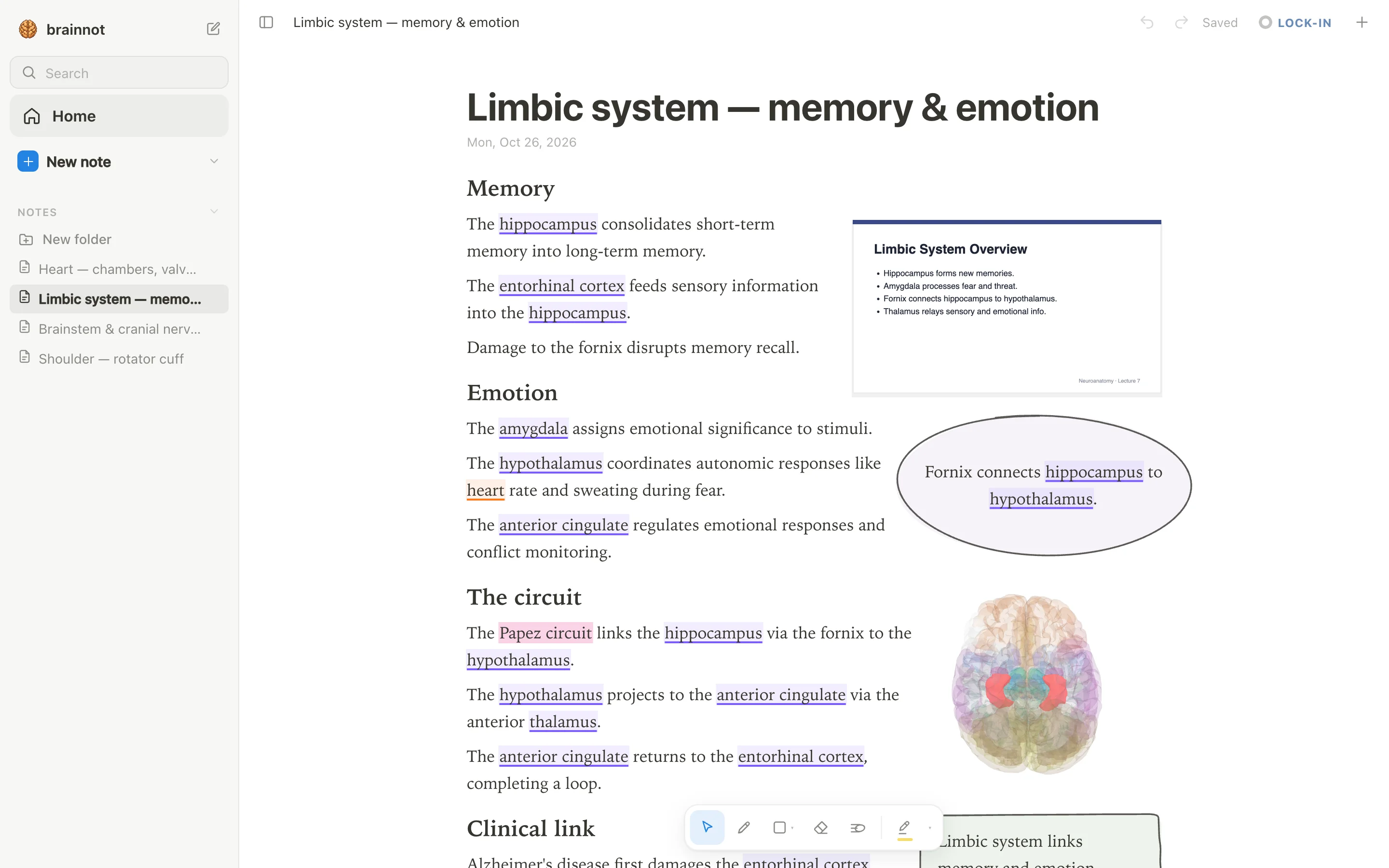
Type a structure's name and the word lights up: brain structures underlined in violet, body structures in orange. Tap the word to open that structure in 3D.
- Good: 76 brain regions in 3D, each lit inside a see-through brain; tap a highlighted brain word and the structure turns in 3D above the word.
- Good: 6,800 body parts in 3D (muscles, bones, organs, vessels, nerves), opened from the word you typed.
- Good: Put a 3D view into the note as a picture cut to the model's edges; the text flows around it.
- Good: Draw with pen, mouse or Apple Pencil; loop a takeaway and it becomes a box; the text makes room for whatever you draw.
- Watch out: No native iPhone or Android app (web app only).
- Watch out: No spaced-repetition scheduler like Anki's; use Anki alongside it.
2. Goodnotes — best for handwriting on iPad
Goodnotes is a handwriting-first note-taking app from Goodnotes Limited, with Apple apps as the flagship. It runs on iPad, iPhone, Android, Windows, Mac and web; cross-platform sync is still rolling out gradually.
The free tier is free forever but limited: up to 3 files total, 3 folders, 5MB import size, 20 min audio, watermarked exports, 100MB storage. Paid plans: Essential $11.99/year, Pro $35.99/year.
It supports PDF annotation, handwriting search and conversion, typed text boxes, and Study Sets flashcards with spaced repetition called Smart Learn.
- Good: Handwriting-first with Apple Pencil pressure/tilt on iPad, and active pens like S Pen on Android/Windows.
- Good: Built-in Study Sets flashcards with Practice Mode and Smart Learn spaced repetition, and import from Anki/Quizlet.
- Good: PDF annotation everywhere, and imports Word/PowerPoint on iOS (converted to PDF).
- Watch out: Free tier is limited to 3 files, watermarked exports, and 5MB import size.
- Watch out: Cross-platform sync (Goodnotes Cloud) requires Pro plan and is still rolling out gradually on iOS; Apple-only sync is iCloud.
- Watch out: No 3D anatomy features; it's a general note app.
3. Notability — best for audio-synced handwritten notes
Notability is best for medical students who record lectures and want the audio synced to their handwritten notes. You can tap a written word to jump to that moment in the recording. It now runs on iPad, iPhone, Android, Mac, Windows, and web, though Windows is newer and less proven.
The free Starter plan is limited to 5 notes, so most students need a paid plan. Notability Classic costs $39.99 one-time for unlimited note-taking without AI. The Plus subscription is $15.99/year (currently discounted from $19.99) with AI features like Learn quizzes and flashcards, and Pro is $79.99/year with unlimited AI and live transcription.
- Good: Audio recording syncs with handwriting, so you can replay exactly what was said when you wrote a note.
- Good: A one-time Classic purchase ($39.99) removes the note limit without a subscription.
- Good: Learn generates AI flashcards, quizzes, and summaries from notes, PDFs, and recordings (limited on Plus, unlimited on Pro).
- Watch out: The free Starter is capped at 5 notes, which is not enough for a full course.
- Watch out: Windows desktop app is new and its stylus support and overall maturity are unverified.
- Watch out: AI features require a subscription and are not available on MDM-managed devices or in China, Hong Kong, or Macau.
4. OneNote — best for free typed notes everywhere
OneNote is a free, typed-first notebook that syncs across Windows, Mac, iPad, iPhone, Android, and web. It's part of Microsoft 365, so it integrates with Word, PowerPoint, and Teams. Handwriting is supported but less paper-like than Goodnotes or Notability.
The free plan is genuinely free: no note limit, just OneDrive storage limits. Paid Microsoft 365 plans add Copilot AI features, but even free users get a capable note app. PDF annotation is limited: you insert printouts and ink over them, not edit text. Typed notes, tables, and tags are strong.
- Good: Completely free on all platforms with no note limit; notebooks live on OneDrive.
- Good: Strong typed-note editor with movable containers, tables, and Office-style formatting.
- Good: Integrates with Microsoft 365 and Teams, handy if your school uses them.
- Watch out: No built-in spaced-repetition flashcards; Copilot Study Guide flashcards are for education/enterprise customers only.
- Watch out: PDF annotation is weak: you ink over page images, not native text.
- Watch out: Feature parity varies; no ink-to-text on Mac, web can't export a whole notebook to PDF.
5. RemNote — best for notes and spaced repetition in one app
RemNote is best for medical students who want outline notes, PDF annotation, and spaced-repetition flashcards built into the same app. You write notes as bullets and turn any bullet into a flashcard with a keystroke. It imports Anki decks, and the scheduler defaults to Anki's SM-2 with FSRS available as an opt-in beta.
RemNote has a free tier with unlimited notes, but annotating more than 3 PDFs requires Pro ($96/year or $10/month). The Pro with AI plan adds 20,000 AI credits per month for $216/year or $20/month. Students get 25% off Pro, applied automatically for recognized school emails.
- Good: Spaced repetition is built in; make flashcards from note bullets, and import Anki APKG files.
- Good: Handwriting is supported (free plan allows 1 handwritten document; Pro unlimited), including drawing on PDFs.
- Good: 25% student discount on Pro (not on the AI portion or via app stores).
- Watch out: Free plan caps annotated PDFs/files/websites at 3, image occlusion at 5, and handwritten documents at 1.
- Watch out: App Store in-app purchases cost much more than buying from remnote.com ($14.99/mo vs $10/mo for Pro).
- Watch out: Handwriting-to-text conversion may require Pro or AI credits; not confirmed.
6. Obsidian — best for a private, local Markdown knowledge base
Obsidian is best for students who want a private, local-first Markdown knowledge base they fully own. Notes are plain text files on your device, so they work offline and you can sync them however you like. There is no built-in handwriting, PDF annotation, or flashcards; those features come from community plugins, which vary in quality and are not vendor-reviewed.
The app itself is free for personal use, with no limits. Obsidian's own paid services are optional: Sync for $4/month billed annually (1 GB, 5 MB file limit) and Publish for $8/month. Students and faculty get 40% off Sync and Publish. If you rely on handwriting, PDF markup, or spaced repetition, be prepared to install and maintain third-party plugins.
- Good: Free forever for personal use, no account needed; notes are plain Markdown files you keep locally.
- Good: 40% student discount on Obsidian Sync and Publish, verified by school email.
- Good: Strong Markdown editing with links, backlinks, properties, and Canvas; no lock-in.
- Watch out: No native handwriting or stylus ink; only community plugins, which aren't manually reviewed.
- Watch out: No built-in PDF annotation or flashcards; you must add plugins like Spaced Repetition or Anki Sync.
- Watch out: No web app; mobile apps work offline but syncing across devices requires Obsidian Sync or third-party setup.
7. Anki — best for spaced-repetition flashcards
Anki is a flashcard app, not a note-taking app. Medical students often pair it with a separate note app because Anki focuses purely on memorization through spaced repetition.
Anki runs on Windows, macOS, Linux, Android, and the web for free. The official iOS app (AnkiMobile) costs $24.99 one-time.
It works fully offline and syncs via the free AnkiWeb service. Anki's default scheduler now includes FSRS, which predicts memory decay and reduces review load.
- Good: Free on Windows, macOS, Linux, Android, and the web; only the iOS app costs $24.99 one-time.
- Good: Built-in spaced repetition with FSRS scheduler for efficient long-term retention.
- Good: Large shared-deck ecosystem for medical subjects (anatomy, pharmacology, etc.).
- Good: Works fully offline; syncs via free AnkiWeb.
- Watch out: No handwritten notes or long-form note editing; it is only for flashcards.
- Watch out: The official iOS app is paid, while other platforms are free.
Side-by-side comparison
| App | Platforms | Handwriting | 3D anatomy | Flashcards | Price |
|---|---|---|---|---|---|
| anotemy | Browser (laptop/desktop) and iPad web app; no native iPhone/Android | Draw with pen, mouse, or Apple Pencil; no handwriting-to-text | 76 brain regions and 6,800 body parts in 3D | No spaced-repetition flashcards; quiz questions only | Free while in beta |
| Goodnotes | iPad, iPhone, Mac, Windows, Android, web (some features limited) | Yes, Apple Pencil and stylus support; handwriting search and conversion | No | Study Sets with spaced repetition (Smart Learn); import from Anki/Quizlet | Free tier (up to 3 files); Essential $11.99/yr, Pro $35.99/yr |
| Notability | iPad, iPhone, Mac, Windows, Android, web | Yes, Apple Pencil and Android stylus; handwriting recognition and math conversion | No | AI-generated flashcards and spaced repetition via Flashcard Import | Free tier (5 notes); Lite $11.99/yr, Plus $15.99/yr, Pro $79.99/yr, Classic $39.99 one-time |
| OneNote | Windows, Mac, iPad, iPhone, Android, web | Yes, inking with pen/touch; ink-to-text on Windows | No | Limited; Study Guide AI flashcards in some plans, no built-in SRS | Free with Microsoft account; Microsoft 365 plans from $9.99/mo |
| RemNote | Windows, Mac, Linux, iPad, iPhone, Android, web | Yes, handwritten documents and inline drawings; stylus support | No | Built-in spaced repetition with Anki SM-2 or FSRS; cards inline in notes | Free tier (limited); Pro $8/mo billed annually, Pro with AI $18/mo |
| Obsidian | Windows, Mac, Linux, iPad, iPhone, Android; no web app | No native handwriting; plugins only | No | No built-in; plugins only | Free for personal use; Sync and Publish paid |
| Anki | Windows, Mac, Linux, Android, iPhone, iPad, web (limited) | Limited; scratchpad on mobile only, no notes | No | Core feature; spaced repetition with FSRS | Free except iOS app $24.99 one-time |
Which one should you pick?
If you take handwritten notes on an iPad with Apple Pencil, Goodnotes and Notability are the strongest choices. Goodnotes offers a paper-like ink engine and built-in Study Sets, while Notability adds audio-synced recordings and AI-generated quizzes. anotemy also works on iPad for drawing and 3D anatomy notes, but it is not a full handwriting app with recognition.
If you type most notes on a laptop, OneNote (free and cross-platform) or Obsidian (local Markdown files) are solid. OneNote is best for free-form rich text inside Microsoft 365; Obsidian is best for a private, local knowledge base you can extend with plugins. RemNote is also an option if you want typed outline notes with built-in flashcards.
In your first year, anatomy is central. anotemy is built for anatomy notes: type a structure name and see it in 3D, with brain regions and body parts. Pair it with Anki for anatomy flashcards, since anotemy does not have spaced repetition.
During exam blocks, you need a spaced-repetition engine. Anki is the standard; it is free on most platforms and has FSRS scheduling. RemNote integrates flashcards into your notes, and Goodnotes has Study Sets, but Anki remains the most flexible for heavy medical deck use.
Prices and features checked on 26 October 2026 on each one's own site: Goodnotes · Notability · Microsoft OneNote · RemNote · Obsidian · Anki (desktop) + AnkiWeb + AnkiMobile + AnkiDroid.