 anotemy
Sign in
Try it free
anotemy
Sign in
Try it free
How to Make Anatomy Notes with 3D Diagrams
Use anotemy to type anatomy notes where structure names light up and open in 3D. Dock lecture slides, draw mnemonic boxes, and put 3D views into your notes so text flows around them.
What makes anatomy notes good
Good anatomy notes are an active study tool, not a transcript of the lecture. They combine typed structure names that you can click to inspect in 3D, hand-drawn boxes for mnemonics and memory hooks, and a 3D model that you can turn, rotate, and isolate so each page becomes a reviewable diagram. anotemy is a web app for medical, nursing, PA, PT, dental, and neuroscience students that brings these pieces into one browser page.
The best notes use color-coding for tissue types or regions, short headings you can quiz yourself on later, and diagrams that sit beside the text instead of in a separate app. They also avoid copying slides verbatim; instead, the slide acts as a reference while your own words and sketches do the work.
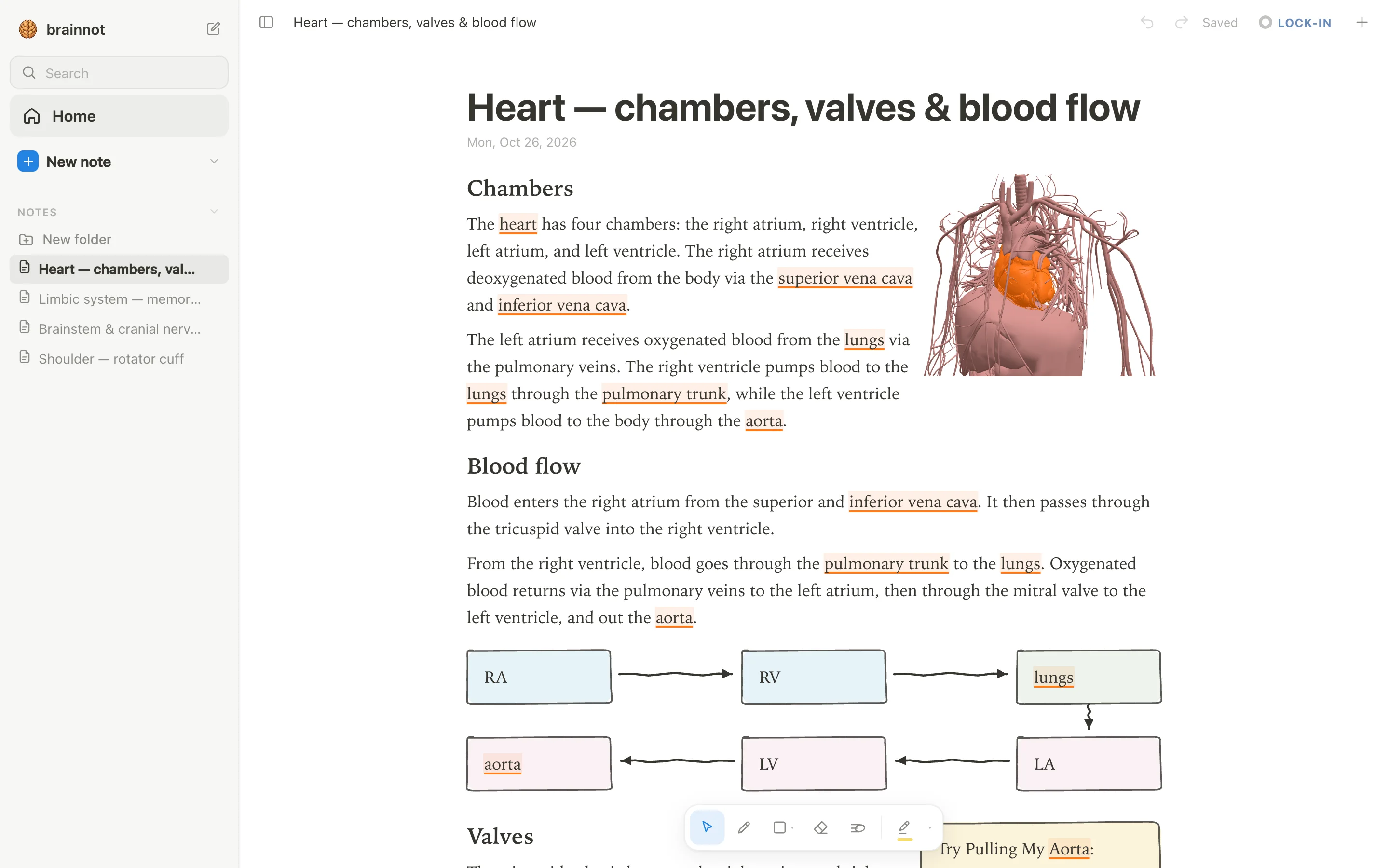
- Type a structure name like 'hippocampus', 'amygdala', 'brainstem', 'heart', or 'rotator cuff' and the word itself lights up in the text: brain structures are underlined in violet, body structures in orange.
- Tap the highlighted word to open that structure in a 3D model; anotemy has 76 brain regions in a see-through brain and 6,800 body parts from muscles and bones to vessels and nerves.
- Put a 3D view into the note as a picture cut to the model's edges, and the text flows around it, so the diagram becomes part of the page.
- Draw with a pen, mouse, or Apple Pencil, and loop a takeaway to turn it into a box; the text makes room for whatever you draw, and you can add hand-drawn tables, lists, and arrows.
- Use four highlighter colors (yellow, green, blue, pink) to color-code, and drop lecture slides in as PDFs to keep beside your notes; a one-tap quiz on any structure gives quick active recall questions.
Step 1: Type short headings first
Start a new note in anotemy and type the lecture as short headings rather than full sentences. For example, when the professor says 'brainstem', 'cerebellum', 'hippocampus', or 'rotator cuff', type those words exactly, and anotemy automatically lights up each anatomy term: brain structures are underlined in violet, body structures in orange. This means every structure name becomes a clickable link to its 3D model, so you do not need to write a definition or copy the slide.
Keep the headings short: a structure name plus a few key relationships or clinical points. You can later tap any highlighted word to open the 3D model right above the text, and the model turns in place so you can check the spatial relations. anotemy has 76 brain regions and 6,800 body parts available from the words you type, so you can work entirely from your own notes instead of switching to a separate atlas.
Because anotemy runs in a modern browser on a laptop, desktop, or iPad, you can type on a keyboard or draw with Apple Pencil. You can start writing without an account, and if you sign in with Google or Apple, your notes sync to every device. No native iPhone or Android app is needed, and the app is free while it is in beta.
Step 2: Dock the lecture slide
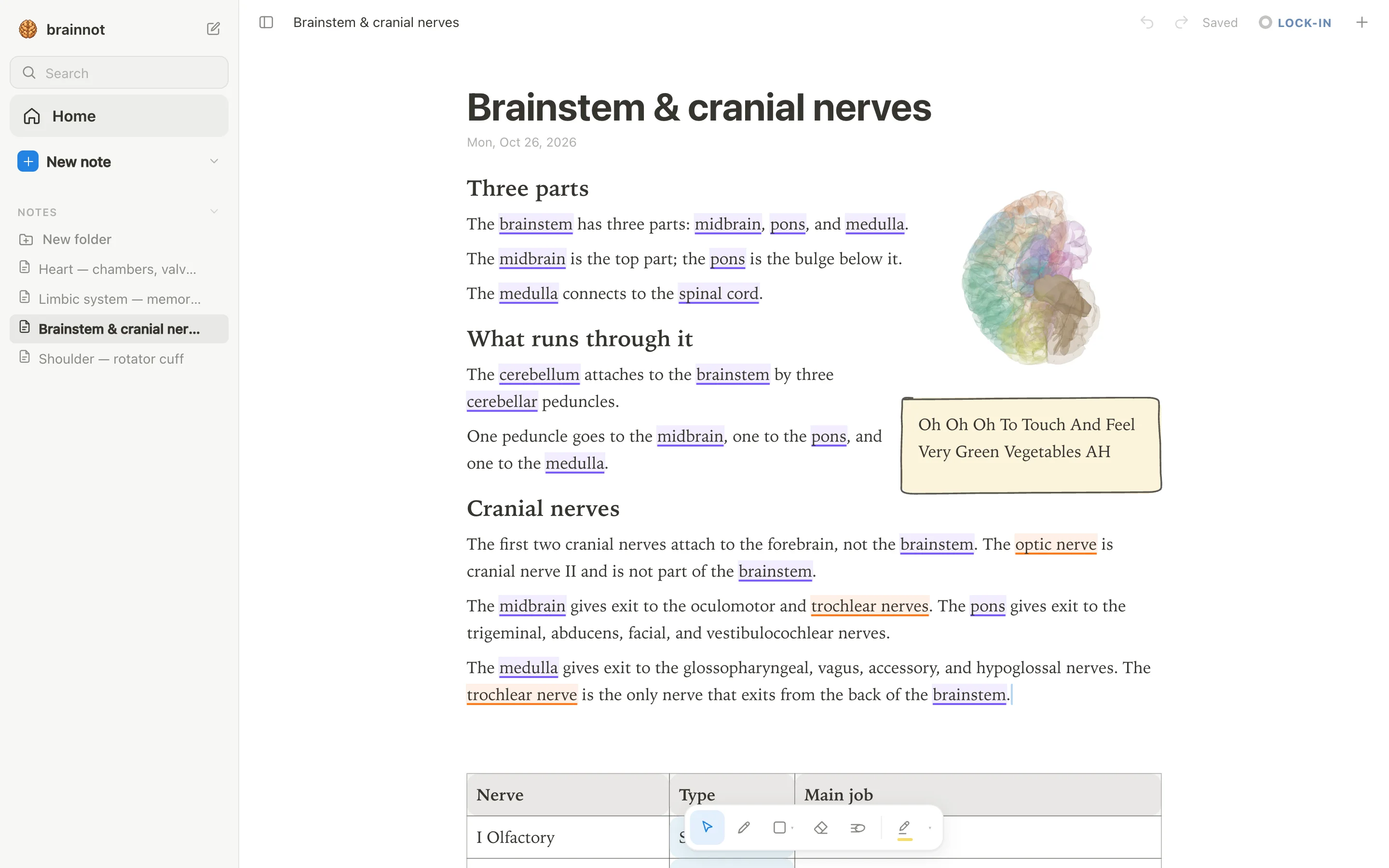
Instead of redrawing a complex diagram or transcribing every label, drop the lecture slide into anotemy as a PDF. PowerPoint slides can be saved as PDF first, and then they wait in a rail beside the page, so you can see the slide while you type your own notes. This saves the time of copying the professor's drawing and keeps the original labels and images intact.
You can drag any slide from the rail into the note itself, and the text automatically reflows around it. That means the slide becomes part of the page, and you can draw arrows or box a specific region directly on the note to focus on that structure. anotemy does not have handwriting-to-text recognition or audio recording, so the slide import is the fastest way to pair the lecture's diagram with your own annotations.
When you combine the slide with your typed headings and a 3D view, you get a note that shows both the professor's illustration and the actual 3D anatomy. For example, if the slide shows the heart, you can type 'heart' in your note, tap the word to open the 3D heart, and put that 3D view next to the slide so you can compare the two. The text flows around both images, keeping the page neat.
Step 3: Add 3D and boxes
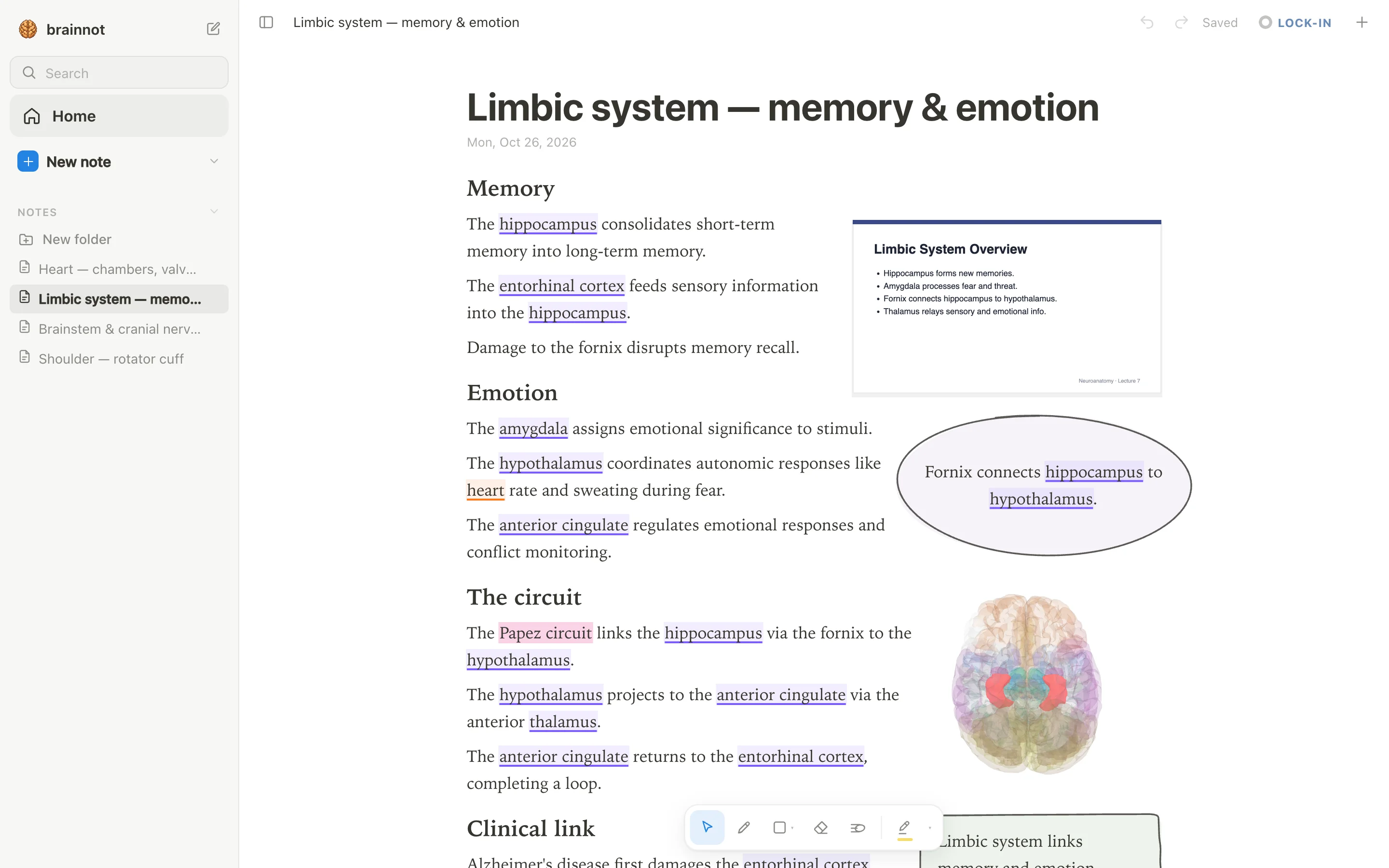
When you tap a highlighted anatomy word in anotemy, the structure opens in 3D right above the word, and you can turn the model to any angle you need. For example, tap 'rotator cuff' and you can see the four muscles lit in 3D while you write the SITS mnemonic beside it. Then put that 3D view into the note as a picture cut to the model's edges, and the text flows around the view, so the diagram lives inside your notes instead of a separate tab.
After the 3D view is in place, use the draw tools to loop a takeaway and turn it into a box, or highlight key words in one of four colors: yellow, green, blue, or pink. You can draw tables, lists, and arrows by hand, and the text makes room for whatever you draw. This is where mnemonics and active recall cues go: a yellow box for the SITS muscles, a pink circle around a brainstem structure you keep forgetting.
Finally, use the quiz feature on any structure for quick active recall: one tap on a highlighted word gives you questions about that structure, so you can test yourself right from the note. Because the 3D view, slide, and your drawings all sit on one page, reviewing becomes a single scrolling pass instead of switching between apps. anotemy is free while in beta, and you can start without an account to see if this workflow fits your anatomy study.
Step 4: Draw boxes and arrows flow
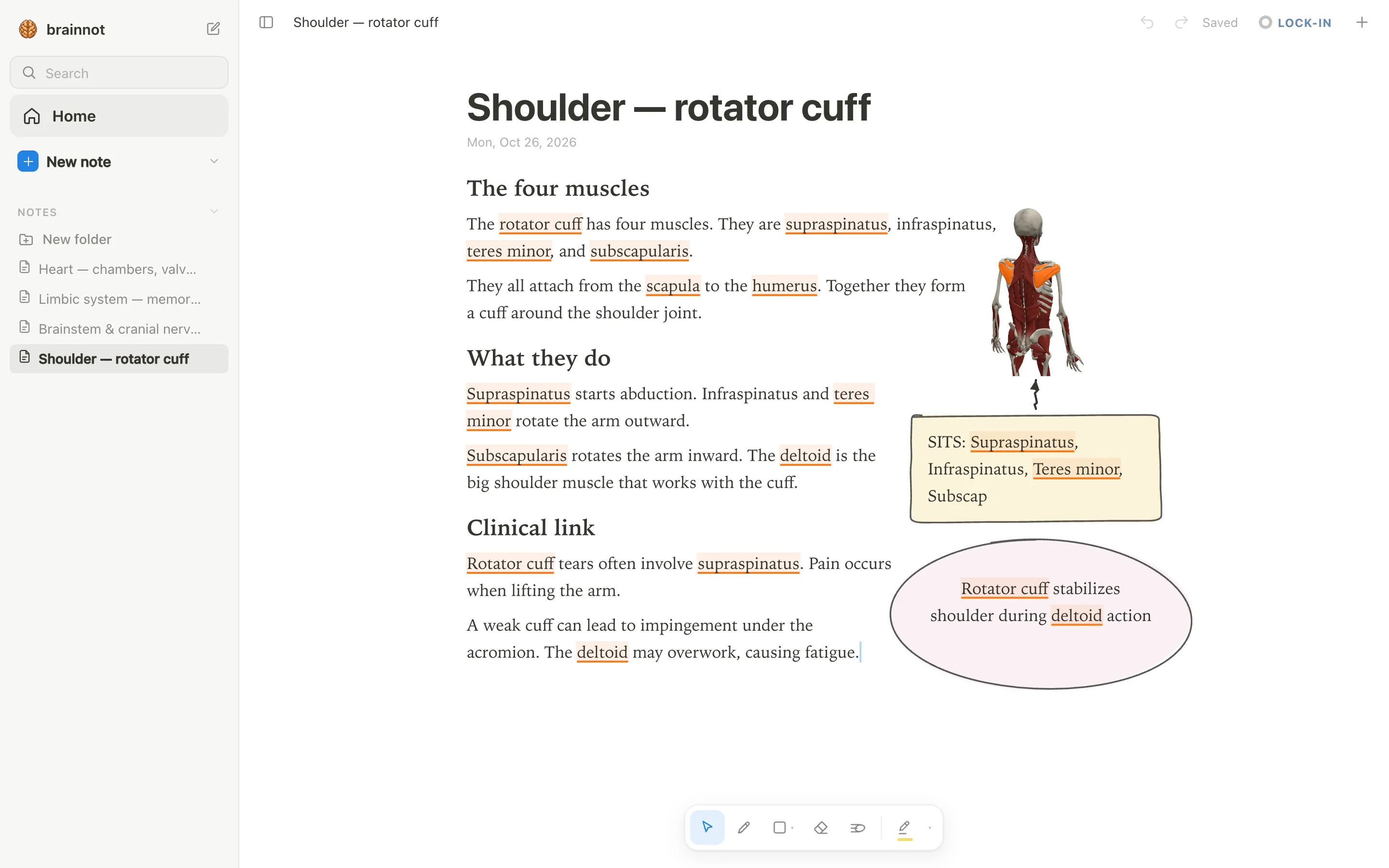
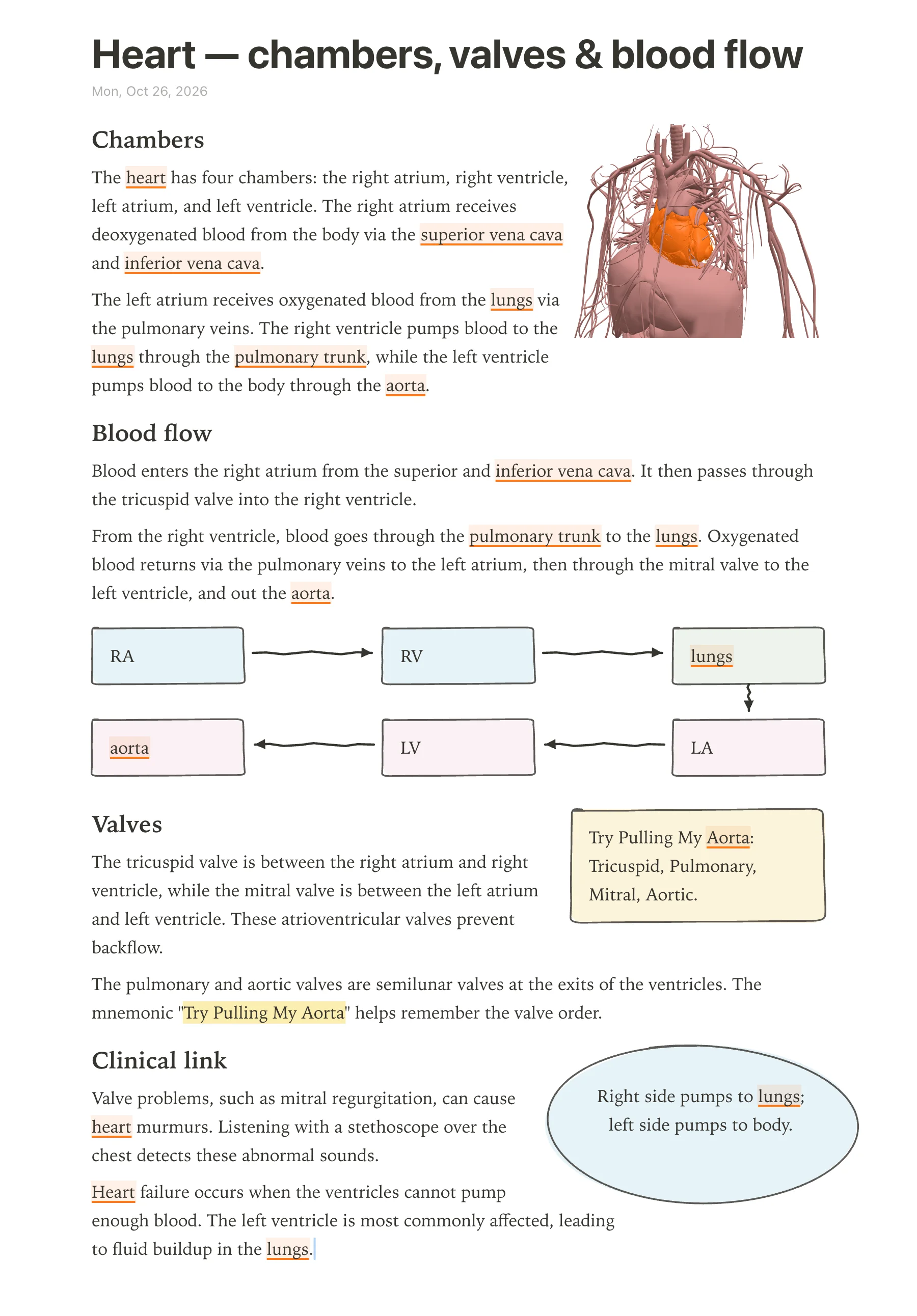
In anotemy, use the pen, mouse, or Apple Pencil to sketch a hand-drawn flow diagram right where you type. Loop a takeaway and it becomes a box automatically; draw arrows between boxes to show direction, and the text makes room for whatever you draw.
For the heart, draw five boxes: right atrium → right ventricle → lungs → left atrium → left ventricle → aorta. Add labels inside each box, then draw a loop from aorta back to the right atrium for systemic circulation.
This is faster than importing an image, and because it is your own drawing, you will remember the sequence better.
Step 5: Color-code and box key takeaways
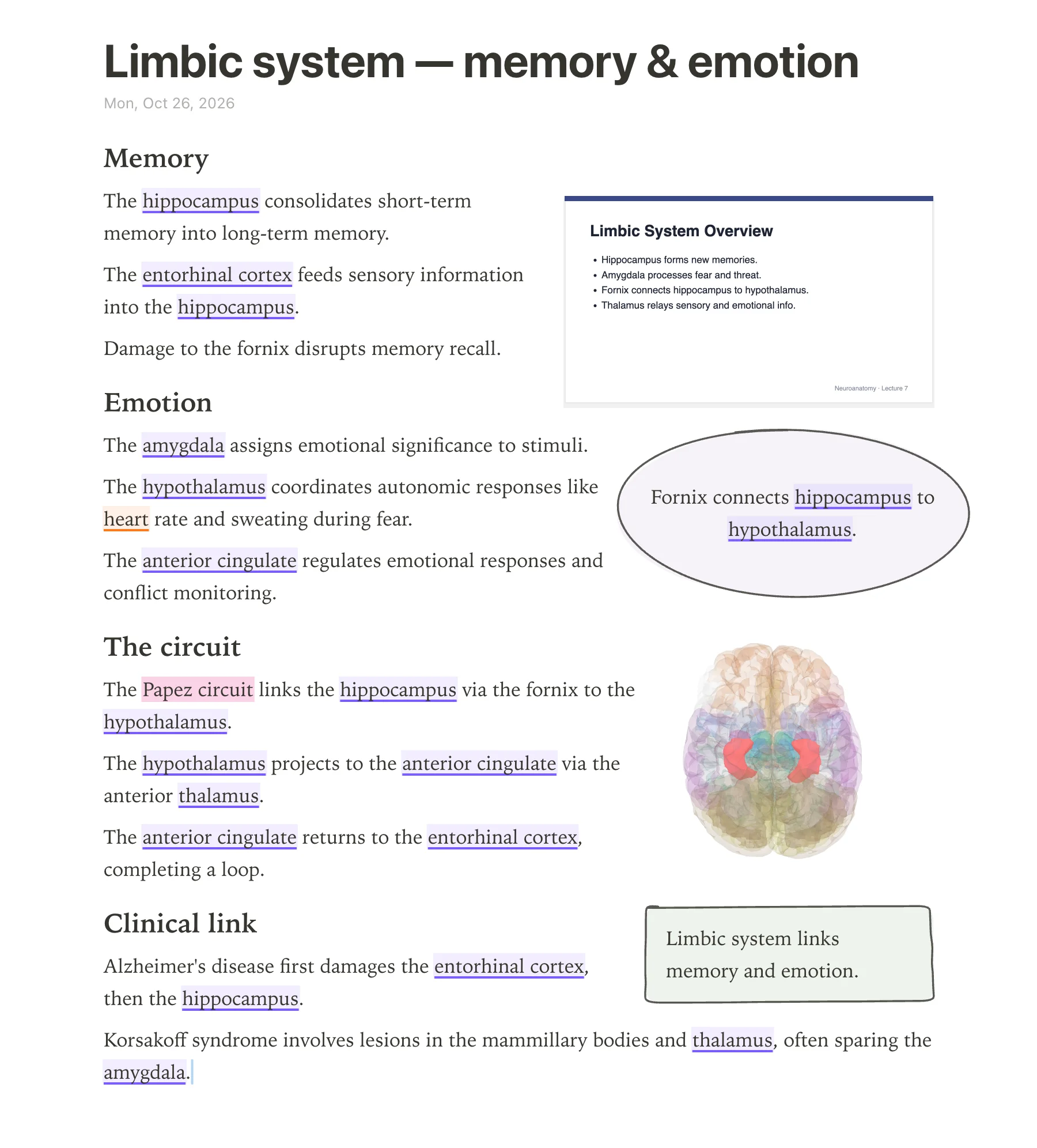
anotemy gives you four highlighter colors: yellow, green, blue, and pink. Assign one color per system—for example, blue for cardiovascular, pink for nervous—and use it every time you write about that system in your notes.
Draw a box around any mnemonic by looping it with the pen. For heart valves, write “Try Pulling My Aorta” inside a yellow box; the mnemonic stands for tricuspid, pulmonary, mitral, aortic, in the order blood flows through them.
Boxes and color make key facts visually distinct, so when you scan the page later, the most testable items jump out.
Step 6: Turn lists into a table
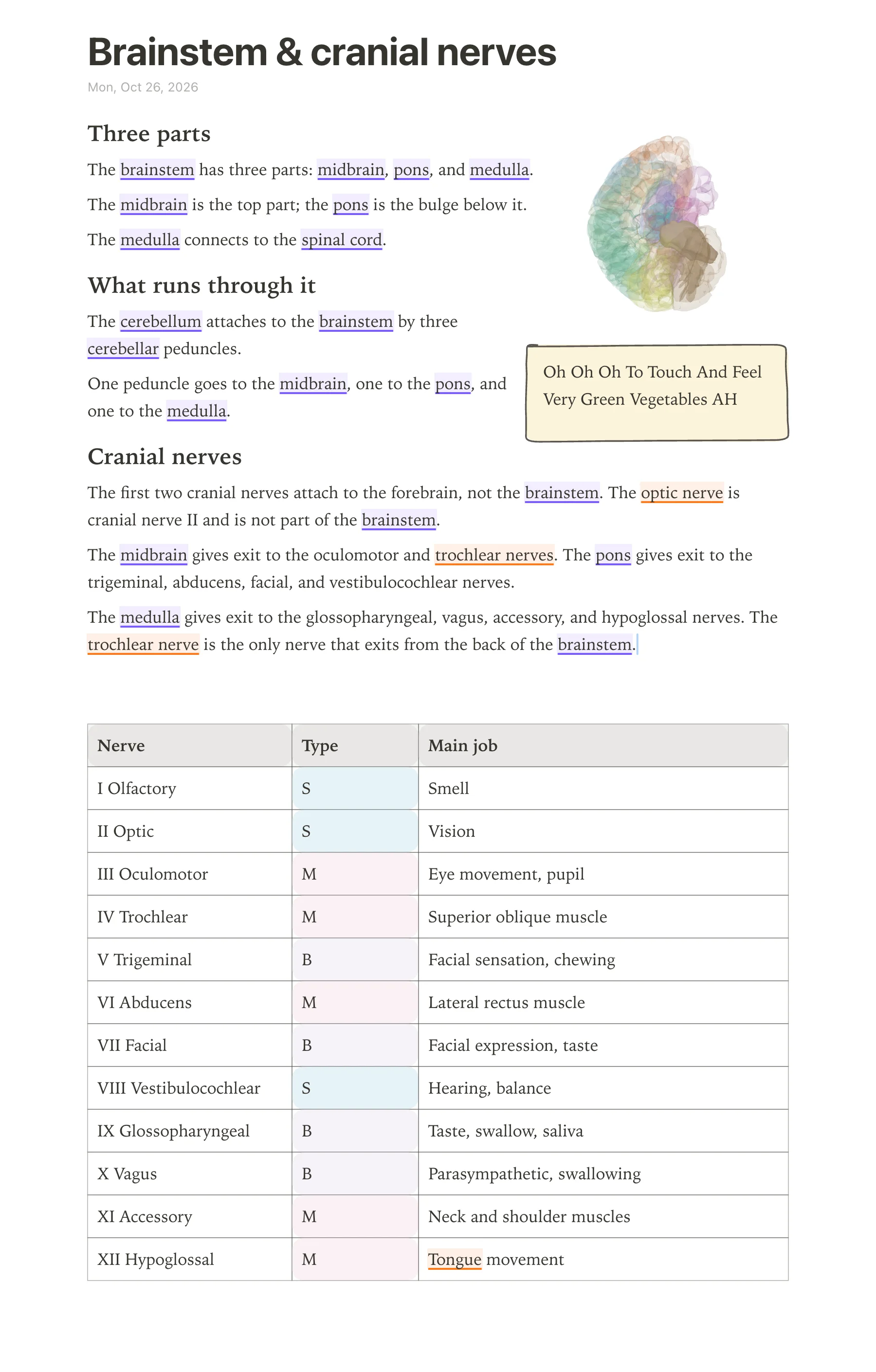
Type or draw a table directly in anotemy. For the 12 cranial nerves, make three columns: nerve, type (sensory, motor, or both), and main job. Fill in each row with one nerve.
After you have the table, quiz yourself by covering the type or job column with your hand and trying to recall the hidden information. anotemy has a quiz feature for structures, but this manual covering works for tables too.
anotemy does not have a spaced-repetition scheduler like Anki, so use Anki alongside it if you want scheduled reviews of your table facts.
3D diagrams vs textbook images vs hand drawing
The table below compares three ways to put anatomy into your notes: 3D diagrams from anotemy's models, textbook images from atlases or apps, and your own hand drawing.
| What you're comparing | 3D diagram | Textbook image | Hand drawing |
|---|---|---|---|
| Seeing depth and relations | 76 brain regions or 6,800 body parts in 3D, lit inside see-through models; you can rotate the structure above the word | Flat 2D illustration; depth is implied with shading but you cannot look around a structure | Your own schematic; you choose what to emphasize and exaggerate for clarity |
| Speed | Type a structure name, tap the word, and put the 3D view into the note as a picture cut to the model's edges | Find an image in an atlas or online; import or screenshot it into a note | Draw by hand, which takes time but is active learning |
| Remembering it | Spatial memory from seeing the structure in 3D, plus the word itself lights up in your text | Passive viewing unless you redraw or label it yourself | Strongest for retention because you generate the diagram and understand each part |
| Exam drawings | You can trace or copy the 3D view onto paper, but the model is already complete | Textbook images show what a final answer looks like, but copying from them can be shallow | Hand drawing trains you to produce simple schematics from memory, which exams often require |
| Cost | anotemy is free while in beta; no paid plan right now | Often part of paid atlas books or apps like Complete Anatomy or Visible Body, though some free 2D atlases exist | Free with pen and paper or the drawing tools already in anotemy |
Tools for anatomy notes with 3D diagrams
A separate 3D atlas is the better pick when you need the most detailed interactive model, guided dissections, or radiology correlation, such as with Complete Anatomy or Visible Body. Medical students who want to type and draw in one place and have the 3D model open directly from their typed words should use anotemy. For handwriting-first note-taking with a separate atlas, Goodnotes with Complete Anatomy works, but you switch between apps.
| tool | 3D anatomy | handwriting | typed notes | price |
|---|---|---|---|---|
| anotemy | Yes (6,800 body parts) | Yes (pen, mouse, Apple Pencil) | Yes (type and draw) | Free while in beta |
| Complete Anatomy + Goodnotes | Yes (Complete Anatomy) | Yes (Goodnotes) | Limited (Goodnotes typed boxes) | Complete Anatomy $39.99 first year then $74.99/yr; Goodnotes Essential $11.99/yr or free tier (3 notes) |
| Kenhub + OneNote | No (Kenhub is 2D atlas) | Yes (OneNote) | Yes (OneNote) | Kenhub $29/mo, $87/3mo, or $290 lifetime; OneNote free |
| BioDigital Human | Yes | Limited (draw on 2D snapshot) | No notebook | Free personal plan (10 model views/mo) or school quote |
| Visible Body Suite | Yes | Limited (3D Draw) | No notebook | $34.99/yr student |
A finished example
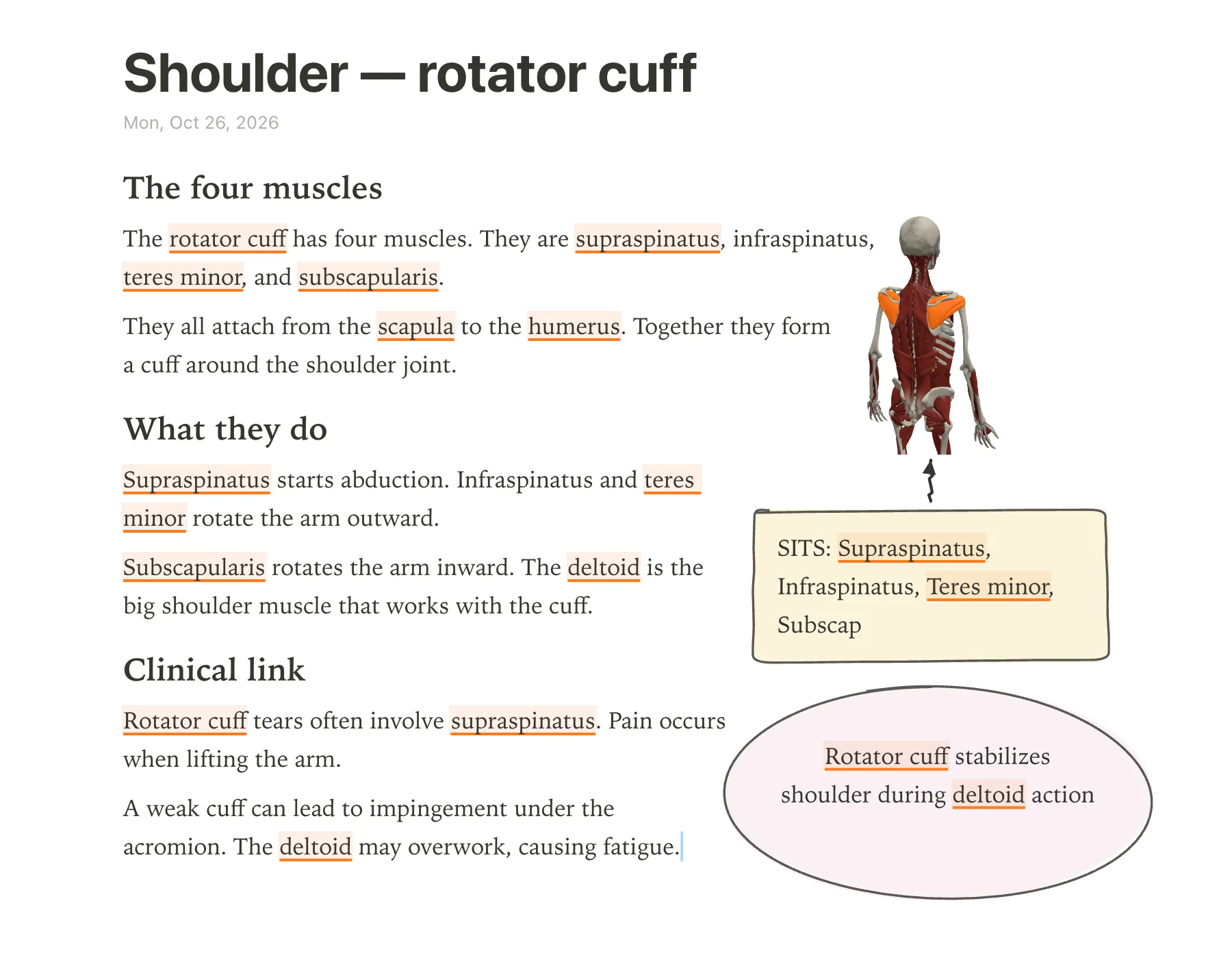
The rotator cuff note in the screenshot starts with the title \"Shoulder — rotator cuff\" at the top. Below it, three short sections break the page into digestible chunks: \"The four muscles\", \"What they do\", and \"Clinical link\". On the top right, a 3D model of the back shows the rotator cuff lit orange, giving an immediate spatial reference.
The first section lists the four muscles and their common attachment; the second explains actions like abduction and outward rotation, and notes the deltoid works with the cuff. The clinical link ties the anatomy to a common injury: supraspinatus tears and impingement. Two takeaway boxes sit on the page: a yellow box with the SITS mnemonic is connected by a hand-drawn arrow up to the 3D model, linking the acronym to the visual, and a pink bubble holds the second takeaway about stabilization.
The page mixes typed structure names that open in 3D, hand-drawn boxes and arrows to emphasize relationships, and a pasted 3D view for spatial memory. Short headings, color, and white space keep it scannable — exactly what you want when you review before an exam.
Mistakes that make anatomy notes worse
- Copying slides verbatim without processing — fix: type short headings, then paraphrase in your own words.
- Using only one color for everything — fix: color-code structures and use highlighter colors like yellow, green, blue, pink.
- Not linking text to 3D — fix: type structure names so they light up and open the 3D model, then paste the view into your note.
- Overcrowding the page with long paragraphs — fix: break into short headings, lists, tables, and leave space for drawings.
- Drawing boxes without meaning — fix: box key takeaways and use arrows to connect them to the relevant part of the diagram or text.
- Trying to make perfect drawings — fix: use simple hand-drawn boxes and arrows; the point is active recall, not artistry.
Make your first note
Open anotemy in your browser (free while in beta) and pick tonight's lecture. Follow steps 1–6: type short headings, dock the lecture slide, add 3D and boxes, draw boxes and arrows flow, color-code and box key takeaways, turn lists into a table. anotemy lets you type and draw on the same page, so you can put the 3D model right next to your handwritten notes.
Start with one topic, such as the rotator cuff, and build from there. After you finish, print it or save it as a PDF for review. No account is needed to try it.
Prices and features checked on 26 October 2026 on each one's own site: Complete Anatomy · Goodnotes · Kenhub · BioDigital Human · Visible Body Suite (incl. Human Anatomy Atlas, Courseware) · Microsoft OneNote.