 anotemy
Sign in
Try it free
anotemy
Sign in
Try it free
anotemy vs Anki for Medical and Anatomy Students
anotemy is a 3D anatomy note-taking web app for medical students who learn by writing and visualizing structures; Anki is a spaced-repetition flashcard system built for heavy memorization. They complement each other: use anotemy for notes and Anki for review.
We make anotemy; the facts about Anki come from its own pages, read on 2026-10-26. Prices may change.
Side by side
| What you're comparing | anotemy | Anki |
|---|---|---|
| Platforms | Runs in a modern browser on laptop or desktop, and on iPad (Apple Pencil draws, finger scrolls). No native iPhone or Android app. | Desktop (Windows 10+ x64, Windows 11 ARM, macOS 13+ Apple Silicon and Intel, Linux), AnkiMobile (paid iOS/iPadOS), AnkiDroid (free Android), AnkiWeb (browser). |
| Price (free tier and paid) | Free while in beta; no paid plan yet. | Desktop, AnkiDroid, and AnkiWeb are free with no feature tiers. Only iPhone/iPad needs AnkiMobile, a one-time $24.99 purchase. |
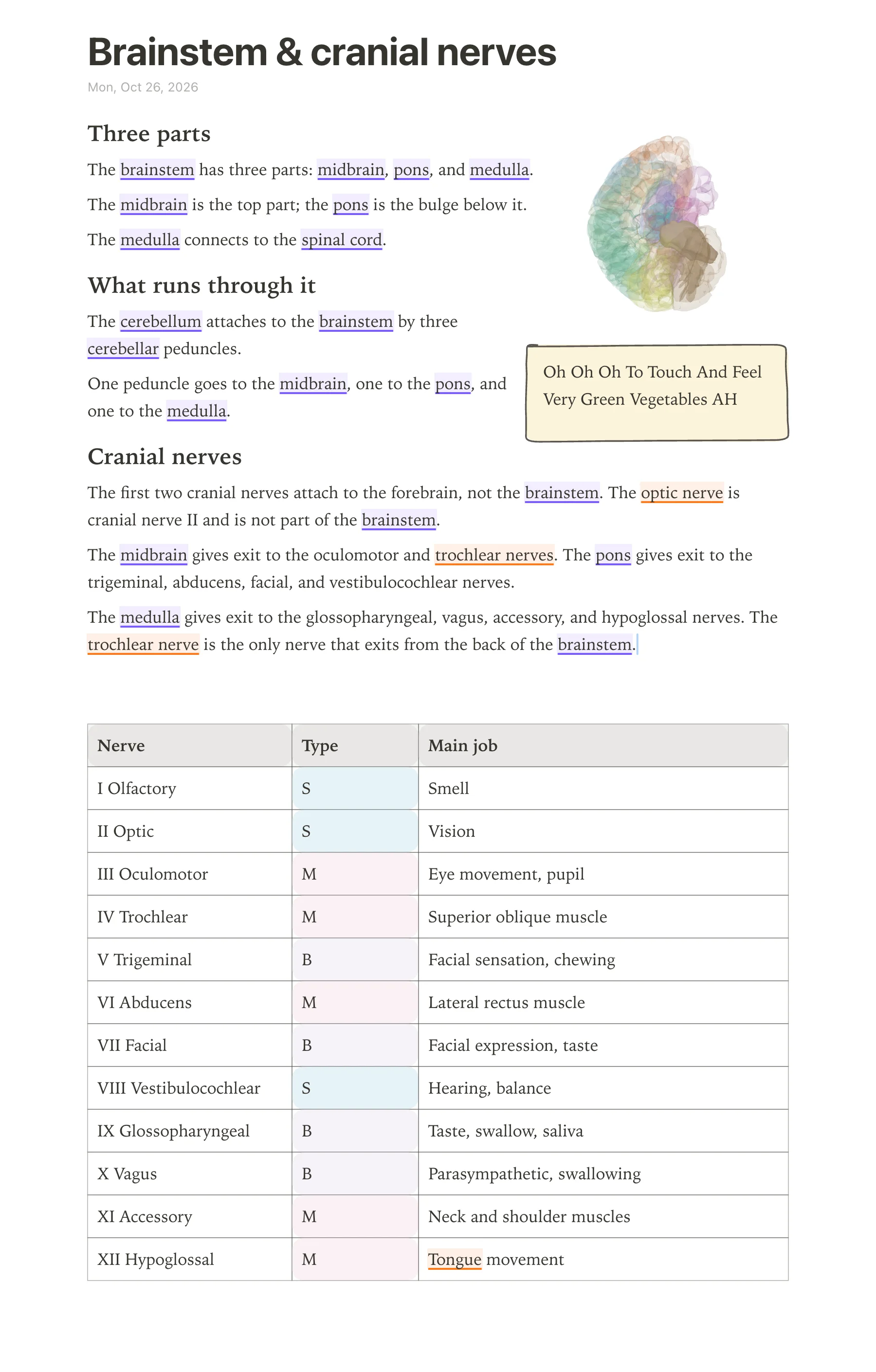
| Handwriting | Draw with pen, mouse, or Apple Pencil; hand-drawn boxes, circles, arrows, tables, headings, lists, and four highlighter colors (yellow, green, blue, pink). | No handwritten notes. AnkiMobile has a review-time scratchpad (pressure-sensitive with Apple Pencil; undo per stroke or clear all) and, on iPad only, drawing an image to attach to a card. AnkiDroid has a whiteboard during review. Desktop: none. |
| Typed notes | Type a structure's name and the word itself lights up in the text: brain structures underlined in violet, body structures in orange. Tap the word to open that structure in 3D. | Card-field editor with rich text/HTML, MathJax/LaTeX, media, custom templates/CSS. Built for writing flashcards, not long-form notes. |
| PDF and slides | Drop lecture slides in as a PDF (PowerPoint: save as PDF for now): they wait in a rail beside the page and go anywhere in the note, and the text reflows around them. | No PDF or slide viewer/annotation; images and media can be put on cards, and add-ons exist (third-party). |
| 3D anatomy | 76 brain regions in 3D, each lit inside a see-through brain; 6,800 body parts in 3D (muscles, bones, organs, vessels, nerves), opened from the tapped word. Put a 3D view into the note as a picture cut to the model's edges. | No built-in 3D anatomy models. |
| Flashcards or quizzes | Quiz: one tap on a structure gives quick questions about it. No spaced-repetition scheduler. | Core purpose. Default legacy SM-2 scheduler; FSRS is a built-in opt-in (desired retention default 90%), supported on Anki/AnkiMobile 23.10+, AnkiWeb, AnkiDroid 2.17+. Native image occlusion, cloze, basic/reversed, type-in answers, filtered decks, add-ons, large shared-deck library. |
| Sync across devices | Start writing without an account; sign in with Google or Apple to keep notes and sync them to every device. | Local-first: collection lives on each device and works fully offline; optional free AnkiWeb sync (manual or automatic), or self-hosted sync server. |
Where Anki is better
- Anki's spaced repetition engine (SM-2 or built-in FSRS) is designed for heavy, long-term memorization of facts, which suits medical exam prep.
- Anki has a huge library of shared decks and community add-ons, so you can often find pre-made cards for your course.
- Anki is free and open source on desktop, Android, and AnkiWeb; only the iOS/iPadOS app costs $24.99 one-time.
- Anki works fully offline on each device with local collection files, then syncs when you choose (or automatically).
- Anki lets you create custom card templates with HTML/CSS, MathJax, and media, giving precise control over card appearance and behavior.
Where anotemy is better
anotemy is built specifically for anatomy note-taking, so it handles spatial and visual material that Anki does not. Anki is a flashcard app with no 3D anatomy viewer and no long-form note editor.
anotemy runs in a modern browser on a laptop or desktop, and on iPad, where Apple Pencil draws and a finger scrolls. There is no native iPhone or Android app, so you need a browser on mobile. You can start writing without an account, but sign in with Google or Apple to keep notes and sync them to every device.
Anki does none of this: its handwriting is limited to a review-time scratchpad, and it has no PDF slide viewer or 3D model support. Anki also lacks a built-in anatomy model, so you cannot see a 3D structure from a flashcard.
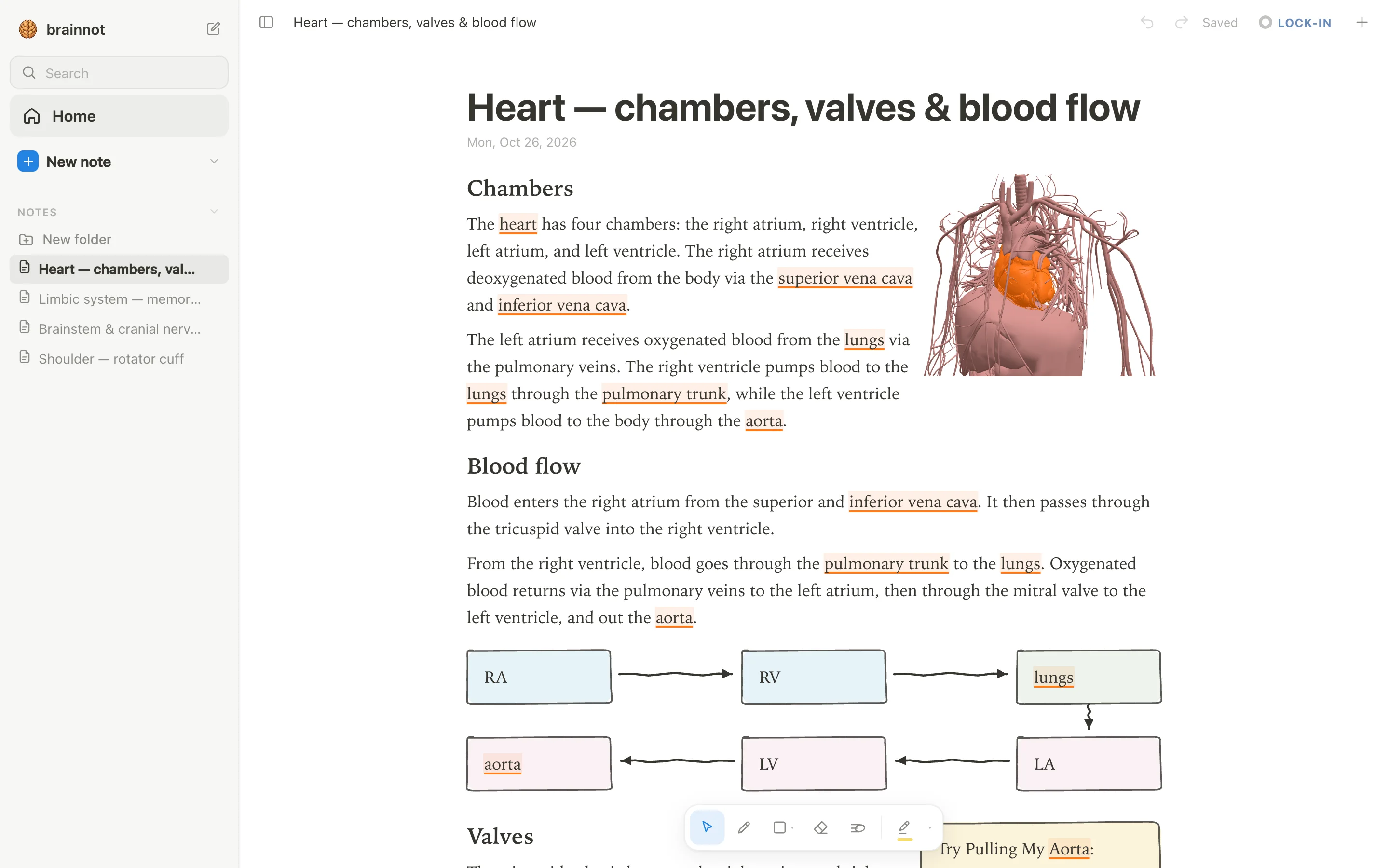
- Type a structure's name, like \"hippocampus\" or \"heart\", and the word itself lights up: brain structures underlined in violet, body structures in orange. Tap the word to open that structure in 3D right above the word, so you see it while you read.
- Add a 3D view into your note as a picture cut to the model's edges, and the text flows around it. You can do this for 76 brain regions and 6,800 body parts, from the brainstem to the rotator cuff.
- Draw with a pen, mouse, or Apple Pencil; loop a takeaway and it becomes a box, and the text makes room for whatever you draw. Hand-drawn boxes, circles, arrows, tables, headings, lists, and four highlighter colors (yellow, green, blue, pink) are supported.
- Drop lecture slides in as a PDF; PowerPoint needs to be saved as PDF for now. They wait in a rail beside the page and go anywhere in the note, with text reflowing around them, keeping your lecture material next to your notes.
- Get quick quiz questions with one tap on a structure, and print your note on A4 with ⌘P. The print view is a clean A4 layout for study sheets.
Using both together
anotemy and Anki serve different jobs, so using both side by side works well. anotemy helps you build spatial understanding and write clear notes with 3D views, drawings, and PDF slides. Anki then handles long-term memorization with spaced repetition, so you can review the facts you learned.
For example, you might take notes in anotemy during a lecture, adding a 3D heart or hippocampus and drawing around key points. Later, you make Anki cards from those notes for daily review, using Anki's Cloze deletion or basic cards to test recall. anotemy's quiz questions are useful for a quick check, but they are not a spaced-repetition scheduler like Anki's, so Anki is still the tool for retention.
Cost is not a barrier for most: Anki's desktop and Android apps are free, and AnkiWeb sync is free. AnkiMobile for iPhone or iPad costs $24.99 one-time; that purchase funds Anki's development. anotemy is free while in beta, so you can start with anotemy for notes and add Anki when you need to drill facts.
Which should you choose?
If you are a medical or anatomy student who needs to see structures in 3D while taking notes, choose anotemy. It puts 3D models into your written notes, supports drawing and PDF slides, and helps you connect words to anatomy. You won't get spaced repetition, but you'll get a note-taking workspace tailored to the subject, with quick quiz questions that do not schedule reviews.
If your priority is memorizing a huge volume of facts for exams and you already use flashcards, choose Anki. It is a mature spaced-repetition engine with free desktop and Android apps, a large shared-deck library, and scheduling features like FSRS. But it has no 3D anatomy viewer and no long-form note editor; you'll need another tool for notes.
If you want both, use anotemy for understanding and Anki for recall. Write notes with 3D in anotemy, then turn the key points into Anki cards using Cloze deletions or basic cards. That combination gives you spatial context while you learn and long-term retention when you review.
Prices and features checked on 26 October 2026 on each one's own site: Anki (desktop) + AnkiWeb + AnkiMobile + AnkiDroid.