 anotemy
Sign in
Try it free
anotemy
Sign in
Try it free
Best apps for neuroscience notes: 6 apps compared
There is no single winner: Goodnotes is the strongest handwriting-first pick on iPad, and anotemy is built for typed neuroscience notes where brain terms open 3D models and lecture slides sit beside the page.
We make anotemy; the facts about the other apps come from their own pages, read on 2026-10-26, and prices change.
How we picked
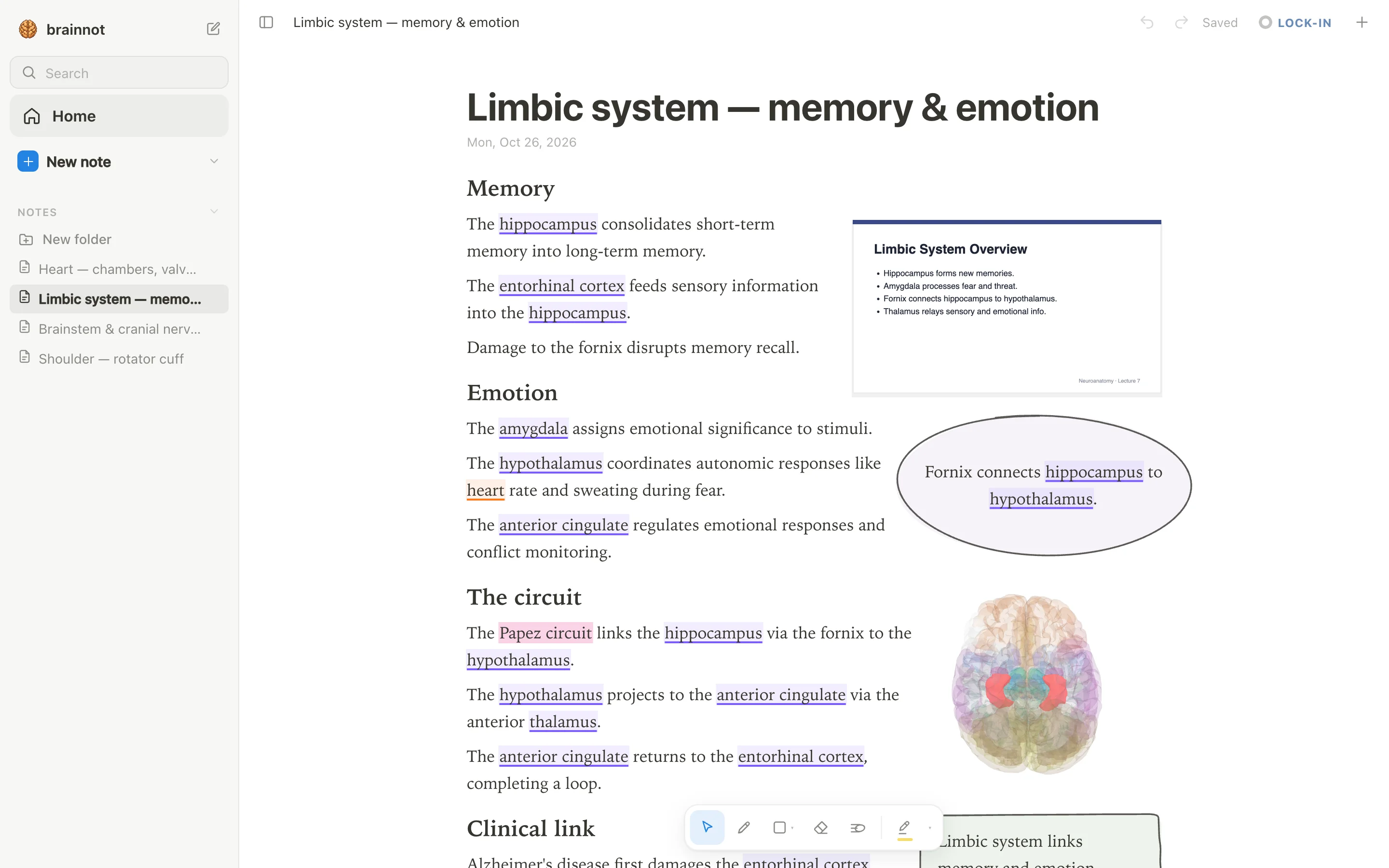
Neuroscience notes carry more than text: named brain regions, pathways you redraw from memory, lecture slides, and facts you need to recall weeks later. A note app for this course has to hold three things at once — 3D brain structure, diagrams you draw yourself, and slides that stay next to the notes.
We compared six apps — anotemy, Goodnotes, Notability, OneNote, MyScript Notes and RemNote — from each company's own pages, read on 2026-10-26. We make anotemy, so we have a stake in the answer; every app below is judged on the same points, and anotemy's gaps are listed beside its strengths.
- Whether a brain region can be seen in 3D from inside the note, not just described in words.
- Room for pathway diagrams you draw by hand: arrows, loops, boxes and labels around a slide.
- How lecture slides arrive, and whether they stay visible while you write.
- Whether the app helps you test yourself later, with questions, flashcards or spaced repetition.
- Price and the free plan's main limit, stated plainly.
- Pen and platform support: iPad and Apple Pencil, a laptop, or both.
1. anotemy — best for typed notes that open 3D brain structures
anotemy is an anatomy note-taking web app for medical, nursing, PA, PT, dental and neuroscience students, and it is the one we make. It is best for typed neuroscience notes where the words do work: type hippocampus and the word itself lights up, then tap it to open that structure in 3D right above the word. Pick it if your lecture notes are typed, your slides are PDFs, and your pathway diagrams are drawn by hand where a 3D model cannot help.
Price: free while in beta. It runs in a modern browser on a laptop or desktop, and on iPad where Apple Pencil draws and a finger scrolls; there is no native iPhone or Android app. You can start writing without an account, then sign in with Google or Apple to keep notes and sync them to every device.
- Good: 76 brain regions in 3D, each lit inside a see-through brain and opened from the word you typed.
- Good: lecture slides drop in as a PDF and wait in a rail beside the page, so a pathway diagram sits next to the slide that explains it.
- Good: draw with a pen, mouse or Apple Pencil; loop a takeaway and it becomes a box, and the text makes room for the drawing.
- Good: tap a recognized structure for quick questions about it, which covers about 140 common structures.
- Watch out: only recognized words light up — most cranial nerve names are not among them, and the brachial plexus is not in the 3D library, so you draw those.
- Watch out: no handwriting-to-text, no lecture audio recording and no spaced-repetition scheduler, so pair it with Anki for recall.
2. Goodnotes — best for handwriting-first neuroscience notes on iPad
Goodnotes is the handwriting-first option, and the best fit if you write your neuroscience notes by hand on an iPad and want polished ink over imported lecture slides. Typed text boxes exist, so typed labels beside a hand-drawn diagram work, and Study Sets add flashcards, Practice Mode and spaced repetition.
The free plan is free forever but limited to 3 files total across notebooks, whiteboards and text documents, with 100MB of storage and watermarked exports; Essential is $11.99 a year and lifts the file cap. iPad, iPhone and Mac are the flagship platforms (iOS/iPadOS 18.6+, macOS 15.6+), and Android, Windows and web versions exist — though Goodnotes' own Windows page says they do not offer the full Goodnotes 6 iPad feature set.
- Good: strong Apple Pencil ink and handwriting search, so handwritten words can be found again later.
- Good: imports PDFs and images on every platform, and PowerPoint on iOS/iPadOS, where it is converted to PDF and the layout may shift.
- Good: Study Sets take typed, image or handwritten cards and add Practice Mode and Smart Learn spaced repetition, with Anki and Quizlet import.
- Watch out: the free plan stops at 3 files total, so one neuroscience notebook and two annotated slide decks use it up.
- Watch out: no 3D anatomy, so a brain region cannot be opened and rotated inside the note.
- Watch out: cross-platform Goodnotes Cloud sync needs Pro at $35.99 a year, and handwriting-to-text conversion is not available on Windows.
3. Notability — best for audio-synced lecture notes
Notability is the pick when you want your handwriting synced to the lecture audio, so a line you scribbled during a pathways diagram sits with the recording. It is a handwriting-first app: ink comes first, and typing mixes in on the same page as basic rich text. Pick it if you record lectures and want AI quizzes and flashcards built from your notes and recordings.
It runs on iPad, iPhone, Mac, Windows, Android and the web, with Android released in August 2026 and a Windows desktop installer available from the vendor. The free Starter tier keeps 5 notes with 7-day version history and all editing tools, including PDF import. Paid tiers are Lite at $14.99 a year, Plus at $19.99 a year, Pro at $99.99 a year and Classic at $49.99 as a one-time purchase; a site-wide 20% off promotion is running now, so the lower prices you may see are sale prices. The free tier has no AI features at all.
There is no 3D anatomy of any kind, so brain regions and pathways stay as your own drawings and imported slide images.
- Good: audio recording is synced to your handwritten notes, which suits recorded neuroscience lectures.
- Good: Learn generates AI summaries, quizzes and flashcards from notes, PDFs and recordings on Plus (limited) and Pro (unlimited).
- Good: PDF, DOC, presentation and image import with annotation, plus a presentation mode with laser pointer.
- Watch out: the free Starter tier stops at 5 notes, and AI needs Plus or Pro.
- Watch out: handwriting recognition and math-to-LaTeX conversion are there, but the new Windows desktop app's pen support is unverified.
- Watch out: there is no 3D model of a brain region or pathway, so structural diagrams come from your own ink or imported slides.
4. OneNote — best for a free typed notebook on every device
OneNote is the safest free choice for typed neuroscience notes that need to sync across a laptop, a lab PC and a phone. Pick it if you already live in Microsoft 365 or Teams, want free-form pages with text containers, tables and tags, and treat handwriting as a secondary input rather than the main event.
The app itself is free on Windows, Mac, iPad, iPhone, Android and in the browser with a free Microsoft account; the main limit is that notebooks live on OneDrive, so free OneDrive storage applies. Copilot inside OneNote needs a Microsoft 365 plan, starting at $9.99 a month or $99.99 a year for Personal, and the Copilot pricing page lists OneNote as web and mobile only. Microsoft says college students can save 50% on Microsoft 365 with a verified college email.
Inking is solid on Windows, iPad and Android, and Ink to Text exists on Windows, but Macs draw with a mouse or trackpad and do not convert handwriting to text. PDFs are inserted as page images you can ink over, not as editable documents.
- Good: genuinely free on every major platform, with full editing in the browser and no install needed.
- Good: typed notes are the main mode, with rich text, tables, tags and Office-style formatting.
- Good: syncs through OneDrive and merges offline edits when you reconnect.
- Watch out: no ink-to-text on Mac, and no native PDF annotation beyond inking over page images.
- Watch out: Copilot and its study tools require a paid Microsoft 365 plan, and consumer access to the Study Guide flashcards is unverified.
- Watch out: no built-in anatomy models or spaced repetition, and free-form containers can make layouts messy.
5. MyScript Notes — best for turning handwriting into typed text
MyScript Notes (formerly Nebo) is the pick if you handwrite everything and want it converted cleanly: handwriting recognition in 66 languages, math to LaTeX, and rough diagrams snapped into shapes. It also has a mode where handwritten text reflows on a responsive page, which helps when a lecture adds a step to a pathway halfway through.
It runs on iPad, iPhone, Mac with M1 or later, Android and Chromebooks, and on Windows 10 and 11 through the older Nebo app, which stays functional but gets no new features. There is no web app. After a 7-day full trial, a limited free version has no cloud sync and no AI features; paid plans are subscriptions or a lifetime purchase sold only through the App Store and Google Play, and MyScript does not publish prices on its site because they vary by region and store.
PDF import and annotation are paid features, so a free user cannot mark up lecture slides.
- Good: best-in-class handwriting recognition that converts ink to searchable, editable typed text.
- Good: mix writing, typing and dictation in the same document, with scratch-to-erase and formatting gestures.
- Good: import several PDFs at once and annotate with the pen, keeping annotations editable and searchable.
- Watch out: the free version is capped at five pages per notebook with no sync or AI.
- Watch out: no flashcards, and no 3D anatomy models for brain regions or body structures.
- Watch out: AI features such as Chat and study sets are iOS only and need an internet connection.
6. RemNote — best for notes plus spaced repetition
RemNote is the pick if your neuroscience notes need to become flashcards you actually review. Notes are written as an outline of bullets, and you turn any bullet into a spaced-repetition card inline, with Anki .apkg import and an exam scheduler. Pick it if you already study with Anki or Quizlet and want the notes and the review in one place.
It runs on Windows, macOS, Linux, iPad, iPhone, Android and the web. The free tier has unlimited notes and flashcards across synced devices, capped at 3 annotated PDFs or files, 5 image-occlusion images, 1 handwritten document and 250 AI credits a month. Pro is $96 a year or $10 a month, and Pro with AI is $216 a year or $20 a month; enrolled students, faculty and staff get 25% off Pro only, not the AI portion.
Annotation is built into a PDF and web reader with multi-color highlights and freehand drawing, and clicking a sentence can make a card from it, which suits dense pathway papers and slide handouts.
- Good: spaced repetition is built in, with cards made inline from your notes and Anki .apkg import.
- Good: PDF reader with highlights, drawings and notes linked to highlights, unlimited on Pro.
- Good: AI flashcards, quizzes and summaries from text, PDF, PowerPoint and YouTube, metered by credits.
- Watch out: the free tier caps you at 3 annotated documents and 1 handwritten document.
- Watch out: 250 AI credits a month on free, 1,000 on Pro; heavy AI users need Pro with AI.
- Watch out: no 3D anatomy, and RemNote Pro is $10/month billed monthly (1,000 AI credits a month).
Side-by-side comparison
anotemy is the only app here that opens a brain structure in 3D from a word you type. Goodnotes, Notability and MyScript Notes are ink-first, OneNote is typed-first with ink as a second input, and RemNote builds flashcards into an outline.
Free tiers differ sharply, so read the price column before you commit a semester's notes to an app. Nothing in the table below is a trial length except where the app itself says so.
| App | Handwriting | 3D brain | Diagrams | Flashcards | Price |
|---|---|---|---|---|---|
| anotemy | Yes — pen, mouse or Apple Pencil | Yes — 76 brain regions, plus 6,800 body parts | Yes — boxes, circles, arrows, tables, plus a 3D view placed as a picture | No scheduler; tap a structure for a quiz (about 140 have questions) | Free while in beta |
| Goodnotes | Yes — pressure and tilt with Apple Pencil | No | Yes — freehand ink | Yes — Study Sets; help center suggests Apple-only | Free: 3 files total; Essential $11.99/year |
| Notability | Yes — stylus ink on iPad and Android | No | Yes — freehand ink | Yes — AI Learn cards, plus an Anki importer (TXT, CSV, APKG) or typed lists | Free: 5 notes; Lite $14.99/year |
| OneNote | Yes — plus Ink to Text on Windows | No | Yes — ink over a page | Limited — Copilot Study Guide cards; consumer availability unverified | Free with a Microsoft account; OneDrive storage applies |
| MyScript Notes | Yes — converts ink to typed text and math | No | Yes — rough drawings convert to shapes | No — AI quiz only, no deck | Free version capped; paid plans sold through app stores, prices vary by region |
| RemNote | Yes — handwritten documents and inline drawings | No | Yes — inline drawings in a bullet | Yes — built-in spaced repetition, Anki .apkg import | Free: 3 annotated PDFs; Pro $96/year |
Which one should you pick?
**Brain regions in 3D.** Pick anotemy. Type hippocampus, amygdala, hypothalamus, thalamus, brainstem, cerebellum, basal ganglia, corpus callosum or spinal cord and the word lights violet; tap it and the structure turns in 3D above the line you typed. It knows 76 brain regions, so a pathway that runs through most cranial nerves, or through the brachial plexus and its nerves, is still yours to draw by hand.
**Drawing pathways by hand.** Goodnotes is the safe iPad choice: ink is the main event and PDF slides import for markup. Notability does the same and adds audio synced to handwriting, which suits a lecture you will replay. If you want the drawing beside a 3D structure, anotemy's pen works with mouse, pen or Apple Pencil and the text reflows around what you draw.
**Handwriting to text.** MyScript Notes is the strongest converter: ink becomes typed text and math in 66 languages, and rough diagrams become shapes, though the free version is limited after a 7-day trial. Goodnotes converts handwriting on iPad, iPhone, Mac, Android and web but not on Windows. OneNote keeps Ink to Text on Windows only.
**Flashcards in your notes.** RemNote fits best — cards are written inline as bullets, spaced repetition is built in, and Anki .apkg files import; the free plan caps annotated PDFs at 3. Notability's Learn suite generates cards from your notes, and its separate importer adds Again/Hard/Good/Easy scheduling. anotemy quizzes the structure you tap but has no scheduler, so use Anki alongside it. Goodnotes Study Sets appear to be Apple-only.
Prices and features checked on 26 October 2026 on each one's own site: Goodnotes · Notability · Microsoft OneNote · MyScript Notes (formerly Nebo) · RemNote.