 anotemy
Sign in
Try it free
anotemy
Sign in
Try it free
Best note-taking apps for PA school: iPad picks for 2026
For most PA students on an iPad, Goodnotes is the safest handwriting-first pick for slide markup; Notability is stronger if you record lectures and want audio tied to notes. anotemy is the anatomy-focused browser app we make, with 3D structures opened from typed words and a free beta.
We make anotemy; the facts about the other apps come from their own pages, read on 2026-10-26, and prices change.
How we picked
PA school puts unusual pressure on a note app: you type fast in lecture, drop slides beside your notes, switch to Apple Pencil for anatomy, and still need the material back for recall. For a physician assistant student on an iPad, a good app keeps those jobs close together instead of scattering them across four tools.
We compared six apps — Goodnotes, Notability, anotemy, OneNote, RemNote and Anki — from their own pages, read on 2026-10-26. We make anotemy, so treat that as a disclosed interest; it runs in the iPad's browser, where Apple Pencil draws and a finger scrolls.
- Speed in lecture: typed notes, slide drops and pen marks should not make you fight the page.
- Slides: PA school lectures arrive as PDFs and PowerPoint files, so importing and placing them matters.
- Anatomy: 3D structures or clean diagrams help, but only if they sit beside the note you are writing.
- Recall: built-in flashcards, spaced repetition or a reliable export to Anki.
- iPad behavior: Apple Pencil drawing and finger scrolling should feel natural, not bolted on.
- Clear limits: a free plan's file cap, export watermark or AI cap should be visible before you commit.
1. Goodnotes — best for handwriting-first iPad note-taking
Goodnotes is best for handwriting-first students on iPad who want polished ink, PDF markup and built-in spaced-repetition flashcards, with lighter cross-platform needs. Pick it if your PA school day is mostly pen on slides and you like Study Sets for recall.
Goodnotes runs on iPad, iPhone, Mac, Android, Windows and web. The Apple apps are the flagship; Goodnotes' own Windows page says Windows does not offer the full Goodnotes 6 iPad feature set. The free tier is free forever, but its main limit is 3 files total across notebooks, whiteboards and text documents; Essential is $11.99 a year and Pro is $35.99 a year at regular price.
- Good: handwriting is the core feature, with Apple Pencil pressure and tilt on iPad.
- Good: Study Sets add flashcards, Practice Mode and Smart Learn for spaced repetition.
- Good: PDF and image import are supported everywhere; Word and PowerPoint import only on iOS/iPadOS and may shift layout.
- Watch out: the free tier caps you at 3 files total and watermarks exports.
- Watch out: there is no 3D anatomy, and Goodnotes Cloud cross-platform sync needs Pro.
2. Notability — best for lecture recording and audio-synced notes
Notability is best for PA school students who record lectures and want audio synced to handwritten notes, plus AI quizzes and flashcards from their material. Pick it if you want one app for pen notes, PDF markup and lecture audio, and you accept that the strongest AI features sit on paid tiers.
Notability runs on Mac, Windows, iPad, iPhone, Android and web; its Android app launched natively in August 2026, and its Windows desktop app is newer. Starter is free with 5 free notes. Lite is $14.99 a year at regular price (a 20% sale is on), Plus is $19.99 a year regular and Pro is $99.99 a year regular.
- Good: audio recording is tied to your handwritten notes, so you can revisit the lecture moment.
- Good: Learn builds AI flashcards, quizzes, fill-in-the-blank and summaries from notes, PDFs or recordings; Plus is limited, Pro is unlimited.
- Good: typing and handwriting can mix on one page, and PDFs, DOCs, presentations and images can be imported.
- Watch out: the free Starter plan stops at 5 free notes, and AI needs Plus or Pro.
- Watch out: there is no 3D anatomy library.
- Watch out: Windows desktop app maturity is unclear; Notability's Cloud FAQ lists iOS, Android, Mac and web, not Windows.
3. anotemy — best for typed anatomy notes that open in 3D
anotemy is the pick for PA students who type anatomy notes and want the structures they name to open as 3D models. It is an anatomy note-taking web app for medical, nursing, PA, PT, dental and neuroscience students. We make anotemy, so weigh that when you read this section.
Pick it if your didactic year is heavy on anatomy words you need to see in space, such as brainstem, hippocampus, heart or aorta, and you work on a laptop or iPad. It is free while in beta. The main catch for a phone-first student is the platform: it runs in a modern browser on a laptop or desktop, and on iPad, where Apple Pencil draws and a finger scrolls; there is no native iPhone or Android app.
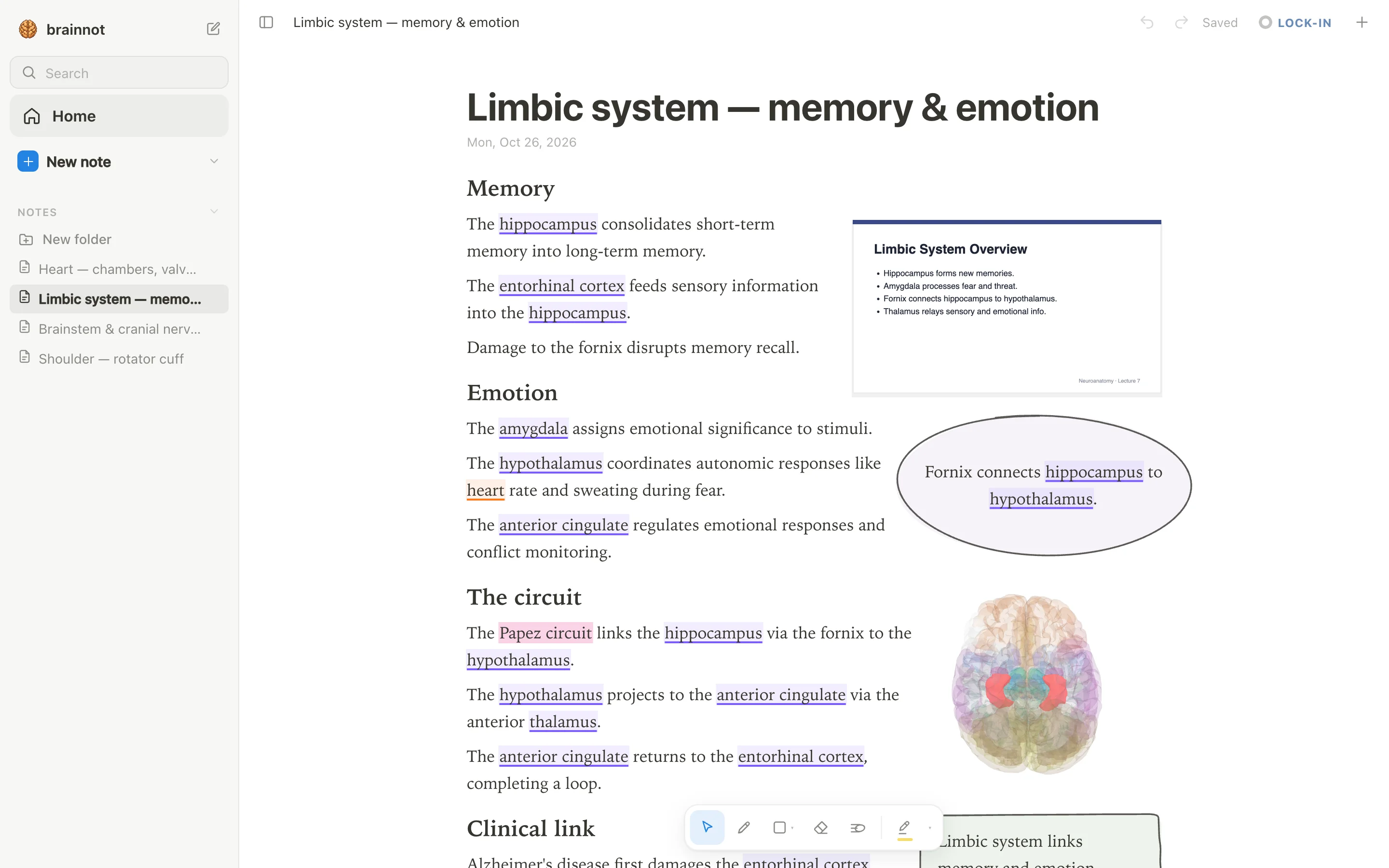
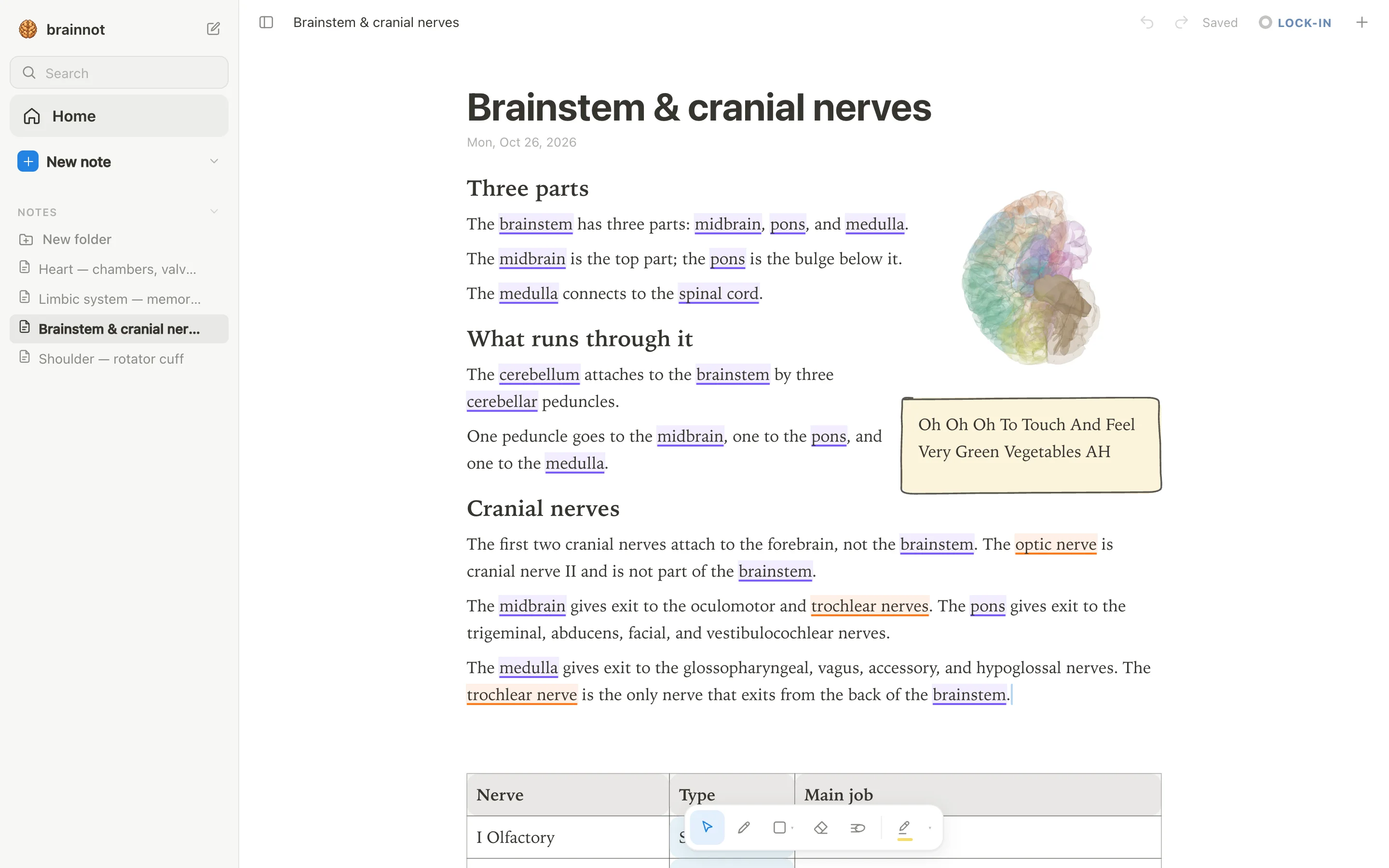
- Good: Type "brainstem" and the word lights up with a violet underline; tap it and the brainstem opens in 3D above the word.
- Good: Body structures are underlined in orange; type "heart" or "aorta" and open the 3D model from the note.
- Good: Lecture slides can sit in a rail beside the page as PDFs and go anywhere in the note, and the text reflows around them.
- Watch out: There is no lecture audio recording and no handwriting-to-text; anotemy also has no spaced-repetition scheduler, so plan to use Anki alongside it.
- Watch out: Not every term is recognized. anotemy knows 76 brain regions and 6,800 body parts, but most cranial nerve names are not among them (optic and trochlear are).
4. OneNote — best for free, typed-first notes that sync across devices
OneNote is the pick for PA students who want a free, typed-first notebook that syncs across devices and fits inside Microsoft 365. Pick it if you already use Word, Outlook or Teams and want handwriting as a secondary input, not the main event.
Price: OneNote itself is free on all platforms with a free Microsoft account, and notebooks are stored on OneDrive, so the free OneDrive storage applies. Microsoft 365 Personal is $99.99 per year if you want Copilot in Microsoft 365 apps. It runs on Windows, Mac, iPad, iPhone, Android and the web, though feature parity varies: for example, there is no ink-to-text on Mac.
- Good: Free on all platforms with a Microsoft account, with full rich text, tables, tags and Office-style formatting on a free-form page canvas.
- Good: Syncs through OneDrive and merges offline edits when you reconnect; the free OneDrive storage limit is the main constraint on the free setup.
- Good: Handwriting works on Windows, iPad and Android, with Ink to Text on Windows.
- Watch out: PDFs are inserted as file printouts you can ink over, not as a native PDF annotator; printout text is not editable.
- Watch out: There is no classic built-in flashcard deck or spaced-repetition scheduler. Copilot Study Guide can generate editable AI flashcards from files, but it is tied to Microsoft 365/Copilot licensing and consumer availability is unverified.
- Watch out: Mac drawing uses a mouse or trackpad and does not support handwriting-to-text conversion.
5. RemNote — best for outline notes plus built-in spaced repetition
RemNote is the pick for PA students who like bullet-outline notes and want spaced-repetition flashcards built from the same page. Pick it if you annotate PDFs and want to turn a highlighted sentence into a card without moving to another app.
Price: the free plan has unlimited notes and flashcards but caps annotated PDFs, files and websites at 3, handwritten documents at 1 and image-occlusion images at 5. Pro is $96 per year, and currently enrolled students, faculty and staff get 25% off Pro with a recognized school email. It runs on Windows, macOS, Linux, iPad, iPhone, Android and the web.
- Good: Flashcards are written inline in your notes; spaced repetition is built in, and Anki .apkg import is supported.
- Good: The PDF and web reader supports multi-color highlights, freehand drawing and notes linked to highlights; click a sentence to make a card.
- Good: The 25% student discount applies to Pro monthly or yearly with a recognized school email.
- Watch out: The free plan caps annotated PDFs/files/websites at 3 and handwritten documents at 1; Pro is needed for unlimited use.
- Watch out: The editor is an outliner built on bullets, not a free page layout, so typed notes follow that structure.
- Watch out: PowerPoint files are supported as an AI-card source; annotating PowerPoint directly is unverified.
6. Anki — best for long-term memorization with spaced repetition
Anki is the pick for PA students who need long-term memorization and want a free, open-source spaced-repetition engine rather than a note editor. Pick it if you are ready to build or import decks and study cards on a schedule, and you do not need PDF annotation or lecture recording in the same app.
Price: Anki desktop, AnkiDroid and AnkiWeb sync are free with no feature tiers; the free AnkiWeb account can lose data after 6 or more months of inactivity, with an email warning and 30 days to act. On iPhone and iPad you need AnkiMobile, a one-time $24.99 purchase. It runs on Windows, macOS, Linux, Android, iOS/iPadOS and the web through AnkiWeb.
- Good: Free on desktop, AnkiDroid and AnkiWeb sync; FSRS is a built-in opt-in scheduler with a default desired retention of 90%.
- Good: A large shared-deck library, .apkg import and export, and native image occlusion since version 23.10.
- Good: Local-first design: the collection lives on each device and works fully offline, with optional AnkiWeb sync.
- Watch out: It is not a note editor or PDF annotator; it is built for writing and reviewing flashcards.
- Watch out: iPhone and iPad require the paid AnkiMobile app at $24.99 one-time, and there is no student discount.
- Watch out: There is no built-in AI; AI is only available through third-party add-ons.
Side-by-side comparison
The table compares the six apps on the features a PA student is most likely to check before the first anatomy block: iPad handwriting, PDF slide handling, 3D anatomy, flashcards, and price. Prices are regular prices; where a sale is live, the sale is noted in the price cell.
A free plan is listed with its main limit, not as an unlimited trial. anotemy is free while in beta and runs in a browser; its quiz is a structure quiz, not a spaced-repetition scheduler.
| app | iPad handwriting | PDF slides | 3D anatomy | flashcards | price |
|---|---|---|---|---|---|
| Goodnotes | Yes — Apple Pencil core feature | Yes — PDFs/images; Word/PPT only on iOS/iPadOS | No | Yes — Study Sets with Practice Mode and Smart Learn | Free: 3 files; Essential $11.99/yr; Pro $35.99/yr |
| Notability | Yes — Apple Pencil and Android stylus | Yes — PDFs, DOC, presentations; convert Word/PPT to PDF first for reliable import | No | Yes — Learn AI cards plus flashcard import with spaced repetition | Free: 5 notes; Lite $14.99/yr (sale on); Plus $19.99/yr; Pro $99.99/yr; Classic $49.99 one-time |
| anotemy | Yes — Apple Pencil draws, finger scrolls | Yes — drop PDF slides into a rail beside the page | Yes — 76 brain regions and 6,800 body parts | Limited — structure quiz, no spaced-repetition scheduler | Free while in beta; no native iPhone/Android app |
| OneNote | Yes — Draw tab inking; ink-to-text on Windows | Limited — PDFs inserted as page images to ink over, not native annotation | No | Limited — Copilot Study Guide can generate flashcards where available; no classic SRS scheduler | Free with OneDrive storage limits; Microsoft 365 Personal $99.99/yr |
| RemNote | Yes — handwritten documents and PDF drawing | Yes — built-in PDF reader with highlights and drawing; free tier capped at 3 annotated docs | No | Yes — inline cards with spaced repetition and Anki .apkg import | Free: 3 annotated docs, 1 handwritten doc; Pro $96/yr |
| Anki | Limited — review scratchpad; iPad drawing to card | No | No | Yes — core spaced-repetition engine with FSRS option | Free on desktop and Android; AnkiMobile $24.99 one-time |
Which one should you pick?
For handwriting on slides, Goodnotes is the safer pick if your workflow is iPad-first and you want polished ink plus PDF markup; its free plan stops at 3 files, so most students will need Essential or Pro. Notability is the alternative when you also want audio on the same page, but its free plan stops at 5 notes.
For recording lectures, Notability is the direct fit because audio syncs to handwritten notes and its Learn tools can make quizzes and flashcards; the free plan gives 5 notes, so check paid tiers early. anotemy does not record audio, so keep a recorder or Notability if lecture capture is nonnegotiable.
For the anatomy block, anotemy is the one to try when you type structure names and want the word to open a 3D view; it recognizes 76 brain regions and 6,800 body parts, and it is free while in beta. Use it alongside a handwriting app if you annotate slides by hand, because it has no handwriting-to-text recognition.
For board-style recall, Anki remains the default because its spaced-repetition engine is the core product and FSRS is built in; desktop and Android are free, while iPhone/iPad needs the $24.99 AnkiMobile app. RemNote is the pick if you want cards written inline in outline notes, with a free tier capped at 3 annotated documents and 1 handwritten document.
Prices and features checked on 26 October 2026 on each one's own site: Goodnotes · Notability · Microsoft OneNote · RemNote · Anki (desktop) + AnkiWeb + AnkiMobile + AnkiDroid.