 anotemy
Sign in
Try it free
anotemy
Sign in
Try it free
Best Note-Taking Apps for Anatomy Students (2026)
For anatomy students in 2026, anotemy is the best pick when you want typed notes whose recognized structure names open in 3D, and Goodnotes is the strongest handwriting-first iPad option. Use Anki alongside either for spaced repetition.
We make anotemy; facts for the other apps come from their own pages, read on 2026-10-26, and prices change.
How we picked
We picked for anatomy study, not general note-taking: can you label a diagram, open a 3D model from a typed word, mix typed and drawn notes, and practice for a lab practical without leaving your workflow? Price mattered too, so we noted each free plan's main limit.
In 2026 we compared six apps from their own pages: anotemy, Goodnotes, Notability, OneNote, Complete Anatomy and Anki. We make anotemy, so we state that here and keep the other apps' facts to what their pages say.
- Labeling: can you type a structure name and reach that structure in 3D, or annotate a diagram?
- Drawing: pen, mouse or Apple Pencil, with text that flows around what you draw.
- 3D: a model you can open from the note, not a separate atlas only.
- Practical prep: quizzes or practice that look like a pinned lab station.
- Price: the free plan and its main limit, plus the paid price where one exists.
1. anotemy — best for typed notes that open 3D
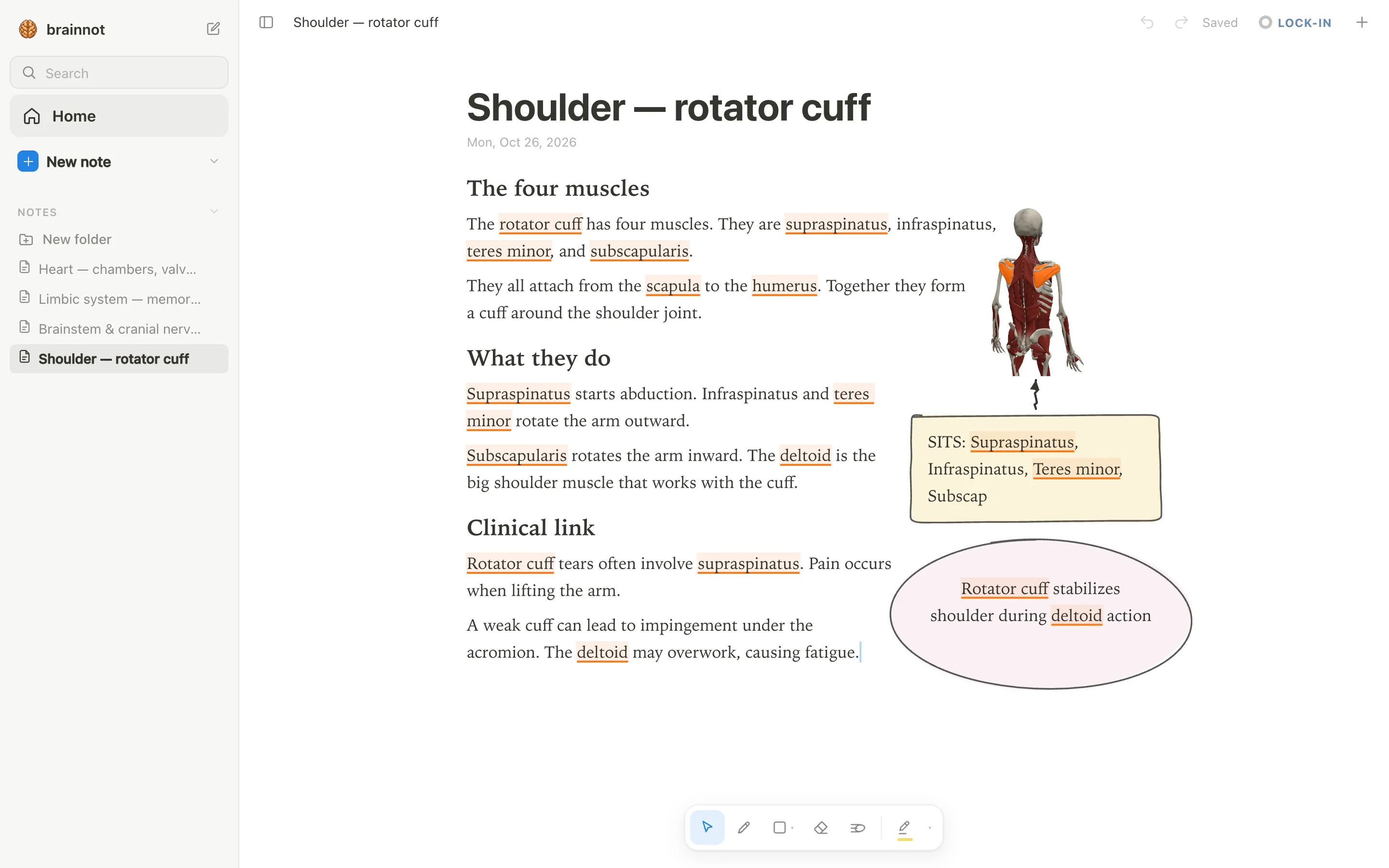
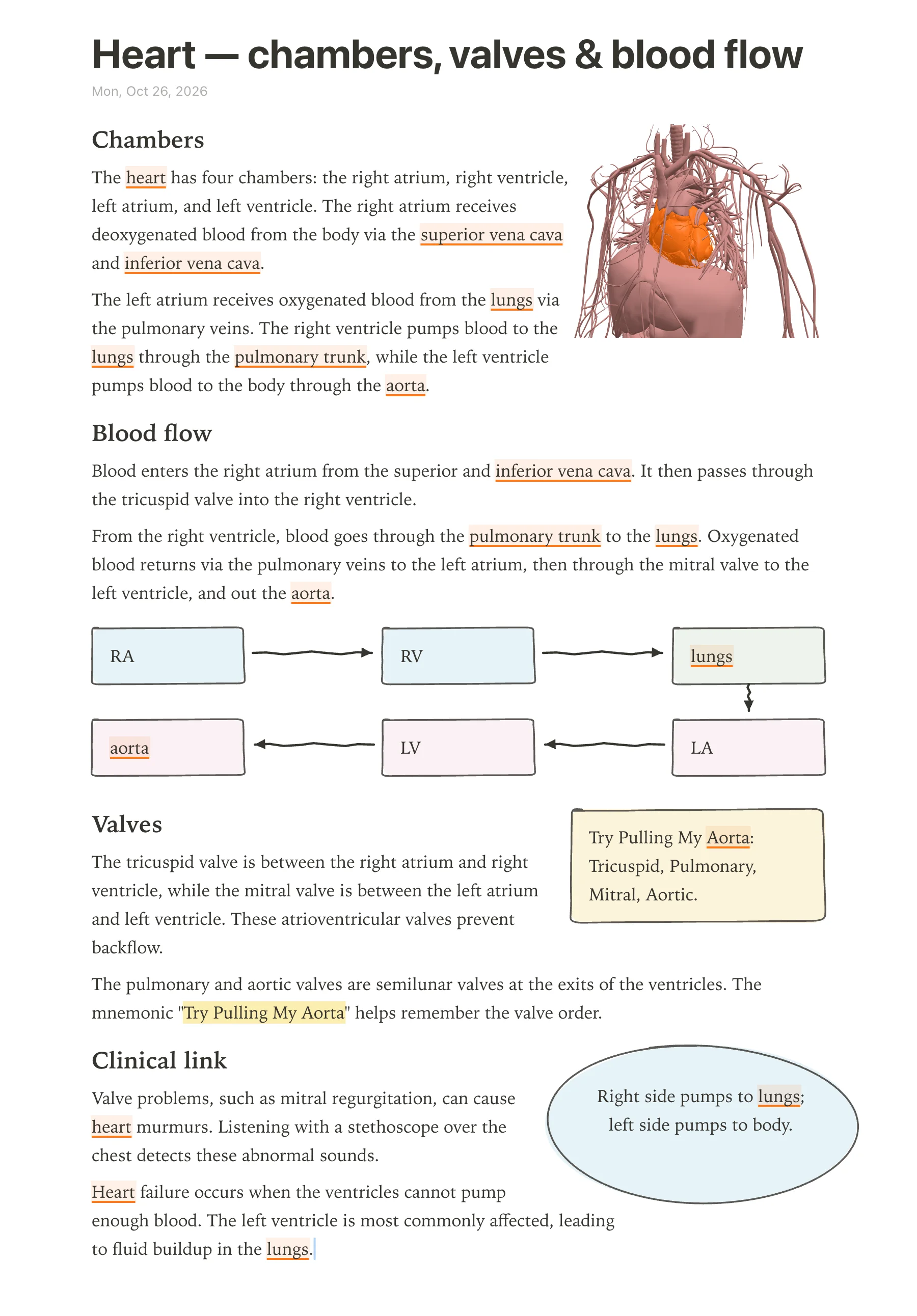
anotemy is best for anatomy students who type structure names and want the word to open a 3D model beside the note. Pick it if you study from labeled diagrams, lecture slides and a lab practical list, and you want typed and drawn notes on the same page.
It runs in a modern browser on a laptop or desktop, and on iPad, where Apple Pencil draws and a finger scrolls. It is free while in beta; there is no native iPhone or Android app. You can start without an account; sign in with Google or Apple to keep notes and sync them to every device.
- Good: type hippocampus or rotator cuff and the word lights up; tap it to open that structure in 3D.
- Good: 76 brain regions and 6,800 body parts in 3D, plus a full-screen Brain and Body explorer.
- Good: drop lecture slides in as a PDF; they wait in a rail and the text reflows around them.
- Good: quiz about 140 common structures and print notes on A4 with ⌘P.
- Watch out: no handwriting-to-text, no spaced-repetition scheduler like Anki, no audio recording and no real-time collaboration.
- Watch out: most cranial nerve names are not recognized, and the brachial plexus is not in the 3D library; draw those.
2. Goodnotes — best for handwriting-first iPad notes
Goodnotes is best for anatomy students who write by hand on an iPad and want polished ink, PDF markup and built-in study sets. Pick it if your diagrams are drawn with Apple Pencil and you want flashcards in the same app.
It is free forever with up to 3 files total across notebooks, whiteboards and text documents; Essential is $11.99/year and Pro is $35.99/year. It runs on iPad, iPhone, Android, Windows, Mac and web, but its own Windows page says those versions do not offer the full Goodnotes 6 iPad feature set.
- Good: strong Apple Pencil handwriting, handwriting search and handwriting-to-text on iPad, iPhone, Mac, Android and web, but not Windows.
- Good: imports PDFs and images everywhere; Word and PowerPoint only on iOS/iPadOS.
- Good: Study Sets add flashcards, Practice Mode and Smart Learn spaced repetition; import from Anki or Quizlet.
- Watch out: free tier caps you at 3 files total and watermarked exports.
- Watch out: no 3D anatomy; Study Sets are likely Apple-only per the help center.
3. Notability — best for lecture audio synced to your handwriting
Notability is best for students who record lectures and want the audio tied to their handwritten notes, with AI quizzes and flashcards built on top. Pick it if you write by hand on an iPad or an Android tablet and want one app for ink, PDF markup and lecture recording. The free Starter tier gives you 5 notes total, 7-day version history and all editing tools; AI features need Plus or Pro.
Paid plans run $14.99 a year for Lite, $19.99 a year for Plus and $99.99 a year for Pro at regular price, with a 20% off sale live now; there is also a one-time Classic purchase at $49.99. It runs on iPad, iPhone, Mac, Windows, Android and the web, and typing and handwriting mix on the same page.
- Good: Audio is synced to your handwritten notes, which is the core reason students pick it for lectures.
- Good: Learn generates summaries, quizzes, flashcards and fill-in-the-blank questions from your notes, PDFs and recordings; limited on Plus, unlimited on Pro.
- Good: Available on nearly every platform, including a native Android app and a web app.
- Watch out: The free Starter tier stops at 5 notes total, and version history is only 7 days.
- Watch out: The Windows desktop app is new, and stylus support there is unverified.
- Watch out: AI features are not available on MDM-managed school devices or in China, Hong Kong and Macau.
4. OneNote — best for free typed notes that sync across every device
OneNote is best for students who want a free, typed-first notebook that syncs everywhere and sits inside Microsoft 365 and Teams. Pick it if your notes are mostly text with tables and tags, you already use a Microsoft account, and handwriting is a secondary input. OneNote itself is free on Windows, Mac, iPad, iPhone, Android and the web with a free Microsoft account, but notebooks live on OneDrive, so free OneDrive storage applies; Copilot inside OneNote needs a Microsoft 365 plan with AI.
Microsoft 365 Personal is $99.99 a year at regular price, and Microsoft says college students can save 50% with a verified college email. Typed notes are the strong mode: a free-form page canvas with movable text containers, rich text, tables, tags and Office-style formatting.
- Good: Free on every major platform, including full editing in a browser with no install.
- Good: Strong typed-text canvas with tables, tags and Office formatting.
- Good: Draw tab inking on Windows, iPad and Android, with Ink to Text on Windows.
- Watch out: PDFs and slides come in as printout images you can ink over; the printout text is not editable.
- Watch out: No built-in spaced-repetition flashcards; Copilot Study Guide flashcards are scoped to Education and Enterprise licenses, and consumer availability is unverified.
- Watch out: Storage is cloud-first on OneDrive, so free OneDrive limits apply, and some features like OCR need internet.
5. Complete Anatomy — best for detailed interactive 3D gross anatomy
Complete Anatomy is best for students who want the most detailed interactive 3D gross-anatomy model with guided courses, dissections and radiology on native apps. Pick it if you learn by rotating and stripping models rather than typing notes, and you want quizzes and Screens inside the same tool. There is no free tier stated: you get a 3-day free trial with no payment details, then the Student plan is $74.99 a year at full price, with a first-year discount to $39.99 on the web store.
Native apps run on iPad, iPhone, Mac, Windows and Android phone and tablet; the web version is for institutional subscribers only. Dissect and annotate tools are only on tablet and desktop, not phone.
- Good: Full male and female gross anatomy, 20+ microanatomy models, 700+ Gray's-inspired atlas screens, cross-sections, muscle motion, AR and 550+ radiology images.
- Good: Guided courses, quizzes and Screens (interactive bookmarks) let you study inside the model; you can create unlimited questions and quizzes on both plans.
- Good: Apps largely work offline once courses, videos and models are downloaded.
- Watch out: No free tier is stated, and after the 3-day trial what remains usable is not specified.
- Watch out: There is no standalone notebook or PDF/slide import; you annotate on the model, not in a note editor.
- Watch out: Dissect and annotate tools are tablet and desktop only, and individual web access is not available.
6. Anki — best for long-term memorization with spaced repetition
Anki is best for learners who need heavy, long-term memorization for exams and want a mature spaced-repetition engine with a large shared-deck library. Pick it if you are comfortable writing flashcards rather than long-form notes, and you want your review schedule handled for you. The desktop app, AnkiDroid for Android and AnkiWeb sync are free with no feature tiers; only iPhone and iPad need the paid AnkiMobile app, a one-time $24.99 purchase.
Anki runs on Windows, macOS, Linux, iPhone, iPad, Android and the web, with an optional free AnkiWeb sync. The free tier's main catch is inactivity: AnkiWeb accounts inactive for 6+ months get a deletion warning and 30 days to act. It has no notebook editor and no PDF annotation, so many students keep their typed notes in a separate app and put only their cards here.
- Good: Mature spaced-repetition engine with FSRS built in as an opt-in, plus cloze, image occlusion and filtered decks.
- Good: Free on desktop, Android and AnkiWeb; only iOS and iPadOS require the one-time $24.99 AnkiMobile purchase.
- Good: Works fully offline; sync is optional, and you can self-host a sync server.
- Watch out: Built for flashcards, not long-form notes — the editor is card fields, with no notebook or PDF annotation.
- Watch out: AnkiWeb accounts inactive for 6+ months get a deletion warning with 30 days to act.
- Watch out: No handwritten notes (mobile has a review scratchpad only) and no built-in AI.
Side-by-side comparison
The table puts the six apps side by side on what anatomy study asks for: ink, 3D, labeling, recall tools and price. Prices are regular US prices; a sale may be running on some of them. Where an app is free, its main limit sits in the same cell.
| App | Handwriting | 3D anatomy | Labeling diagrams | Flashcards or quizzes | Price |
|---|---|---|---|---|---|
| anotemy | Yes, with pen, mouse or Apple Pencil | 76 brain regions and 6,800 body parts, opened from a typed word | Pen-drawn boxes, arrows and four highlighter colors; no diagram library | Tap a recognized structure for questions (about 140 structures have them) | Free while in beta |
| Goodnotes | Yes, pressure and tilt with Apple Pencil | No | Ink over imported PDFs and images | Study Sets flashcards, Practice Mode and Smart Learn | Free: 3 files; Essential $11.99/year |
| Notability | Yes, handwriting-first ink engine | No | Ink over imported PDFs, images and slides | Learn AI flashcards and quizzes; flashcard import with ratings | Free: 5 notes; Lite $14.99/year (a sale is on) |
| OneNote | Yes; handwriting-to-text on Windows only | No | PDFs arrive as page printouts you ink over | No standard decks; Copilot Study Guide flashcards on some plans | Free with a Microsoft account, on free OneDrive storage |
| Complete Anatomy | Pen annotations on the model, tablet and desktop only | Full male and female gross anatomy, plus 20+ microanatomy models | Labels and sketches on the model, saved as Screens | Create Questions and Quizzes; no flashcards | $74.99/year (first year $39.99) |
| Anki | Review-time scratchpad only | No | Image occlusion on cards | Spaced repetition is the whole point | Free on desktop, AnkiDroid and AnkiWeb; AnkiMobile $24.99 one-time |
Which one should you pick?
**All handwriting on an iPad.** Goodnotes and Notability are the two to weigh. Goodnotes has the more polished ink and its Study Sets schedule review over days, but its free tier stops at 3 files and cross-platform sync needs the Pro plan; Notability records lecture audio onto your handwriting and its free tier gives you 5 notes, with unlimited notes on the regular $14.99/year Lite plan. If you want built-in review scheduling, confirm which Goodnotes tier includes Study Sets; Essential at $11.99/year is the cheaper paid plan.
**Typed notes with 3D in them.** anotemy is the one built for this. You type a structure's name — hippocampus, supraspinatus, aorta — and the word lights up: brain structures underlined in violet, body structures in orange. Tapping it opens that structure in 3D — a brain structure turns in 3D right above the word, and a body structure opens from the word you typed. Expect only recognized words to light up; it knows the 76 brain regions and 6,800 body parts, and the 28 permanent teeth are in the explorer rather than lit by short names like "first molar." It is free while in beta, so cost is not the deciding factor.
**A lab practical next week.** Start with the free practice tests at anotemy.com/tools: a structure lit orange on a 3D body the way a pinned structure looks at a station, four names to choose from, up to 10 a round (fewer in smaller regions such as thorax, 9), a score at the end, and no sign-up. The whole region set covers 48 structures. Be clear about what it is — four-choice naming, not a full practical — and use it next to whatever app holds your notes.
**A tight budget.** OneNote is free on every platform with a free Microsoft account, though your notebooks live on OneDrive and free storage applies. Anki is free on desktop, AnkiDroid and AnkiWeb, with the paid piece only being AnkiMobile at $24.99 once for iPhone and iPad. anotemy is free while in beta if you want the 3D-linked typed notes.
Prices and features checked on 26 October 2026 on each one's own site: Goodnotes · Notability · Microsoft OneNote · Complete Anatomy · Anki (desktop) + AnkiWeb + AnkiMobile + AnkiDroid.