 anotemy
Sign in
Try it free
anotemy
Sign in
Try it free
Note-Taking Apps with 3D Anatomy
Yes. anotemy is a note-taking app with built-in 3D anatomy models: type a structure name and open it in 3D right above your note. Complete Anatomy is a 3D atlas you can annotate, but it lacks standalone notebook-style notes.
We make anotemy; the other apps' facts come from their own pages, read on 2026-10-26; prices change.
How we picked
Built-in 3D means the 3D models live inside the same app as your own notes, not a separate window or a pasted image. We treat three levels separately: a note-taking app where typing a structure name links to a 3D view; a 3D atlas you can draw on or tag; and a plain notes app where you paste screenshots.
For this page, we compared apps from their own pages as of 2026, including anotemy and Complete Anatomy. We make anotemy, so we know it firsthand; for other apps we rely on what they publish.
- Built-in 3D means the 3D model is native to the note: you open it from the words you type, not from a file upload or a screenshot.
- A 3D atlas with annotation is different: you get a detailed model, but your 'notes' are labels or sketches stuck on the model rather than a notebook you write in.
- Pasting images of a 3D atlas into a generic notes app is not built-in 3D anatomy and we did not count it here.
- We read each app's own feature, pricing, and platform pages on 2026-10-26; prices change and we do not guess what is unpublished.
1. anotemy — best for typed notes linked to 3D anatomy
anotemy is an anatomy note-taking web app for medical, nursing, PA, PT, dental, and neuroscience students. It is free while in beta, with no paid plan published. It runs in a modern browser on a laptop or desktop, and on iPad, where Apple Pencil draws and a finger scrolls; there is no native iPhone or Android app.
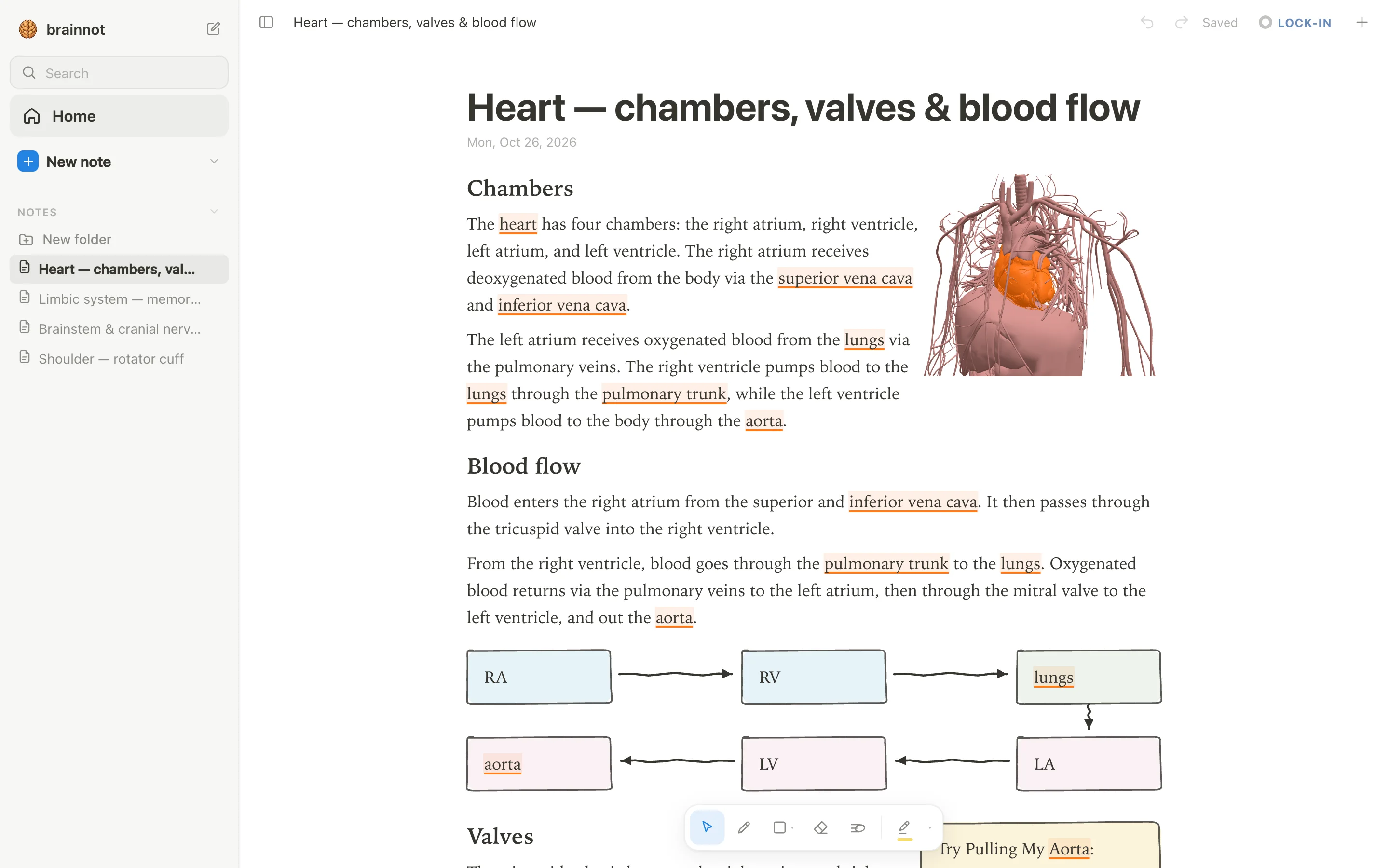
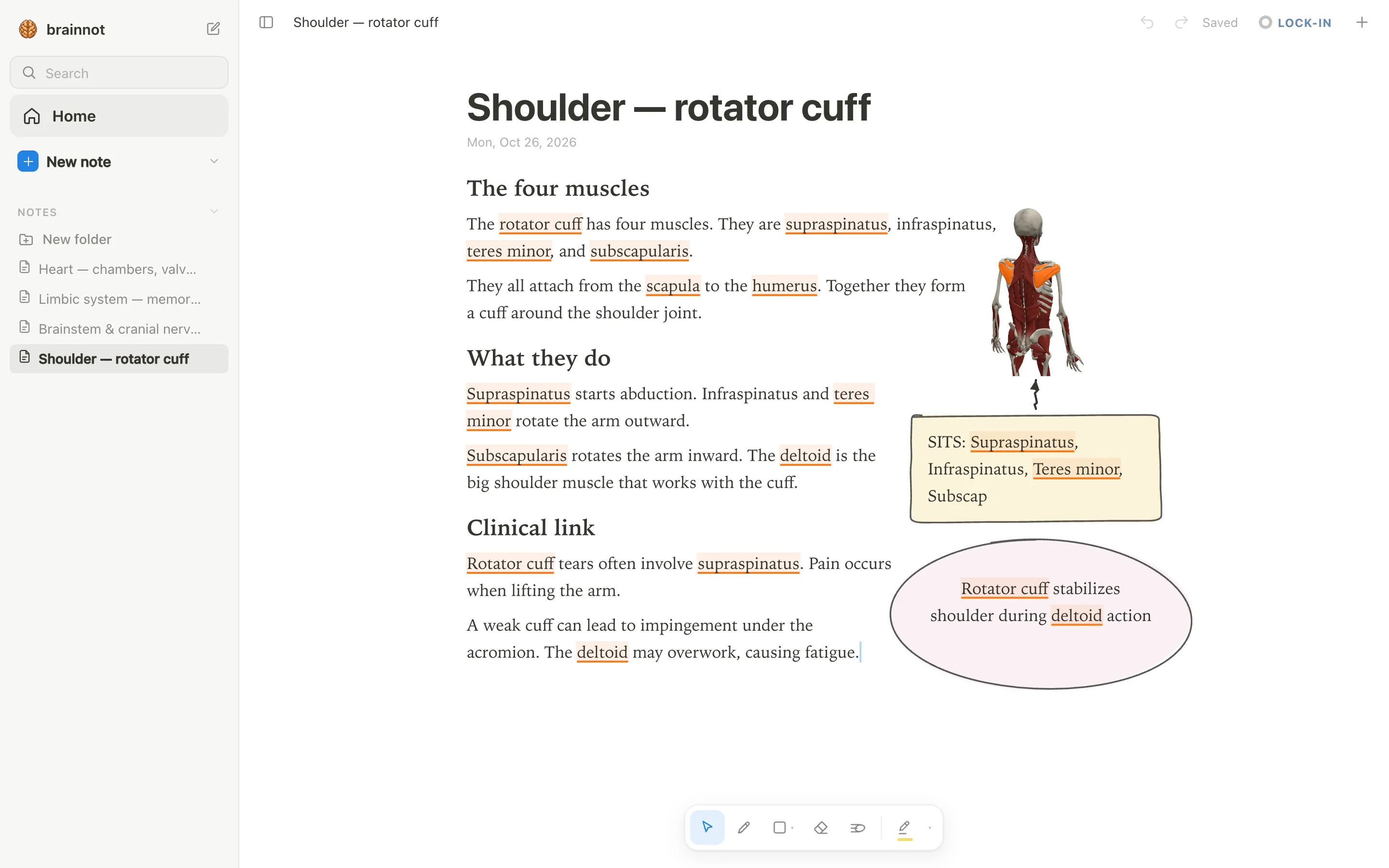
Pick anotemy if you write your own notes and want the 3D model to appear at the exact structure you are studying. Type a structure's name such as 'hippocampus', 'amygdala', 'heart', or 'rotator cuff', and the word itself lights up in the text; tap it and that structure opens in 3D right above the word.
You are not limited to viewing the model: you can put a 3D view into the note as a picture cut to the model's edges and the text flows around it, or draw with a pen, mouse, or Apple Pencil and loop a takeaway into a box. There is no handwriting-to-text recognition and no spaced-repetition scheduler, so many students use Anki alongside it.
- Good: 76 brain regions in 3D, each lit inside a see-through brain, and 6,800 body parts in 3D, all opened from the words you type.
- Good: Free while in beta, with no paid plan; start writing without an account and sign in with Google or Apple to sync notes.
- Good: Put a 3D view into the note as a picture and text reflows around it; drop lecture slides in as a PDF beside the page.
- Good: Draw with Apple Pencil, pen, or mouse; loop a takeaway and it becomes a box; there are four highlighter colors, headings, lists, and tables.
- Watch out: No native iPhone or Android app; it is a web app and needs a modern browser.
- Watch out: No spaced-repetition scheduler like Anki's; no real-time collaboration or audio recording of lectures.
2. Complete Anatomy — best for a full 3D atlas with annotations
Complete Anatomy, from 3D4Medical by Elsevier, is the most detailed interactive 3D gross-anatomy model we found, with guided courses, dissections, radiology, and native apps for iPad, iPhone, Mac, Windows, and Android. Complete Anatomy for Web is only for institutional subscribers; individual web access is in development.
There is no free tier: you download the app and get a 3-day free trial with no payment details required, but what stays usable after the trial is not stated. The Student plan costs $39.99 for the first year and then $74.99 per year; Professional is $99.99 per year.
Pick Complete Anatomy if you want to explore a full male and female 3D body, add your own text, labels, or sketches directly on the model, and save those annotated views as Screens. It is not a notebook: there is no standalone notes page, no PDF import, and no flashcards or spaced repetition.
- Good: Full male and female gross anatomy, 20+ microanatomy models, 550+ radiology images, muscle motion, AR, and a new 3D brain model in beta.
- Good: Sketch, label, and add stickies directly on any structure, then save the annotated view as an interactive Screen.
- Good: Native apps work offline after you download courses and detailed models; work created offline syncs on reconnect.
- Good: Guided courses, dissections, and quizzes are built in; the Student plan includes a first-year discount.
- Watch out: No free tier, only a 3-day trial; after that you must pay for a yearly plan, and web access is institutional only.
- Watch out: No standalone notes or notebook feature, no PDF or slide import, and no flashcards or spaced repetition.
3. Human Anatomy Atlas — best for a one-time 3D atlas with annotations
Human Anatomy Atlas 2027 is best for students who want a one-time-purchase, dissectible 3D atlas on iPad, iPhone, or Mac and prefer annotated views over typed notes. It has no subscription: the app costs $24.99 up front, and the separate Mac version also costs $24.99. There is no free plan or trial, and no web version.
It runs on iPhone, iPad, and Mac (macOS 12+); Android is also available. A Windows Store edition exists but has not been updated to 2027. For typed notes that link to 3D structures, anotemy is a better fit; Human Anatomy Atlas keeps notes as labels and text boxes on model views.
- Good: One-time purchase $24.99, no subscription; full male and female models, movable muscles, bones, cross-sections, diagnostic images.
- Good: Annotate with tags, text, and 3D drawings; Apple Pencil supported (documented on iPad).
- Good: Save annotated views as Notecards or Tours for study and sharing.
- Watch out: No free version or trial; pay $24.99 up front, and Mac app is a separate $24.99 purchase.
- Watch out: No PDF or slide import; lecture slides can't be added.
- Watch out: No flashcards; "Notecards" are saved 3D views, not spaced-repetition cards.
4. Get3DMed — best for browser 3D atlas with notes and AI tutor
Get3DMed is best for students who want a low-cost, browser-based 3D atlas with notes pinned to structures, flashcards built from quiz mistakes, and an AI tutor. The free plan is generous: no credit card, with 7 demo models, 10 find-the-part questions a day, 3 prepared tutor answers, and flashcards at no cost.
Paid Student Pro is $9.99 per month or $69.99 per year and includes all models, unlimited quizzes, and 100 live tutor answers a month. It runs only in the browser, with no native app, but state syncs across devices. Unlike anotemy, Get3DMed does not link typed words in a document to 3D models; notes live on individual structures.
- Good: Free plan with no card or time limit; includes 7 demo models, 10 quiz questions daily, and flashcards at no cost.
- Good: Student Pro gives access to all 93 models, molecules, unlimited quizzes, and 100 AI tutor answers a month.
- Good: Notes are attached to structures, so they appear whenever you select that structure; you can download your data after canceling.
- Watch out: Browser-only; no native iOS, Android, or desktop app.
- Watch out: No PDF or slide import; no free-form notebook or document editor.
- Watch out: Flashcard spaced repetition is explicitly not available; the AI tutor's free answers are limited to 3 prepared responses.
5. Durgical — best for Spanish-English students with AI study plan
Durgical is best for Spanish- and English-speaking health students who want a browser 3D atlas where notes on each structure are turned into a study plan and review cards by an AI assistant. It is free during early access, with no published pricing or paywall; exploring 3D models works without an account, but saving notes and the study plan requires sign-in with Google or email.
Durgical runs only in the browser, on phone, tablet, or computer. It includes 1,164 structures, male and female models, and tools like taking parts apart and a 3x magnifier. For students who want to type anatomy words in a document and tap them to open the 3D model, anotemy is a closer match.
- Good: Free during early access; no credit card needed to explore 3D models without an account.
- Good: 1,164 structures with male and female models; take parts apart, see-through selection, magnifier, and saved views as shareable links.
- Good: Notes attach to each structure card and Durgi turns them into review cards and a study plan based on your exam date.
- Watch out: No prices or plans published; future cost after early access is unknown.
- Watch out: Browser-only with no native app; no PDF or slide import.
- Watch out: Spaced repetition for review cards is not stated; AI provider is not named.
6. Easy Anatomy 3D — best for curated notes with voice AI
Easy Anatomy 3D is best for phone and tablet learners who want premade notes, a large spaced-repetition flashcard deck, and a voice AI tutor that controls the 3D atlas. The app is a free download with in-app purchases and a 3-day free trial, but the developer does not state what works without Premium.
Premium costs $7.99 per week or $99.99 per year; AI Voice Tutor minutes cost $3.99 for 10 minutes, $9.99 for 30, and $17.99 for 60. Platforms are iPhone, iPad, Mac with Apple M1 or later, and Android; there is no Windows or web 3D version. The atlas has 11,000+ structures and works offline once models are downloaded. For students who want to type anatomy terms into their own notes and tap them to open 3D models, anotemy is a different approach.
- Good: 11,000+ structures with male and female models; full 3D atlas works offline after you download the models.
- Good: 16,000+ illustrated premade flashcards with spaced repetition across four mastery levels.
- Good: Voice AI Tutor answers aloud, highlights structures, and builds study plans; sold separately in 10/30/60-minute packs.
- Watch out: No free tier details; it's a free download but you must pay for Premium or AI minutes, and what works free is unclear.
- Watch out: No PDF or slide import; writing your own notes is not clearly supported (one user review mentions it, but developer does not).
- Watch out: Premium costs $7.99 per week or $99.99 per year; AI voice minutes cost extra.
Side-by-side comparison
| app | 3D models | typed notes | handwriting | notes tied to structures | price |
|---|---|---|---|---|---|
| anotemy | 76 brain regions + 6,800 body parts in 3D, opened from typed words | Yes; typed notes with highlighting that opens 3D above the word | Limited; pen, mouse, Apple Pencil drawings, boxes, arrows, tables, lists, highlighters; no handwriting-to-text | Yes; highlighted words link to structures; 3D views can be embedded | Free while in beta |
| Complete Anatomy | Full male + female gross anatomy, 20+ microanatomy, 700+ Gray's screens, cross-sections, muscle motion, AR, radiology; new brain model beta | Limited; text, textboxes, labels, stickies on model saved as Screens; no standalone notebook | Limited; sketch/pen annotations on 3D model, tablet + desktop only; Pencil support unverified | Yes; annotations on model tied to view, not a note document | No free tier; 3-day trial; Student $39.99 first year then $74.99/yr; Professional $99.99/yr; Individual $59.99/yr |
| Human Anatomy Atlas 2027 | Full male + female, organ views, movable muscle/bone models, muscle actions, fascia, cross-sections, AR; dental add-on | Tags (labels) and Notepad text boxes placed in views, saved as Notecards | Limited; draw in 3D around model with finger or Pencil, iPad only per docs; no notebook | Yes; tags pin notes to structures; Notecards save annotated views | One-time $24.99 per store (iPhone/iPad, Mac, Android separately); add-ons $7.99–$19.99 |
| Get3DMed | 93 labelled models with 4,006 parts, 91 molecules; organ to cell; from Z-Anatomy and HuBMAP | Notes attach to any structure or molecular highlight; grouped in collections; no free-form notebook | Unverified; no pen or drawing tools mentioned | Yes; a note belongs to its structure | Free tier (7 demos, limits); Student Pro $9.99/mo or $69.99/yr; tutor top-up $3.49 per 100 answers |
| Durgical | 1,164 structures, male + female; take apart, labels, see-through, magnifier | Notes on each structure's card, Notes tab, search across parts and notes | Unverified; no pen or drawing tools mentioned | Yes; notes written where you see the structure | No prices or plans published; early access; free to explore, sign-in to save notes |
| Easy Anatomy 3D | Male + female with 11,000+ structures; 3D quizzes, narrated videos, muscle animations | 500+ read-only expert notes; writing own notes not described by developer | Unverified; no drawing or annotation tools mentioned | Not described; premade study notes, not tied to individual structures | Free download + 3-day trial; Premium $7.99/wk or $99.99/yr; AI voice minutes from $3.99 |
Which one should you pick?
If you want typed notes that connect to 3D models as you write, anotemy is the most direct fit: each highlighted anatomy word opens the structure in 3D above your text, and you can embed a 3D view into the note. Get3DMed also attaches notes to structures, but its free tier is limited to seven demo models and three saved views. Complete Anatomy and Human Anatomy Atlas let you annotate views, but they are not note-taking apps with a continuous typed document.
If your priority is the deepest interactive 3D atlas, Complete Anatomy has full male and female gross anatomy, over 20 microanatomy models, radiology, and a new brain model; it requires an annual subscription after a 3-day trial. Human Anatomy Atlas is a strong one-time purchase with dissectible models and AR, but no free entry beyond lab activities. Easy Anatomy 3D offers 11,000+ structures to download, but its free tier is unclear and the annual plan is $99.99.
On a phone, choose a native app: Complete Anatomy, Human Anatomy Atlas, or Easy Anatomy 3D; anotemy is a web app with no native iPhone or Android app, so it works best on a laptop, desktop, or iPad. If you're on a budget, anotemy is free while in beta, and Get3DMed has a free explore tier with demo models, while Durgical currently publishes no prices during early access and may be free for now.
Prices and features checked on 26 October 2026 on each one's own site: Complete Anatomy · Human Anatomy Atlas 2027 · Get3DMed · Durgical · Easy Anatomy 3D.