 anotemy
Sign in
Try it free
anotemy
Sign in
Try it free
Best Note-Taking Apps for Physical Therapy Students
anotemy is the best note-taking app for PT students who need quick 3D muscle views and drawing, free while in beta. Goodnotes is the top handwriting choice; Complete Anatomy has the deepest 3D atlas but no notes; Anki covers spaced repetition.
We make anotemy; the other apps' facts come from their own pages, read on 2026-10-26, and prices change.
How we picked
PT school notes need muscles in 3D, drawing muscles and nerves, origins and insertions, recall tools, and a low price. We compared six apps (anotemy, Goodnotes, Notability, OneNote, Complete Anatomy, and Anki) from their own pages. We make anotemy.
For each app, we checked the free plan's main limit, the platforms it runs on, and whether it supports 3D anatomy, handwriting, typing, PDFs, flashcards, and spaced repetition.
- anotemy links typed anatomy words to 3D models and is free while in beta.
- Goodnotes is handwriting-first with a 3-file free limit and paid plans at $11.99/year.
- Notability records audio synced to notes, with a 5-note free limit.
- OneNote is free and typed-first, but has no 3D anatomy.
- Complete Anatomy has the most detailed 3D atlas but no note editor.
- Anki has spaced repetition and no handwriting input.
1. anotemy — best for typed notes with instant 3D muscle views
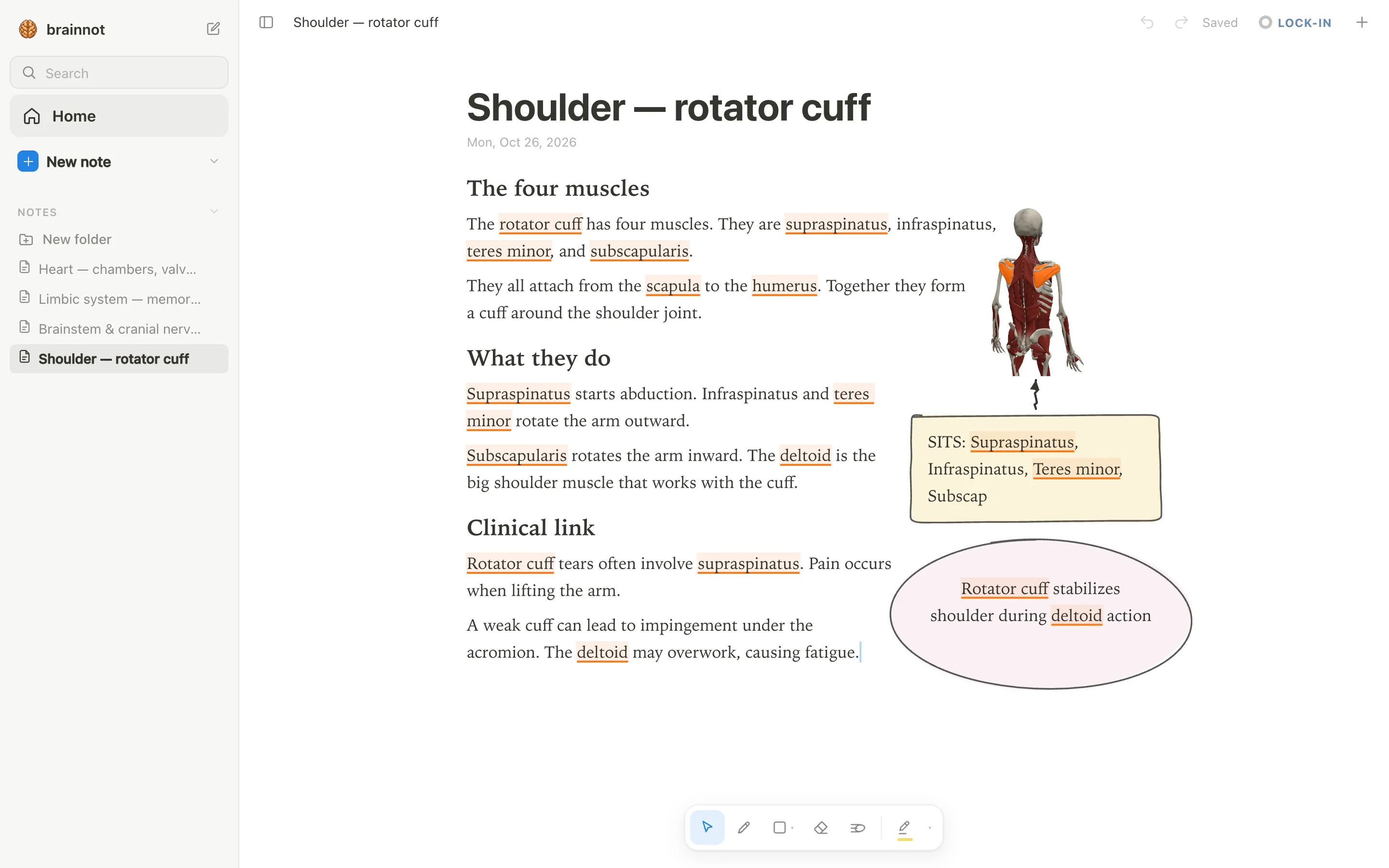
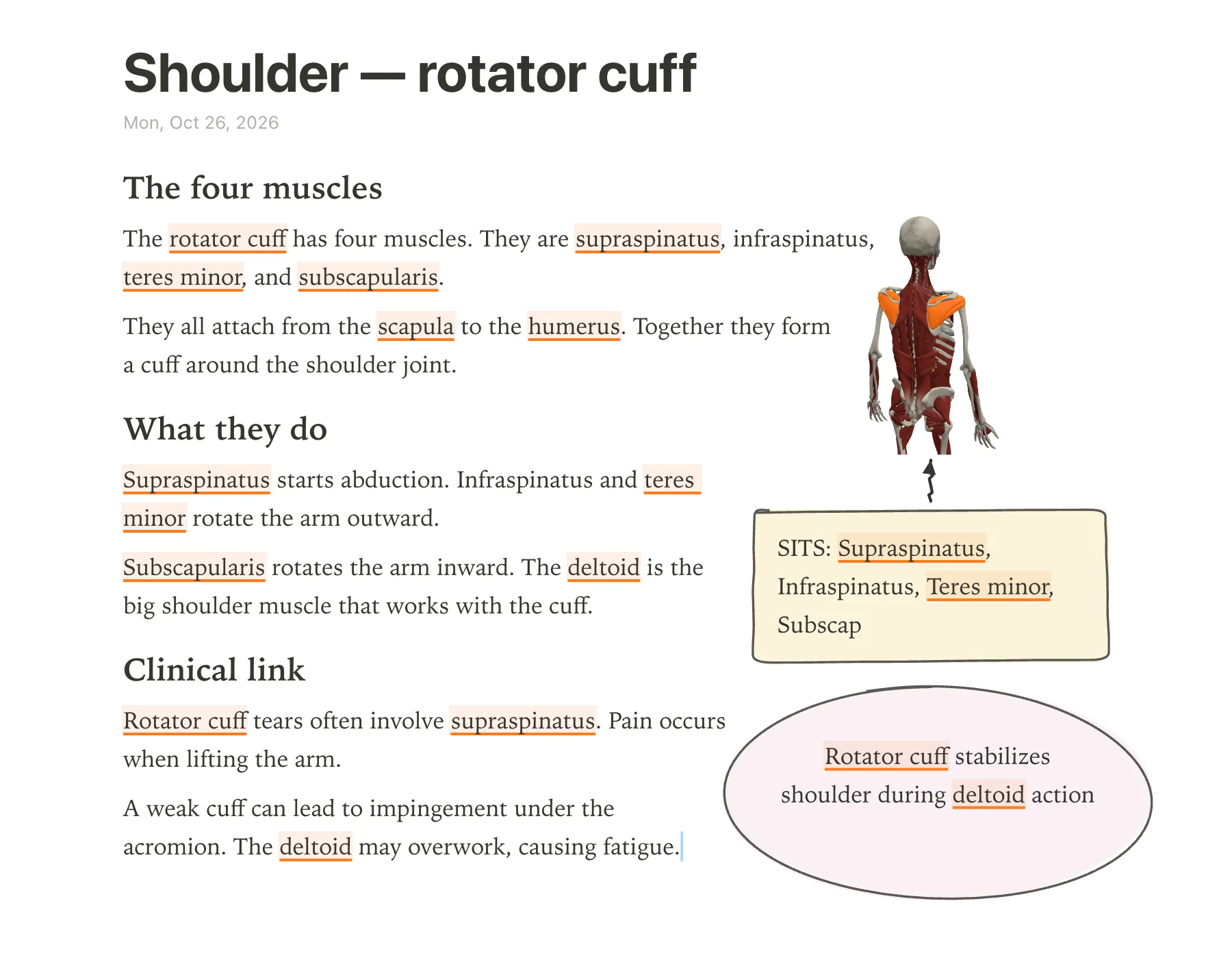
anotemy is a browser-based anatomy note-taking app for PT students who want muscles, bones, and nerves to light up from the words they type. You type 'rotator cuff' and the term is highlighted; tap it to see the structure in 3D. It runs on laptop, desktop, and iPad (with Apple Pencil), and it's free while in beta.
Pick anotemy if you need quick recall of origins and insertions and like drawing arrows or boxes on the same page. It has 6,800 body parts in 3D, including muscles, bones, organs, vessels, and nerves. It also lets you draw with a pen, loop takeaways into boxes, and drop lecture slides as PDFs.
Watch out: it has no native iPhone or Android app, no handwriting-to-text, and no spaced-repetition scheduler like Anki's. Use Anki alongside it for memorization.
- Good: Type a muscle name and tap the word to open it in 3D right above your note.
- Good: Draw with Apple Pencil on iPad; loop a takeaway and it becomes a box.
- Good: Free while in beta, with no account needed to start writing.
- Good: 6,800 body parts in 3D, including the rotator cuff, supraspinatus, deltoid, biceps brachii, femur, quadriceps, scapula, humerus.
- Watch out: No native iPhone or Android app; it's web-only.
- Watch out: No spaced-repetition scheduler; use Anki for flashcards.
2. Goodnotes — best for handwriting-first iPad notes
Goodnotes is a handwriting-first note app for iPad, iPhone, Mac, Android, Windows, and web, but the iPad app is the flagship. It's good for PT students who prefer writing by hand and marking up PDFs. The free plan is forever but limited to 3 files total, 3 folders, 5MB import size, and watermarked exports.
Pick Goodnotes if you want polished ink, PDF annotation, and built-in flashcards with spaced repetition. The Essential plan is $11.99/year and removes file limits and watermarks; the Pro plan at $35.99/year adds cross-platform sync and AI. There is no student discount stated.
Watch out: it doesn't have 3D anatomy. Typed notes are possible but handwriting is the core. On Windows, it lacks full iPad features.
- Good: Handwriting feels natural with Apple Pencil; handwriting search and conversion on most platforms.
- Good: Built-in Study Sets for flashcards with spaced repetition (Smart Learn).
- Good: Free plan is truly free but limited to 3 files and watermarked exports.
- Watch out: Essentials $11.99/year still lacks cross-platform sync; Pro $35.99/year needed for Goodnotes Cloud.
- Watch out: No 3D anatomy; anatomy terms stay as plain text.
- Watch out: Windows app doesn't offer the full iPad feature set.
3. Notability — best for audio-synced lecture notes
Notability suits DPT students who record lectures and want the audio tied to their handwriting. The app runs on Mac, Windows, iPad, iPhone, Android, and the web, and the free Starter plan gives you 5 notes. Paid plans start at $11.99 a year for Lite (promo price, regular $14.99), with Plus at $15.99 and Pro at $79.99, or a one-time Classic purchase at $39.99.
Handwriting is the core: Apple Pencil or Android stylus ink, shape recognition, and handwriting-to-text conversion. For musculoskeletal anatomy, you can annotate PDFs from lecture slides, but there is no 3D model; if you want typed notes with instant 3D muscle views, anotemy is the app to pair with Notability.
- Good: audio recording syncs to your handwritten notes, so you can tap a word and hear what the lecturer said.
- Good: Learn generates AI flashcards, quizzes, and summaries from your notes (limited on Plus, unlimited on Pro).
- Good: flashcard import adds spaced repetition with Again/Hard/Good/Easy ratings, and imports Anki TXT/CSV/APKG decks.
- Good: PDF, DOC, and presentation import plus annotation, with form filling.
- Watch out: the free Starter plan is limited to 5 notes total, so it's really a trial for most students.
- Watch out: no 3D anatomy or muscle models; you'll need a separate atlas or anotemy for origins and insertions.
4. OneNote — best for free typed notes synced everywhere
OneNote is the most budget-friendly option because the app itself is free on Windows, Mac, iPad, iPhone, Android, and the web with a Microsoft account. Your notebooks live on OneDrive, so you get the free storage limit that comes with your account, and AI Copilot requires a paid Microsoft 365 plan. Students with a verified college email can save 50% on Microsoft 365, and many schools provide free web access.
It is a typed-first notebook with strong Office-style formatting: text containers, tables, tags, and rich text on a freeform page. Handwriting is available as inking, but it feels secondary, and Ink to Text works on Windows but not Mac. For a DPT student with heavy musculoskeletal anatomy, OneNote can hold your typed notes and slide printouts, but it won't show you a 3D muscle; use anotemy for that and OneNote for long-form notes.
- Good: free on every platform with no note limit; only extras like Copilot or more OneDrive storage cost money.
- Good: typed notes are its main strength, with movable text boxes, tables, and Office-like formatting.
- Good: you can insert PDFs as page printouts and ink over them, then edit offline and merge changes.
- Good: integrates with Microsoft 365 and Teams, which many DPT programs already use.
- Watch out: no built-in spaced-repetition flashcards or scheduler; Copilot's Study Guide flashcards are aimed at education customers, and consumer availability is unverified.
- Watch out: no native PDF annotation—printouts are page images you can draw on, but the text isn't editable. No inking-to-text on Mac.
5. Complete Anatomy — best for detailed 3D anatomy models
Complete Anatomy from Elsevier gives you the deepest interactive 3D gross-anatomy model available: full male and female bodies, 20+ microanatomy models, muscle motion, and over 550 radiology images. It runs on iPad, iPhone, Mac, Windows, and Android; a web version exists only for institutional subscribers. There is no free tier—just a 3-day free trial—and the Student plan costs $39.99 for the first year, then $74.99 per year on the web store; the App Store price is $74.99.
This is primarily a 3D atlas and dissection tool, not a note-taking app. You can sketch, add text, labels, and stickies directly on the model and save them as Screens, but there is no standalone notebook or PDF import. DPT students who need to memorize muscles, origins, insertions, and nerves will love the detail, but they will still need a separate notes app; anotemy combines typed notes with 3D views, so you might use both.
- Good: full male/female anatomy with muscle motion, cross-sections, guided courses, and radiology images.
- Good: sketch and text annotations directly on the 3D model, saved as interactive Screens.
- Good: apps work offline after you download courses and detailed models.
- Watch out: no free tier beyond a 3-day trial, and the first-year discount appears only on the web store.
- Watch out: no standalone notes or notebook; annotations are on the model only, so it's not a note-taking replacement.
- Watch out: no PDF or slide import, no built-in flashcards or spaced repetition, and no AI features.
6. Anki — best for spaced repetition flashcards
Anki is the gold standard for long-term memorization, which is exactly what you need for musculoskeletal anatomy origins, insertions, and innervations. The desktop app (Windows, Mac, Linux), AnkiDroid for Android, and AnkiWeb in the browser are all free; only AnkiMobile for iPhone/iPad costs a one-time $24.99. There are no feature tiers, no subscription, and the collection is stored locally and works offline, with optional AnkiWeb sync.
Anki is not a note-taking app: it has no handwriting, no PDF annotation, and no 3D anatomy models. You build cards with typed text, images, cloze deletions, and image occlusion, then Anki's FSRS spaced-repetition scheduler optimizes your reviews. For DPT students, the large shared deck ecosystem includes pre-made anatomy decks, but you will still need a separate app for notes; anotemy can help you type muscle names and see them in 3D, then you can make Anki cards from that.
- Good: free and open-source on desktop, Android, and web; AnkiMobile is a one-time $24.99, not a subscription.
- Good: FSRS spaced repetition is built in and optional, with desired retention settings.
- Good: large shared-deck library for medical and anatomy topics, plus cloze and image occlusion.
- Good: works fully offline on your device; AnkiWeb sync is optional and free.
- Watch out: no handwritten notes, PDF annotation, or 3D anatomy models; you'll need a separate atlas or anotemy.
- Watch out: AnkiWeb data can be deleted after 6 months of inactivity, and AnkiMobile costs $24.99 with no free trial.
Side-by-side comparison
The table below summarizes how the six apps handle the tools a DPT student needs most.
| app | handwriting | 3D muscles | typed notes | flashcards | price |
|---|---|---|---|---|---|
| anotemy | Yes – pen, mouse, or Apple Pencil; no handwriting-to-text | Yes – 6,800 body parts including muscles, opened from typed word | Yes – primary; word highlighting to 3D | No spaced repetition; quick per-structure quiz | Free while in beta |
| Goodnotes | Yes – ink core with Apple Pencil/S Pen; handwriting search and conversion | No | Yes – text boxes and separate Text Documents, but handwriting-first | Yes – Study Sets with spaced repetition (likely Apple-only) | Free tier: 3 files; Essential $11.99/yr; Pro $35.99/yr |
| Notability | Yes – ink engine with Apple Pencil/Android stylus; handwriting recognition | No | Yes – typing and handwriting mix; basic rich text | Yes – AI Learn (Plus/Pro) + spaced-repetition import | Free tier: 5 notes; Plus $15.99/yr (promo); Pro $79.99/yr; Classic one-time $39.99 |
| OneNote | Yes – Draw tab, ink-to-text on Windows | No | Yes – strong rich text and free-form containers | Limited – Copilot Study Guide; no built-in SRS | Free; Microsoft 365 from $9.99/mo |
| Complete Anatomy | Limited – sketch on 3D model, tablet/desktop only | Yes – full gross anatomy, detailed models | Limited – textboxes and labels on model, no notebook | Limited – quizzes, no spaced repetition | No free tier; Student $39.99 first year, then $74.99/yr |
| Anki | Limited – scratchpad; no handwritten notes | No | Card fields only, not long-form | Yes – core spaced repetition (FSRS) | Desktop/AnkiDroid free; AnkiMobile $24.99 one-time |
Which one should you pick?
If your current block is heavy on muscles, origins and insertions, anotemy’s free beta is the fastest way to connect typed notes to 3D muscle views: you type a muscle name and tap it to see it rotate. It covers 6,800 body parts, but the brachial plexus and its named nerves are not in the library, so you may also want Complete Anatomy for that region or draw them yourself in anotemy.
For written notes on iPad, Goodnotes and Notability are the strongest choices. Goodnotes is handwriting-first with polished ink, PDF markup, and Study Sets with spaced repetition, while Notability adds audio-synced recording and AI-generated flashcards; both require a paid plan after a limited free tier.
If cost is the main constraint, OneNote is free with a Microsoft account and offers strong typed notes with sync, while anotemy is free during its beta and gives you the 3D anatomy tie-in. Goodnotes and Notability free tiers are very limited (3 files vs 5 notes), and Complete Anatomy has only a 3-day trial.
For NPTE prep, Anki is the most mature spaced-repetition tool; its FSRS scheduler and AnkiDroid/desktop are free, and you only pay for AnkiMobile on iPhone/iPad. You can pair it with anotemy for typed anatomy notes that open structures in 3D, but anotemy itself does not have spaced repetition.
Prices and features checked on 26 October 2026 on each one's own site: Goodnotes · Notability · Microsoft OneNote · Complete Anatomy · Anki (desktop) + AnkiWeb + AnkiMobile + AnkiDroid.